

GPS Camera: Geotag & Timestamp
Aparna Jaiswal Photo & Video iPhoneiPadiPod touch
GPS Camera: Geotag & Timestamp is a free Photo & Video app for iPhone and iPad by Aparna Jaiswal. Requires iOS 17.0. Updated August 7, 2026.
- Price
- Free
- on the App Store
- Size
- 34 MB
- Age 4+
- Updated
- Aug 7
- 2026 · v1.0.1
Screenshots


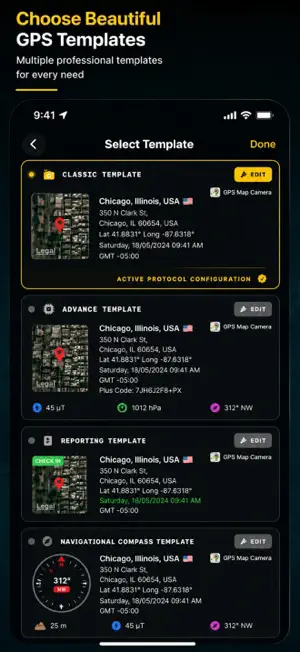

About GPS Camera: Geotag & Timestamp
Capture every moment with precision and context. GPS Camera: Geotag & Timestamp is the ultimate tool for professionals and travelers who need more than just a picture—they need data. Whether you are documenting a construction site, conducting a land survey, or preserving travel memories, our app automatically embeds high-accuracy GPS coordinates, addresses, and technical sensor data directly onto your photos. Why choose GPS Camera: Geotag & Timestamp? • Our app is designed for both "Advanced" and "Classic" needs. With a highly customizable sensor grid, you decide exactly what information appears on your stamp. No more manual notes or trying to remember where a photo was taken. KEY FEATURES: • Customizable Stamp Templates: Choose between Classic layouts or Advanced grids to match your style. • Automatic Geotagging: Instantly add Latitude, Longitude, and Plus Codes to every shot. • Professional Sensor Suite: Display real-time data including: • Azimuth & Compass: Perfect for engineering and orientation. • Environment: Temperature, Humidity, and Air Quality Index (AQI). • Technical: Altitude, Magnetic Field, and Pressure. • Branding & Documentation: Upload your Company Logo and add Project Names, Person Names, and Contact Numbers directly to the stamp. • Interactive Maps: Include a Mini Map (Standard or Satellite) directly on your photo to show the exact surroundings. • Notes & Hashtags: Add observations and descriptions to your photos on the spot. WHO IS THIS FOR? • Construction & Engineering: Record site progress with verified location and time. • Real Estate & Architecture: Create professional property reports with addresses and map overlays. • Travelers & Explorers: Never forget the exact spot of a beautiful view or a hidden gem. • Field Research & NGO Staff: Capture tamper-proof evidence for reports and audits. • Insurance Adjusters: Document damage with authentic, uneditable location stamps. Stop taking photos without context. Download GPS Camera: Geotag & Timestamp today and start capturing the full story behind every pixel. Terms of Service (EULA): https://aparnajaiswal.in/terms-conditions/ Privacy Policy: https://aparnajaiswal.in/privacy-policy/
App privacy
The developer, Aparna Jaiswal, reported these privacy practices to Apple.
Data Used to Track You
The following data may be used to track you across apps and websites owned by other companies:
- Location: Precise Location
- Identifiers: Device ID
- Usage Data: Advertising Data
Data Linked to You
The following data, which may be collected and linked to your identity, may be used for the following purposes:
- Location: Precise Location
- Identifiers: Device ID
- Usage Data: Product Interaction
Used for: Third-Party Advertising, Analytics
Data Not Linked to You
The following data, which may be collected but is not linked to your identity, may be used for the following purposes:
- Usage Data: Advertising Data
Used for: Third-Party Advertising
Alternatives to GPS Camera: Geotag & Timestamp
Looking for apps like GPS Camera: Geotag & Timestamp? Here are 6 similar apps on the App Store.
-
 GPS Location Camera: Map Photo
-
 GPS Map Camera – Geotag Photos
-
 GPS Map Camera: Geotag Stamp
-
 GPS Map Camera: Field Geotag
-
 GPS Photo: Location Map Tags
-
 GPS MAP CLICK - GPS CAMERA
| App | Rating | Price | Last updated | Compare |
|---|---|---|---|---|
| GPS Camera: Geotag & Timestamp | – | Free | August 7, 2026 | |
| GPS Location Camera: Map Photo | – | Free | Sep 21, 2026 | Compare |
| GPS Map Camera – Geotag Photos | – | Free | Jan 6, 2026 | Compare |
| GPS Map Camera: Geotag Stamp | – | Free | Oct 26, 2026 | Compare |
| GPS Map Camera: Field Geotag | – | Free | Sep 9, 2026 | Compare |
| GPS Photo: Location Map Tags | – | Free | Aug 12, 2026 | Compare |
| GPS MAP CLICK - GPS CAMERA | – | Free | Oct 25, 2026 | Compare |