

Oekaki Embroidery
PROTOTYPE LABS, LIMITED LIABILITY COMPANY Graphics & Design iPad
Oekaki Embroidery is a free Graphics & Design app for iPad by PROTOTYPE LABS, LIMITED LIABILITY COMPANY. Requires iOS 17.0. Updated October 20, 2026.
- Price
- Free
- on the App Store
- Size
- 8 MB
- Age 4+
- Updated
- Oct 20
- 2026 · v1.8
Screenshots

About Oekaki Embroidery
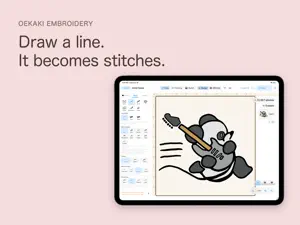
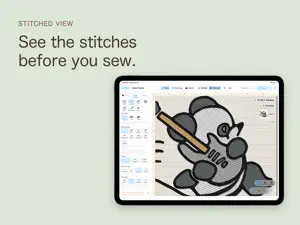
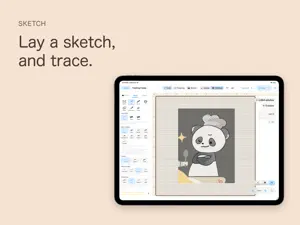
Draw on iPad, and your lines become data your embroidery machine can stitch. There's no digitizing software to learn first. Draw with your finger or Apple Pencil, and each line turns straight into stitches. Export in DST or PES format and send the design to your embroidery machine. ■ Draw Draw lines with the Pen, fill areas with the Brush, and trace over a sketch, just as you would when drawing a picture. Lines can be stitched three ways: running stitch (the thinnest single line), satin (a glossy band), or tatami (stitching that fills an area). Running stitch can be sewn in several passes, and “Triple” gives a bold, solid line. Fill areas with satin or tatami. Choose from 71 Brother Ultra POS thread colors, with Fujix King Star and Pearl Yacht thread numbers available too. The 24 basic colors stay at hand; open the rest when you need them. ■ Trace a Sketch Place a photo or illustration in the hoop and trace over it. Adjust its opacity and size to follow the original closely or loosely, as you like. The sketch is never stitched. It doesn't appear in exported data or in the stitched preview. ■ Plan the Sewing Order In embroidery, the stitching order shapes the result. The app counts every trim, color change, and jump and shows them to you. The app sets the order automatically, for fewer trims and less travel. A five-step “Connectors” setting decides when to trim and when to jump. Dragging rows to reorder them by hand is a Pro License tool. ■ Preview the Result See your design as it will look stitched on fabric, and change the fabric color and texture to match what you'll sew on. A color-coded view (Pro License) warns you where thread piles up thick, so you can spot areas too dense to sew before the design goes on the machine. You can also play back the stitching, one stitch at a time. ■ Export Export in DST (Tajima) and PES (Brother) formats through the Files app, so you can save to iCloud Drive or a USB drive. You can also send designs directly to supported Brother machines connected to the same network. You can also export the artwork itself, not just the stitch file, and open it on another iPad. ■ Work With or Without Apple Pencil Choose how you draw. “Finger Only” — for when you're not using Apple Pencil. Draw and select with your finger. “Apple Pencil Only” — draw with Apple Pencil, select with your finger. Since your finger can't draw, a resting hand won't disturb a line in progress, and you can reselect or move what you've drawn without setting Apple Pencil down. In both modes, zoom and move the canvas with two fingers. Hold Apple Pencil near the screen to see the width of the line you're about to draw, right where it will go. ■ Saving Your artwork is saved automatically, so there's no save button to forget. Artworks are stored on your iPad. No account is needed, and the app doesn't collect your artworks or usage data. ■ 14-Day Trial and Purchase For the first 14 days, you can use every Standard License feature. No sign-up, no payment. After 14 days, you can no longer export DST or PES files, send to a machine, or back up your artworks. You can keep drawing, saving, and viewing your artworks, and nothing is deleted. To keep exporting, purchase the Standard License in the app. It's a one-time purchase, not a subscription, with no recurring charges. To fine-tune exactly where each stitch falls, there's the Pro Upgrade, also a one-time purchase. It unlocks the tools and settings for detailed work, such as numeric sliders, path stitching tools, free-motion stitching, and more stitch patterns and weaves. Standard License owners can try Pro once, for 14 days. For prices, see In-App Purchases on this page, or check in the app. ■ Requirements iPad only. Works in landscape orientation. The Apple Pencil hover preview works on iPad models that support hover (iPad Pro with M2 or later, iPad Air with M2 or later, and iPad mini with A17 Pro).
What’s new
Version 1.8 · Updated October 20, 2026
New App Store screenshots. The app itself is the same as 1.7.
App privacy
The developer, PROTOTYPE LABS, LIMITED LIABILITY COMPANY, reported these privacy practices to Apple.
Data Not Collected
The developer does not collect any data from this app.
Alternatives to Oekaki Embroidery
Looking for apps like Oekaki Embroidery? Here are 6 similar apps on the App Store. The highest rated is Beh.Stitched (3.0/5), and all 6 are free to download.
-
 Beh.Stitched
3.0
Beh.Stitched
3.0
-
 Embroidly: Image to Embroidery
-
 StitchKit: Embroidery Studio
1.0
StitchKit: Embroidery Studio
1.0
-
 Image to Embroidery Converter
-
 PicStitch: Photo to DST PES
-
 StitchFile: Logo to Embroidery
| App | Rating | Price | Last updated | Compare |
|---|---|---|---|---|
| Oekaki Embroidery | – | Free | October 20, 2026 | |
| Beh.Stitched | 3.0 / 5 (1) | Free | Oct 29, 2026 | Compare |
| Embroidly: Image to Embroidery | – | Free | Oct 22, 2026 | Compare |
| StitchKit: Embroidery Studio | 1.0 / 5 (1) | Free | Oct 29, 2026 | Compare |
| Image to Embroidery Converter | – | Free | Sep 16, 2026 | Compare |
| PicStitch: Photo to DST PES | – | Free | Oct 29, 2026 | Compare |
| StitchFile: Logo to Embroidery | – | Free | Oct 25, 2026 | Compare |
Compare Oekaki Embroidery with the top alternatives: ratings, updates, ASO score and keyword gaps →