

Beh.Stitched
Christian Behrenbruch Graphics & Design iPad
Beh.Stitched is a free Graphics & Design app for iPad by Christian Behrenbruch. Rated 3.0/5 from 1 ratings. Requires iOS 15.0. Updated October 29, 2026.
- Rating
- 3.0
- 1 ratings
- Price
- Free
- on the App Store
- Size
- 33 MB
- Age 4+
- Updated
- Oct 29
- 2026 · v1.0.13
Screenshots


About Beh.Stitched
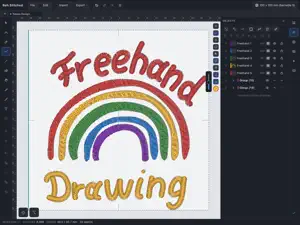
Beh.Stitched creates embroidery files on iPad. Import an image, draw with Apple Pencil or edit your own shapes. Downloading, drawing, project saving and preview are free. Each Apple Account gets five free machine-file exports once, shared across its iPads. Further machine exports require a license. Images and drawing • Import PNG/JPG as color areas, running-stitch lines or multicolor Redwork; import SVG and DXF as vector shapes. • Adjust colors, smoothing and simplification before importing. Redwork remains editable as lines. • Edit nodes and curves, split or unite shapes. Nodes can snap to nodes in other objects. • Create linked mirrored copies with a symmetry axis, including while drawing. Arrange copies in rows, columns, along paths or around a pivot. Stitches, Quilt and ITH • Satin, fill, running stitch and appliqué with adjustable underlay, stitch spacing and pull compensation. • Ten fill patterns, plus a separate Quilt mode with 13 repeating line patterns and single, bean or double stitching. • Draw satin paths with an editable width profile up to 8 mm. Supported pens can control width through pressure. • Sew ITH projects together in the hoop: flat or stuffed turn-through projects, raw edges and envelope closures. Set openings and seam allowance, with machine stops and a worksheet for the construction steps. Lettering • Use your own TTF/OTF fonts and available fonts installed on iPad. Favorites apply across projects. • Import predigitized embroidery fonts from ZIP and BX files into the font library. Original sizes and stitch commands are preserved. • Check and adjust character assignments, baselines, advance widths and spacing. Back up the library and transfer it to other devices you own. • Place text on paths and insert special characters through the glyph browser. Check and adjust View the stitch sequence, jumps, trims and color changes; display needle points and density. Route optimization considers contours and required overlaps. Optional position compensation estimates fabric pull from earlier filled areas and shifts later stitch paths. Test its effect on your chosen fabric and stabilizer. Split large designs across multiple hoops. Print worksheets and color cards. Play the stitching sequence as a film. Spread groups and objects apart with a live preview, keeping their size unchanged. Files and save locations Export DST, EXP, PES, JEF, VP3, XXX and TAP, plus SVG and DXF. Edit finished DST, EXP, PES, JEF and TAP files in the stitch editor. Save projects and exports in Files, iCloud Drive or accessible external storage. Licenses and account Personal and commercial licenses are one-time purchases. Personal use means no income from embroidery files or embroidered goods. A commercial license allows use with income and includes batch export of all machine formats. SVG/DXF and saving films or pictures require a license. An upgrade from personal to commercial is available. The five free exports require internet access and iPadOS 16.3 or later. No account is needed for them. The optional Beh.Stitched account connects verified purchases across iPad, Windows and Mac. Personal licenses allow three computers, commercial licenses five; your own iPads do not use computer places. Sign in with an email code, optionally with an authenticator app. Manage devices and delete your account in Settings. No tracking. Designs and images are not sent to our server. The server manages the free export allowance and, when you use the optional account, sign-in, purchases and devices.
What’s new
Version 1.0.13 · Updated October 29, 2026
• A crash that occurred when loading installed fonts under iPadOS 27 has been fixed. • Multicolour embroidery fonts retain their colours. Colour ordering combines separate stitch areas across letters while preserving overlapping colour layers. • “File → Send to device” sends a project copy to another open device using the same account on the local network. • Copied text can be edited independently of the original.
App privacy
The developer, Christian Behrenbruch, reported these privacy practices to Apple.
Data Linked to You
The following data, which may be collected and linked to your identity, may be used for the following purposes:
- Purchases: Purchase History
- Contact Info: Email Address
- Identifiers: User ID, Device ID
- Usage Data: Product Interaction
- Other Data: Other Data Types
Used for: App Functionality
Alternatives to Beh.Stitched
Looking for apps like Beh.Stitched? Here are 6 similar apps on the App Store. The highest rated is StitchKit: Embroidery Studio (1.0/5), and all 6 are free to download.
-
 Oekaki Embroidery
-
 StitchKit: Embroidery Studio
1.0
StitchKit: Embroidery Studio
1.0
-
 Embroidly: Image to Embroidery
-
 Image to Embroidery Converter
-
 PicStitch: Photo to DST PES
-
 ThreadsES
| App | Rating | Price | Last updated | Compare |
|---|---|---|---|---|
| Beh.Stitched | 3.0 / 5 (1 rating) | Free | October 29, 2026 | |
| Oekaki Embroidery | – | Free | Oct 20, 2026 | Compare |
| StitchKit: Embroidery Studio | 1.0 / 5 (1) | Free | Oct 29, 2026 | Compare |
| Embroidly: Image to Embroidery | – | Free | Oct 22, 2026 | Compare |
| Image to Embroidery Converter | – | Free | Sep 16, 2026 | Compare |
| PicStitch: Photo to DST PES | – | Free | Oct 29, 2026 | Compare |
| ThreadsES | – | Free | Apr 6, 2026 | Compare |
Compare Beh.Stitched with the top alternatives: ratings, updates, ASO score and keyword gaps →