

Embroidly: Image to Embroidery
Jhomar Maravillas Graphics & Design iPhoneiPadiPod touch
Embroidly: Image to Embroidery is a free Graphics & Design app for iPhone and iPad by Jhomar Maravillas. Requires iOS 17.0. Updated October 22, 2026.
- Price
- Free
- on the App Store
- Size
- 3 MB
- Age 4+
- Updated
- Oct 22
- 2026 · v1.0.3
Screenshots


About Embroidly: Image to Embroidery
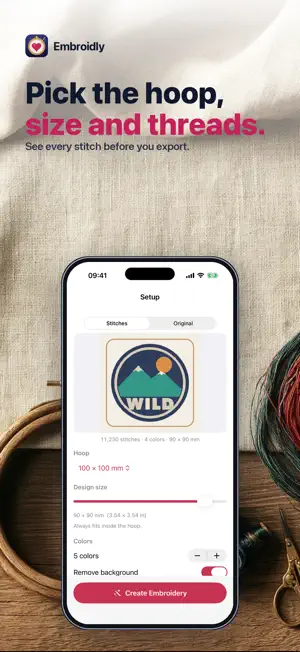
Turn a logo, clip art or a simple flat-color drawing into a machine-embroidery file — DST, PES, JEF or EXP — right on your iPhone or iPad. Choose an image and Embroidly digitizes it automatically: it finds the colors, removes the background and turns every shape into real stitches sized for your hoop. You see the whole design stitched before you decide. • REAL STITCHES — tatami fill for large areas, satin for straight narrow columns (up to 7 mm), underlay and tie-in/tie-off stitches, trims on long jumps. Holes stay open: the middle of an "O" or an "A" is not filled. • HOOP & SIZE — 100×100, 130×180, 160×260 and 200×200 mm hoops or a custom size. The design keeps its proportions and always fits inside the hoop. • COLORS — 1 to 12 thread colors, back to front, one color change per color. Change any thread color before you export. • FILL — fill angle, light / standard / dense density, and an optional running-stitch outline. • SEE IT FIRST — a zoomable stitch preview with stitch count, color changes, trims, size in mm and inches, and estimated sewing time. "Show stitches" draws every needle path and jump. • FILE FORMATS — DST, PES, JEF and EXP, the formats used by most home and commercial embroidery machines. PES and JEF files carry your thread colors as the nearest colors of their own thread charts; DST and EXP store stitches only. • PRIVATE — everything happens on your device. No account, no upload. Embroidly works best on flat-color logos, clip art, text-like shapes and simple drawings. Photos become flat, poster-style shapes, not photo stitching. Automatic digitizing is not a human digitizer: always test-sew on scrap fabric first, and check the design in your machine's own preview. Choosing, digitizing and previewing are free. A one-time purchase unlocks exporting the embroidery files. Questions: [email protected]
What’s new
Version 1.0.3 · Updated October 22, 2026
New: lettering. Type a name or initials, pick one of four fonts (block, slab, college or script) and turn it into a DST, PES, JEF or EXP file, with a live stitch preview.
App privacy
The developer, Jhomar Maravillas, reported these privacy practices to Apple.
Data Not Collected
The developer does not collect any data from this app.
Alternatives to Embroidly: Image to Embroidery
Looking for apps like Embroidly: Image to Embroidery? Here are 6 similar apps on the App Store. The highest rated is Embroidery Digitizing & Viewer (4.4/5), and all 6 are free to download.
-
 PNG to DST: Embroidery
-
 PicStitch: Photo to DST PES
-
 Image to Embroidery Converter
-
 Oekaki Embroidery
-
 StitchKit: Embroidery Studio
1.0
-
 Embroidery Digitizing & Viewer
4.4
| App | Rating | Price | Last updated | Compare |
|---|---|---|---|---|
| Embroidly: Image to Embroidery | – | Free | October 22, 2026 | |
| PNG to DST: Embroidery | – | Free | Oct 29, 2026 | Compare |
| PicStitch: Photo to DST PES | – | Free | Nov 1, 2026 | Compare |
| Image to Embroidery Converter | – | Free | Sep 16, 2026 | Compare |
| Oekaki Embroidery | – | Free | Oct 20, 2026 | Compare |
| StitchKit: Embroidery Studio | 1.0 / 5 (1) | Free | Oct 29, 2026 | Compare |
| Embroidery Digitizing & Viewer | 4.4 / 5 (29) | Free | Oct 23, 2026 | Compare |