

StitchFile: Logo to Embroidery
Ahmet Soybelli Graphics & Design iPhoneiPadiPod touch
StitchFile: Logo to Embroidery is a free Graphics & Design app for iPhone and iPad by Ahmet Soybelli. Requires iOS 16.4. Updated October 25, 2026.
- Price
- Free
- on the App Store
- Size
- 70 MB
- Age 4+
- Updated
- Oct 25
- 2026 · v1.2.0
Screenshots


About StitchFile: Logo to Embroidery
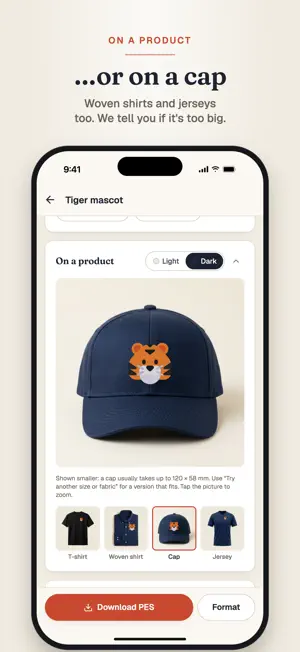
StitchFile turns your logo, badge, mascot or lettering into a machine embroidery file that sews well, and shows you exactly how it will look before you pay. HOW IT WORKS 1. Add your artwork: SVG, PNG or JPG from Photos, the camera or Files. 2. Pick the size you'll sew it at and your fabric. 3. In about 20 seconds you see a stitched preview, drawn from the real machine file. 4. Happy with it? Buy the design and download it for your machine. SEE IT BEFORE YOU SEW IT • A stitched preview, plus a close-up of the busiest part at thread level • Watch it sew: an embroidery machine sews your design colour by colour, with a close-up view and speed control • See it on a T-shirt, woven shirt, cap and jersey at real size, on light or dark fabric • An honest fit check: great, fair or poor for embroidery, with the reasons STITCHED THE WAY A DIGITIZER WOULD • PNG and JPG logos are redrawn as clean vector shapes, so edges come out smooth • Satin for lines and lettering, fill for larger areas, with underlay and pull compensation • Stitched to suit your size: every line and dot kept as drawn, with the right stitch for each detail • Tuned for woven, T-shirt knit, polo piqué, denim or towel, and we tell you which stabiliser to use • A plain background is left as fabric instead of being stitched as a solid block EDIT WITH A FREE ACCOUNT • Remove parts you don't want stitched, or choose fill, satin or an outline for each part • Fewer colours, or change any colour to one of 64 Brother threads • Make it a patch: follow the design, circle, rectangle or shield, with a satin border • Choose how lettering, lines and outlines are sewn, and how full the fill is • Clean up with AI: shading and fuzzy edges redrawn as bold, flat embroidery art • Fit my hoop: the biggest size that fits your hoop, in millimetres or inches FILES THAT JUST WORK • All 5 formats in every download: PES, DST, JEF, EXP and VP3 • For Brother, Baby Lock, Tajima, Janome, Melco, Bernina, Husqvarna Viking, Pfaff and more • Thread colour key in sewing order, with the nearest Brother thread • Every file is checked for gaps between colours, stitches outside their shape and stitches over 7 mm • Free re-sizes and fabric changes for 7 days after you buy • Sew-out guarantee: if a file sews badly, send us a photo and we'll re-run it free PRICING Previews are free. Buy a single design, or a 10-design pack (credits never expire). The app shows the price in your currency before you buy. Private by default: uploads are only visible to you and are deleted after 30 days. Your designs are also on stitchfile.app when you sign in with the same account. Terms of Use: https://stitchfile.app/legal/terms Privacy Policy: https://stitchfile.app/legal/privacy Questions? [email protected]
What’s new
Version 1.2.0 · Updated October 25, 2026
New in 1.2.0: • Watch it sew: an embroidery machine sews your design colour by colour, with a close-up view and speed control. • Every editing tool from the website: remove parts, choose the stitch for each part, change thread colours, make a patch, and set lettering, lines, outlines and fill density. • Fit my hoop: size your design to the biggest that fits your hoop, in millimetres or inches. • See the stitched preview on light or dark fabric. • Share a photo of your finished embroidery and get your next design free.
App privacy
The developer, Ahmet Soybelli, reported these privacy practices to Apple.
Data Linked to You
The following data, which may be collected and linked to your identity, may be used for the following purposes:
- Contact Info: Email Address
- Purchases: Purchase History
- Identifiers: User ID, Device ID
- Usage Data: Product Interaction
- User Content: Photos or Videos, Other User Content
Used for: Developer’s Advertising or Marketing, Analytics, App Functionality
Alternatives to StitchFile: Logo to Embroidery
Looking for apps like StitchFile: Logo to Embroidery? Here are 6 similar apps on the App Store.
-
 PNG to DST: Embroidery
-
 Silu: Embroidery Editor
-
 EngraveKit: Laser Engraving
-
 Image to Embroidery Converter
-
 Oekaki Embroidery
-
 PicStitch: Photo to DST PES
| App | Rating | Price | Last updated | Compare |
|---|---|---|---|---|
| StitchFile: Logo to Embroidery | – | Free | October 25, 2026 | |
| PNG to DST: Embroidery | – | Free | Oct 29, 2026 | Compare |
| Silu: Embroidery Editor | – | Free | Oct 27, 2026 | Compare |
| EngraveKit: Laser Engraving | – | Free | Oct 29, 2026 | Compare |
| Image to Embroidery Converter | – | Free | Sep 16, 2026 | Compare |
| Oekaki Embroidery | – | Free | Oct 20, 2026 | Compare |
| PicStitch: Photo to DST PES | – | Free | Oct 29, 2026 | Compare |