

Event Alarm Sync
ARGO 34, INC. Productivity iPhoneiPadiPod touch
Event Alarm Sync is a free Productivity app for iPhone and iPad by ARGO 34, INC. Requires iOS 26.0. Updated October 16, 2026.
- Price
- Free
- on the App Store
- Size
- 7 MB
- Age 4+
- Updated
- Oct 16
- 2026 · v1.0.6
Screenshots


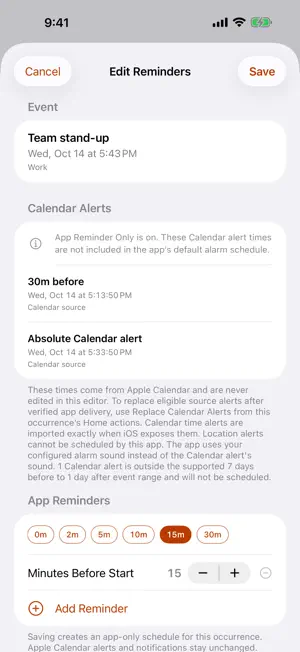

About Event Alarm Sync
Turn upcoming Calendar events and dated Reminders into alarms you can manage from your iPhone. Event Alarm Sync reads the calendars you select, builds a clear timeline of upcoming events and alarm times, and delivers alarms through AlarmKit by default, or through standard notifications when you choose Respect Silent Mode. The app processes Calendar and Reminder content locally. PLAN ALARMS AROUND YOUR SCHEDULE • Use reminder times already attached to Calendar events • Apply a default minutes-before offset • Create custom reminder offsets for individual events • Include incomplete Reminders that have due dates • Choose App Reminder Only timing without changing Calendar alerts STAY IN CONTROL • Choose which calendars can create alarms • Filter all-day, tentative, and declined events • Silence or restore individual alarms • Confirm deletion of eligible writable Calendar events or Reminders • Separately replace eligible Calendar alerts after verified app delivery, with a conditional restore option • Turn all event alarms off with one master control • Choose a fixed snooze time or open a meeting link when available CHOOSE HOW ALARMS ARRIVE • Always Sound uses the iOS alarm screen and system Stop control • Respect Silent Mode uses standard notifications that Silent Mode, Focus, Scheduled Summary, or notification settings may mute or delay • Tap a notification to open Stop, Snooze, or Join in the app; standard notifications do not show a full-screen alarm • Respect Silent Mode requires Notifications, Alerts, and Sounds access and room for no more than 48 pending notifications for this app. If a later schedule exceeds the budget, the app can return to Always Sound and show the change in Settings. PERSONALIZE EACH ALERT • Select from the system alarm sound or five included sounds • Choose how much event information appears in the alarm title • Preview included sounds before scheduling CHECK WHAT IS NEXT • Review upcoming Events and Alarms in the app • Add Home Screen widgets in small, medium, or large sizes; in Respect Silent Mode, their controls open the app • Add an accessory widget to the Lock Screen • Keep alarm state synchronized between the app and its widgets PRIVACY BY DESIGN Core calendar, reminder, alarm, settings, widget, and diagnostic data is processed locally. When Share Anonymous Analytics is enabled, Event Alarm Sync sends a small allowlisted set of anonymous usage and sanitized reliability data. Turn it off at any time in Settings. Calendar or reminder content, meeting links, alarm times, and local diagnostic logs are never sent. The app has no account system, advertising, or cross-app tracking. Requires iOS 26 or later. Sound, vibration, notification presentation, and background calendar refresh timing depend on iOS settings and system behavior. Manual delivery-mode changes are blocked when an alarm or Snooze is due within 15 minutes. Settings reports when delivery cannot be verified.
What’s new
Version 1.0.6 · Updated October 16, 2026
Version 1.0.6 makes upcoming events and alarms easier to scan with compact timelines, clearer calendar selection, and swipe actions. App Reminder Only lets you choose app alarm timing without changing Calendar alerts. For eligible writable Calendar events, you can separately preview, confirm, and later restore replaced Calendar alerts. This update also improves Home Screen widget alarm controls, Stop and Snooze after notification taps, recovery when a source disappears, background checks before upcoming alarms, deletion safeguards, diagnostic-log clearing, and text readability.
App privacy
The developer, ARGO 34, INC., reported these privacy practices to Apple.
Data Not Linked to You
The following data, which may be collected but is not linked to your identity, may be used for the following purposes:
- Identifiers: Device ID
- Usage Data: Product Interaction, Other Usage Data
- Diagnostics: Crash Data, Other Diagnostic Data
Used for: Analytics, App Functionality
Alternatives to Event Alarm Sync
Looking for apps like Event Alarm Sync? Here are 6 similar apps on the App Store. The highest rated is Cal2Alarm: Alarm from Calendar (5.0/5), and 4 of the 6 are free to download.
-
 Call to Meet: Meeting Alarm
-
 Cal2Alarm: Alarm from Calendar
5.0
-
 Calarm: AI Alarm Clock
-
 WhatsNext task manager
-
 Auto Alarm: Accepted Meetings
-
 Calarmiq
5.0
| App | Rating | Price | Last updated | Compare |
|---|---|---|---|---|
| Event Alarm Sync | – | Free | October 16, 2026 | |
| Call to Meet: Meeting Alarm | – | Free | Oct 18, 2026 | Compare |
| Cal2Alarm: Alarm from Calendar | 5.0 / 5 (3) | Free | Oct 7, 2026 | Compare |
| Calarm: AI Alarm Clock | – | Free | Oct 20, 2026 | Compare |
| WhatsNext task manager | – | Free | Mar 15, 2026 | Compare |
| Auto Alarm: Accepted Meetings | – | 4.99 USD | Oct 6, 2026 | Compare |
| Calarmiq | 5.0 / 5 (1) | 1.99 USD | May 11, 2026 | Compare |
Compare Event Alarm Sync with the top alternatives: ratings, updates, ASO score and keyword gaps →