

Call to Meet: Meeting Alarm
Ismael Florit Productivity iPhoneiPadiPod touchApple Watch
Call to Meet: Meeting Alarm is a free Productivity app for iPhone and iPad by Ismael Florit. Requires iOS 26.0. Updated October 5, 2026.
- Price
- Free
- on the App Store
- Size
- 36 MB
- Age 4+
- Updated
- Oct 5
- 2026 · v1.30.0
Screenshots

About Call to Meet: Meeting Alarm
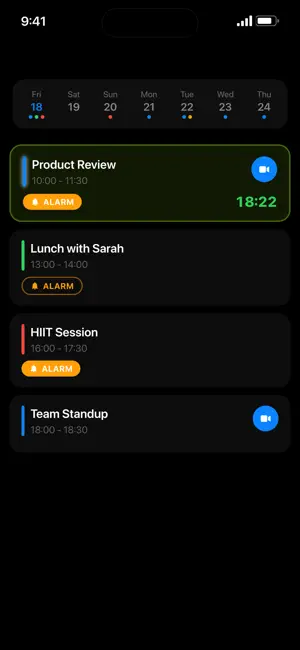
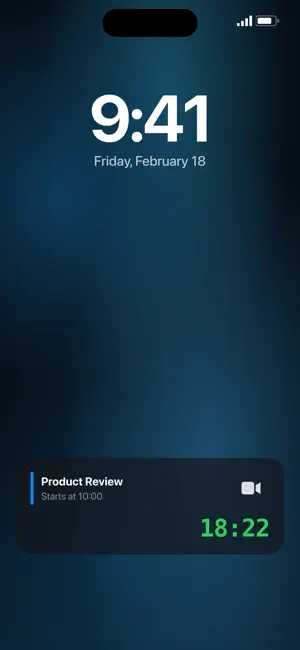
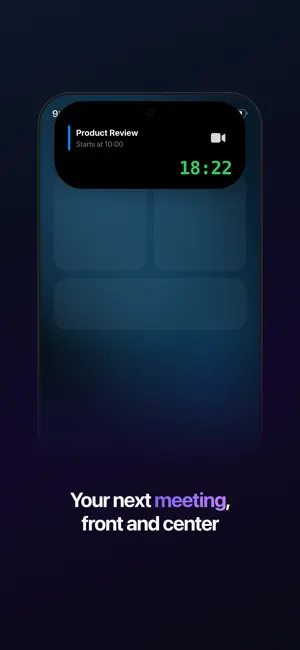
Your calendar already knows where you need to be. Your phone should fight to get you there on time. Calendar notifications fail silently. Silent Mode swallows them. Focus Mode buries them. And when you finally look up from your work, the meeting started five minutes ago — camera off, no context, scrambling for the link. Call to Meet exists because your meetings deserve more than a notification. HOW IT WORKS Call to Meet reads your calendar and sets real system alarms — not notifications — that ring through Silent Mode and Do Not Disturb. Like your morning alarm clock, but for meetings. A persistent countdown appears on your Lock Screen and in Dynamic Island, so you always know exactly how much time you have. When it's time, join Zoom, Google Meet, Microsoft Teams, Webex, or a phone call with a single tap. Bad connection? No laptop nearby? If your invite includes a dial-in number — common in Zoom, Google Meet, and Teams invites — Call to Meet shows a call button. One tap dials the number and auto-fills your PIN. Works without WiFi. Useful when you're driving or when your connection is unreliable. On the go with just your Apple Watch? Join from your wrist over cellular — no iPhone required. Real alarms, not notifications. That's the difference. FLIGHT TRACKING Traveling to your next meeting? Call to Meet tracks your flight in real time — gate, terminal, departure status, and route progress — right on your Lock Screen and Dynamic Island. Know the moment your gate changes. See inbound aircraft status so you know if your flight will be late before the airline tells you. One persistent live view from check-in through landing. CAPTURE EVENTS FROM ANYWHERE Point your camera at any meeting invite — email printout, whiteboard, screen — and Call to Meet extracts the details instantly using on-device AI. No typing. No copy-pasting. The event lands in your calendar ready to alarm. KEY FEATURES - Dynamic Island — Countdown visible at a glance without unlocking your phone. A persistent timer on your Lock Screen shows exactly when your next meeting starts. Always visible. Impossible to miss. - System Alarms That Cut Through — Real system alarms via AlarmKit. Silent Mode won't stop them. Do Not Disturb won't stop them. They ring because they're alarms, not notifications. - Flight Live Activity — Real-time gate, terminal, and route progress on your Lock Screen for every flight. Inbound aircraft tracking so you know delays before they're announced. - One-Tap Join — Jump into Zoom, Google Meet, Teams, Webex, or any platform with a single tap. Join by app or by phone call — your choice. If the invite includes a dial-in number, Call to Meet dials it and fills your PIN automatically. No WiFi required. - Apple Watch — Join meetings directly from your wrist with cellular. See your next meeting countdown with complications that keep you on time — even without your iPhone. - Camera Event Capture — Point at any meeting invite and Call to Meet reads it with on-device AI. No typing required. - Focus Mode Aware — Automatically filters meetings based on your active Focus Mode. Only see what matters right now. ALSO INCLUDED — EVERYTHING IS FREE - Unlimited simultaneous alarms - Auto-alarm for meetings or all events - End-of-meeting alarms — know when to wrap up - Track multiple flights simultaneously - Alarms for any event type Works with your existing calendar. No account required. Available in English, Spanish, German, French, Italian, Japanese, and Simplified Chinese.
What’s new
Version 1.30.0 · Updated October 5, 2026
What's New in 1.30.0 • If you'd rather not allow alarms, you can now get a notification alert before your calls. It may not sound in Silent mode or Focus • Accessibility improvements: Voice Control recognizes the alarm button in all its variants, VoiceOver announces when an alarm is turned on, and focus lands correctly after onboarding
App privacy
The developer, Ismael Florit, reported these privacy practices to Apple.
Data Not Linked to You
The following data, which may be collected but is not linked to your identity, may be used for the following purposes:
- Usage Data: Product Interaction
Used for: Analytics, App Functionality
Alternatives to Call to Meet: Meeting Alarm
Looking for apps like Call to Meet: Meeting Alarm? Here are 6 similar apps on the App Store. The highest rated is Cal2Alarm: Alarm from Calendar (5.0/5), and 5 of the 6 are free to download.
-
 On-Timer
-
 Cal2Alarm: Alarm from Calendar
5.0
Cal2Alarm: Alarm from Calendar
5.0
-
 Timely: Calendar Alarms
5.0
Timely: Calendar Alarms
5.0
-
 EYL
EYL
-
 Ahead Island
-
 Next Meeting Live
| App | Rating | Price | Last updated | Compare |
|---|---|---|---|---|
| Call to Meet: Meeting Alarm | – | Free | October 5, 2026 | |
| On-Timer | – | Free | Jun 7, 2026 | Compare |
| Cal2Alarm: Alarm from Calendar | 5.0 / 5 (3) | Free | Sep 29, 2026 | Compare |
| Timely: Calendar Alarms | 5.0 / 5 (3) | Free | Sep 20, 2026 | Compare |
| EYL | – | Free | Feb 10, 2026 | Compare |
| Ahead Island | – | Free | Jul 14, 2026 | Compare |
| Next Meeting Live | – | 4.99 USD | Oct 31, 2025 | Compare |