

Auto Alarm: Accepted Meetings
TETO, LIMITED LIABILITY COMPANY Productivity iPhoneiPadiPod touchApple Watch
Auto Alarm: Accepted Meetings is a paid Productivity app for iPhone and iPad by TETO, LIMITED LIABILITY COMPANY. Requires iOS 26.0. Updated October 31, 2026.
- Price
- 4.99 USD
- on the App Store
- Size
- 18 MB
- Age 4+
- Updated
- Oct 31
- 2026 · v1.0.16
Screenshots

About Auto Alarm: Accepted Meetings
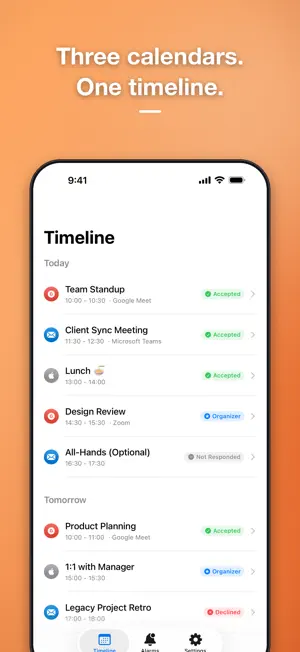
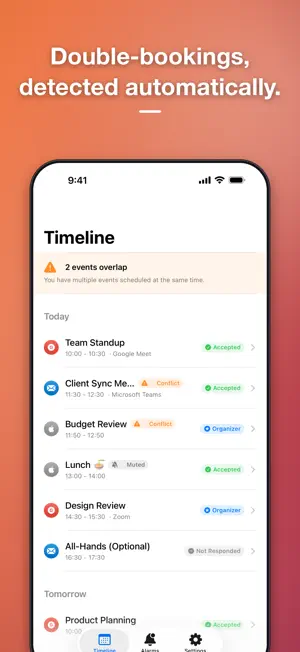
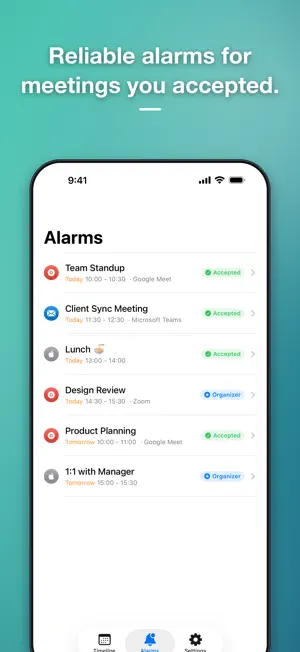
Alarm only for accepted meetings. That's what makes Auto Alarm different. Rings through Silent mode, Focus mode, and even zero volume. Never miss a meeting that matters. Unifies iCloud Calendar, Microsoft Outlook, and Google Calendar in one place. ALARM ONLY WHAT MATTERS Your calendar is full of meetings — but not all of them need your attention. Auto Alarm automatically sets alarms only for meetings you've accepted, ones you organize, or ones matching your custom rules. No need to manually set alarms in Outlook or Google Calendar. RINGS THROUGH SILENT & FOCUS Silent mode, Do Not Disturb, Focus mode, zero volume — Auto Alarm's alarms ring through all of them. When a regular notification isn't enough, Auto Alarm ensures you hear it. STATUS-BASED SMART ALARMS Set different alarm behaviors for each RSVP status — accepted, tentative, not responded, declined, or organizer. Control timing, sound, and notification type for each. WARNS YOU BEFORE BACK-TO-BACK MEETINGS Get an advance warning when there isn't enough time between consecutive meetings to prepare or travel. Never get caught off guard by a packed schedule. A wrap-up alert a few minutes before a meeting ends keeps the current one from running over into the next. RING ON APPLE WATCH ONLY Turn this on and alarms stay silent on your iPhone, ringing only on your paired Apple Watch. You'll feel it on your wrist and never miss it — without disturbing anyone else in the room (requires the free Auto Alarm Watch app). NEXT EVENT ON YOUR WATCH FACE A complication and Smart Stack widget show your next event and the countdown to it at a glance. Snooze or open the meeting on your iPhone right from the alarm on your wrist. DAILY SCHEDULE AT A GLANCE Get a summary notification of today's events at a time you choose — perfect for planning your day each morning. PRIVACY FIRST Fully on-device processing. Your calendar data never leaves your device. Authentication credentials are securely stored in the iOS Keychain. ONE-TIME PURCHASE — NO SUBSCRIPTION Buy once, get everything. No monthly fees, no hidden charges. PERFECT FOR: • Professionals who only want alarms for accepted meetings • Anyone tired of notification overload from calendar apps • Users who need alarms that ring even on Silent mode • Privacy-conscious users who want on-device processing • Apple Watch owners who want alarms to ring quietly on their wrist during meetings
What’s new
Version 1.0.16 · Updated October 31, 2026
Fixes for alarms, sync, and display. Fixed alarms that could ring on neither iPhone nor Apple Watch when Watch priority is on, duplicate alarms when the same meeting is received by multiple accounts, muted events ringing through another account, and syncs that were treated as successful even though events could not be saved. Also improved layouts at the largest text sizes, resuming onboarding where you left off, Siri and Apple Watch messages when data cannot be loaded, and the remote-meetings-only filter.
App privacy
The developer, TETO, LIMITED LIABILITY COMPANY, reported these privacy practices to Apple.
Data Not Collected
The developer does not collect any data from this app.
Alternatives to Auto Alarm: Accepted Meetings
Looking for apps like Auto Alarm: Accepted Meetings? Here are 6 similar apps on the App Store. The highest rated is MeetAlarm (5.0/5), and all 6 are free to download.
-
 MeetAlarm
5.0
MeetAlarm
5.0
-
 mInspections
-
 Event Alarm Sync
-
 HeyDitto
5.0
HeyDitto
5.0
-
 Calendar Alarms - Pealo
5.0
Calendar Alarms - Pealo
5.0
-
 OnTimer: Calendar Alarm
4.8
OnTimer: Calendar Alarm
4.8
| App | Rating | Price | Last updated | Compare |
|---|---|---|---|---|
| Auto Alarm: Accepted Meetings | – | 4.99 USD | October 31, 2026 | |
| MeetAlarm | 5.0 / 5 (1) | Free | Aug 13, 2026 | Compare |
| mInspections | – | Free | Oct 6, 2024 | Compare |
| Event Alarm Sync | – | Free | Oct 22, 2026 | Compare |
| HeyDitto | 5.0 / 5 (1) | Free | Oct 29, 2026 | Compare |
| Calendar Alarms - Pealo | 5.0 / 5 (1) | Free | Oct 11, 2026 | Compare |
| OnTimer: Calendar Alarm | 4.8 / 5 (23) | Free | Oct 26, 2026 | Compare |