

Cal2Alarm: Alarm from Calendar
Leo Apps LLC Productivity iPhoneiPadiPod touch
Cal2Alarm: Alarm from Calendar is a free Productivity app for iPhone and iPad by Leo Apps LLC. Rated 5.0/5 from 3 ratings. Requires iOS 18.0.
- Rating
- 5.0
- 3 ratings
- Price
- Free
- on the App Store
- Size
- 18 MB
- Age 4+
- Updated
- Oct 23
- 2026 · v1.2.2
Screenshots

About Cal2Alarm: Alarm from Calendar
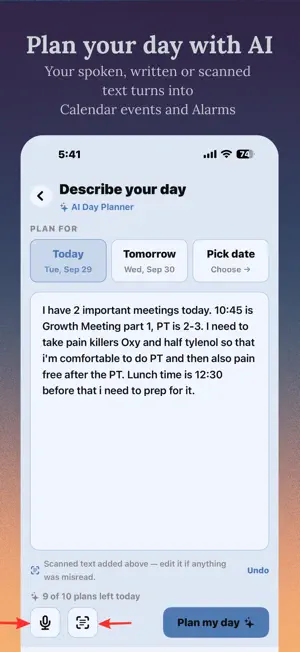
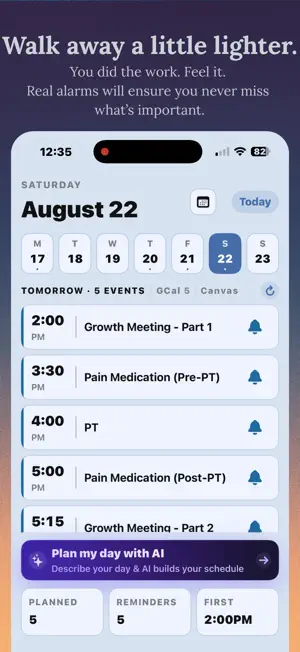
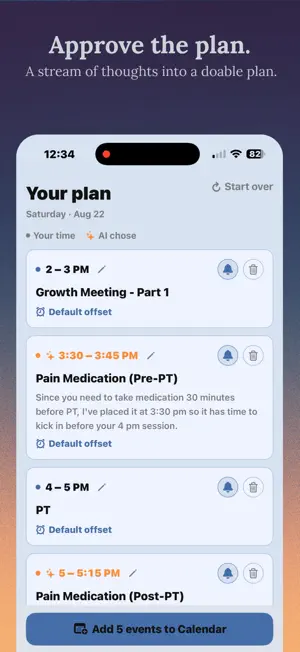
You have a special medication schedule; never miss it because of silent notifications. Your assignment is done. Don't forget to submit it. Never miss a meeting or an event. Use plain text to describe your plan, and Calendar Alarms will use AI to plan your day and will create calendar events and alarms - no need to click through different applications anymore. You can create, edit, move and delete Gcal events. Cal2Alarm connects to Google Calendar and Canvas LMS, turning your events into real alarms. Not notifications you can swipe away. Real alarms that ring until you dismiss them, even in silent mode and Focus modes. AI Day Planner The Plan tab turns a plain-language description of your day ("gym at 7, standup at 9:30, dentist sometime in the afternoon") into a proposed schedule, which the user reviews and then commits to Google Calendar with per-event alarm toggles. ON iOS 26: ALARMKIT INTEGRATION Cal2Alarm now uses Apple's new AlarmKit framework on iOS 26. This is a significant upgrade over any notification-based reminder app and provides greater reliability for daily alarm automation. AlarmKit alarms are system-level. They appear on your Lock Screen with a live countdown, show in the Dynamic Island, work on Apple Watch, and fire even if Cal2Alarm has been force-quit or the phone has restarted. No shortcuts. No permission dialogs. No setup. Just alarms. On iOS 26, your Lock Screen shows events with alarms that show a live countdown. Glance at your phone and know exactly how much time you have before your next event. No need to open the app. CANVAS LMS Students in high school and college: Cal2Alarm connects directly to your Canvas calendar. Assignment due dates, class times, and course events automatically become alarms before they happen. Setup takes under 60 seconds. Open Canvas on your phone, go to Account, then Settings, then scroll to Calendar Feed and copy your personal URL. Paste it into Cal2Alarm. Done. Every Canvas deadline is now an alarm. No IT approval needed. No school login required. Works at any institution that uses Canvas LMS. GOOGLE CALENDAR Cal2Alarm reads your Google Calendar events and creates alarms for meetings, appointments, and anything else on your schedule. Both Canvas and Google Calendar work together in one place, sorted by time, with a filter to view each source separately. BUILT FOR STUDENTS AND PARENTS Missing a submission deadline is one of the most preventable ways to lose a grade. You did the work. You just needed a reminder at the right moment. Cal2Alarm is that reminder. It does not ask you to remember to check your phone. It wakes you up. For parents: if your student uses Canvas at school, Cal2Alarm creates automatic alarms for every assignment due date. Set it up once. It runs in the background. You will both sleep better. TWO MODES: YOUR CHOICE Auto mode: Cal2Alarm creates alarms automatically. You get a summary when it is done. Nothing to approve. Manual mode: Events appear in your list. You review each one and decide which alarms to set. Tap the plus button on any event to instantly add an alarm. Switch between modes anytime in Settings. HOW FAR IN ADVANCE Choose how far in advance of each event your alarm fires: 5 minutes, 15 minutes, 30 minutes, or 1 hour. Set a global default and override per event whenever you need to. PRIVACY FIRST Cal2Alarm reads only event titles, times, and locations. No grades, no course content, no personal data beyond what is needed to set an alarm. Download Cal2Alarm and stop missing what matters. Terms of Use: https://www.apple.com/legal/internet-services/itunes/dev/stdeula/ Privacy Policy: https://www.theleoapps.com/portfolio/cal2alarm/privacy
What’s new
Version 1.2.2 · Updated October 23, 2026
No new permissions, products, or data types. The subscription, the camera use, and the offline behaviour are exactly as approved. 1. Schedule scanning offers two modes, and the text lands in the field the user types into. The camera screen has a Tap to pick / Whole page choice. Tapping lines works as before; Whole page captures everything the camera can read, for a dense timetable. The recognized text is now inserted into the Plan tab's own description field, so it can be read, edited, or removed before anything is sent; it previously appeared in a separate read-only box. What leaves the device is unchanged: recognition runs on-device, and no photo or camera frame is saved or uploaded. 2. A Pro entitlement granted by us now unlocks everything. If we enable Pro on a device identifier instead of a sandbox purchase (offer below), that grant previously left scanning locked. The app now honors a server-granted entitlement everywhere Pro is checked. 3. Analytics now carries the app's anonymous device identifier; the one already sent to our backend and RevenueCat: a random value our server mints on first use, stored in the keychain. It is not the iOS device identifier, not hardware-derived, not an advertising identifier, and not linked to the Google account; nothing about the phone is sent to obtain it. It lets a failed purchase be traced to its session. No new data type is collected; still no tracking, no IDFA, no AppTrackingTransparency prompt, and no event carries an event title, scanned text, or the planner description. 4. Scanning is included in the free trial. A free account can scan while any of its 4 trial plans remain; the plan it feeds counts as one. Once they are spent, the scan button shows a PRO label and opens the paywall. 5. Alarm sound picker (free, iOS 26.1+). With Settings → Alarm Engine on "AlarmKit (native)", Settings → Alarm sound offers Default or one of four sounds made in-house (no third-party audio). Alarms already set switch to the new sound. To check: tap any sound to hear a 4-second preview. Also fixed: the Plan tab's keyboard could not be dismissed; its toolbar now has a chevron for that.
App privacy
The developer, Leo Apps LLC, reported these privacy practices to Apple.
Data Not Linked to You
The following data, which may be collected but is not linked to your identity, may be used for the following purposes:
- Identifiers: Device ID
- Usage Data: Product Interaction
- Diagnostics: Crash Data
Used for: Analytics
Alternatives to Cal2Alarm: Alarm from Calendar
Looking for apps like Cal2Alarm: Alarm from Calendar? Here are 6 similar apps on the App Store. The highest rated is OnTimer: Calendar Alarm (4.7/5), and all 6 are free to download.
-
 Calendar Alarms - Pealo
-
 Event Alarm Sync
-
 OnTimer: Calendar Alarm
4.7
-
 Breakthrough Alarm
3.0
-
 Call to Meet: Meeting Alarm
-
 Unmissable: Calendar Alarm
3.0
| App | Rating | Price | Last updated | Compare |
|---|---|---|---|---|
| Cal2Alarm: Alarm from Calendar | 5.0 / 5 (3 ratings) | Free | October 23, 2026 | |
| Calendar Alarms - Pealo | – | Free | Oct 11, 2026 | Compare |
| Event Alarm Sync | – | Free | Oct 22, 2026 | Compare |
| OnTimer: Calendar Alarm | 4.7 / 5 (23) | Free | Oct 16, 2026 | Compare |
| Breakthrough Alarm | 3.0 / 5 (1) | Free | Oct 11, 2026 | Compare |
| Call to Meet: Meeting Alarm | – | Free | Oct 24, 2026 | Compare |
| Unmissable: Calendar Alarm | 3.0 / 5 (1) | Free | Sep 29, 2026 | Compare |