

Quill Flow : AI Voice Keyboard
Rishabh Raj Productivity iPhoneiPadiPod touch
Quill Flow : AI Voice Keyboard is a free Productivity app for iPhone and iPad by Rishabh Raj. Rated 4.6/5 from 54 ratings. Requires iOS 18.4.
- Rating
- 4.6
- 54 ratings
- Price
- Free
- on the App Store
- Size
- 166 MB
- Age 4+
- Updated
- Nov 2
- 2026 · v1.6.6
Screenshots


About Quill Flow : AI Voice Keyboard
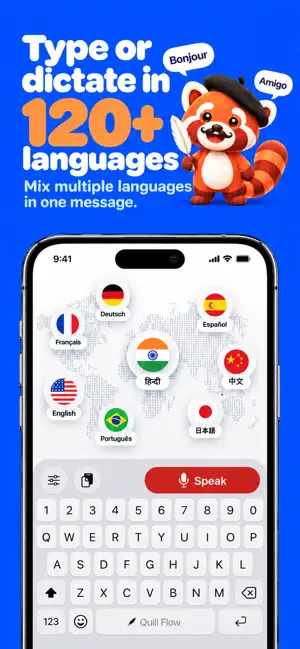
Talk naturally. Quill Flow writes it perfectly. Quill Flow is the AI-powered voice typing keyboard that turns your speech into clean, polished text right inside any app on your iPhone. Type 3x faster with accurate voice-to-text dictation built for iOS, whether you're replying on WhatsApp, drafting an email, writing notes, or prompting AI tools. No filler words. No awkward phrasing. No endless autocorrect battles. Just fast, accurate voice typing that sounds like you actually wrote it. WHY PEOPLE SWITCH TO QUILL FLOW Voice typing in every app — iMessage, WhatsApp, Slack, Gmail, Notes, Instagram DMs, AI tools, and any other app with a text field. If you can type there, Quill Flow works there. Type 3x faster than you can with your thumbs — The average person speaks at 150 words per minute but types at 40. Voice typing lets you write at the speed of thought, not the speed of your fingers. AI that cleans up your speech — Speak naturally with ums, pauses, and half-finished thoughts. Quill Flow's AI turns messy speech into clear, well-formatted writing automatically. Smart voice-to-text that adapts to context — Casual for texts. Professional for emails. Structured for notes. Quill Flow adjusts tone and formatting based on where you're typing. Whisper Mode for quiet places — Dictate quietly in meetings, libraries, or late at night without disturbing anyone. Whisper-quiet voice typing for any situation. Swipe to type, too — Don't want to talk? Swipe your finger across the keyboard for lightning-fast typing without speaking a word. Your personal vocabulary — Add custom words, names, brands, acronyms, and slang to your built-in dictionary so Quill Flow always gets it right. Even your slang. 100+ languages supported — Dictate in English, Hindi, Spanish, French, Japanese, German, Portuguese, Mandarin, and many more. Switch languages seamlessly. BUILT FOR REAL LIFE Reply to messages while walking, driving, or commuting Draft long emails without touching the keyboard Capture ideas the moment they hit Take quick voice notes throughout your day Write social posts and captions on the go Journal and brain-dump thoughts effortlessly Prompt AI tools in seconds HOW IT WORKS Add Quill Flow as a keyboard in your iPhone Settings. Switch to Quill Flow in any app where you type. Tap the mic, speak naturally, and watch your words appear — clean, formatted, and ready to send. AFFORDABLE AND TRANSPARENT Quill Flow is free to try. Upgrade to Pro for voice typing with no weekly limit, advanced AI formatting, Whisper Mode, and priority processing — all at a fraction of the cost of other voice keyboards and dictation apps. Whether you're a student, professional, creator, journalist, or someone who simply hates typing on a small screen — Quill Flow is for you. The fastest voice keyboard for iPhone. PRIVACY FIRST Your voice data is processed securely and never sold to third parties. We respect your privacy because your words are yours. Questions or feedback? Reach us anytime at [email protected] Terms of Service: https://quillflow.app/terms Privacy Policy: https://quillflow.app/privacy
Ratings & reviews
4.6
54 ratings
What’s new
Version 1.6.6 · Updated November 2, 2026
More for iPhone Duo, new see-through Clear keyboards, and letters on your keys in the size you like. • iPhone Duo: set a separate keyboard height for each of the four ways you hold it, folded or open, upright or sideways. The previews in the app follow whichever screen you're using • Clear: six see-through keyboards that show the parts inside your iPhone, drawn for your model. Shell fills the parts in and X-Ray draws their outlines, each in Smoke, Ruby or Jade • Font Size: make the letters on your keys smaller or larger, in five sizes. They grow only as far as each key has room • Two-thumb swiping: a word you pass from one thumb to the other now stays one word • Pause to end a word: a new two-thumb swiping option. Lift both thumbs mid-word and carry on, and a short pause ends the word • Plus smaller fixes
App privacy
The developer, Rishabh Raj, reported these privacy practices to Apple.
Data Not Linked to You
The following data, which may be collected but is not linked to your identity, may be used for the following purposes:
- Contact Info: Email Address, Name
- Diagnostics: Crash Data
Used for: App Functionality
Alternatives to Quill Flow : AI Voice Keyboard
Looking for apps like Quill Flow : AI Voice Keyboard? Here are 6 similar apps on the App Store. The highest rated is NanoVoice: AI Voice Keyboard (5.0/5), and all 6 are free to download.
-
 DictaWiz: AI Keyboard & Notes
4.8
-
 Diction: Speech to Text
4.9
-
 Ai Calendar - Pocket Cal
4.5
-
 NanoVoice: AI Voice Keyboard
5.0
-
 Tuckii - Save Links & Bookmark
5.0
-
 KeyVox: AI Voice Keyboard
4.6
| App | Rating | Price | Last updated | Compare |
|---|---|---|---|---|
| Quill Flow : AI Voice Keyboard | 4.6 / 5 (54 ratings) | Free | November 2, 2026 | |
| DictaWiz: AI Keyboard & Notes | 4.8 / 5 (22) | Free | Jul 30, 2026 | Compare |
| Diction: Speech to Text | 4.9 / 5 (22) | Free | Nov 6, 2026 | Compare |
| Ai Calendar - Pocket Cal | 4.5 / 5 (8) | Free | Oct 6, 2026 | Compare |
| NanoVoice: AI Voice Keyboard | 5.0 / 5 (12) | Free | Oct 28, 2026 | Compare |
| Tuckii - Save Links & Bookmark | 5.0 / 5 (1) | Free | Nov 4, 2026 | Compare |
| KeyVox: AI Voice Keyboard | 4.6 / 5 (18) | Free | Nov 8, 2026 | Compare |