

KeyVox: AI Voice Keyboard
Dominic Esposito Productivity iPhoneiPadiPod touch
KeyVox: AI Voice Keyboard is a free Productivity app for iPhone and iPad by Dominic Esposito. Rated 4.7/5 from 16 ratings. Requires iOS 18.6.
- Rating
- 4.7
- 16 ratings
- Price
- Free
- on the App Store
- Size
- 186 MB
- Age 4+
- Updated
- Oct 29
- 2026 · v1.6.1
Screenshots


About KeyVox: AI Voice Keyboard
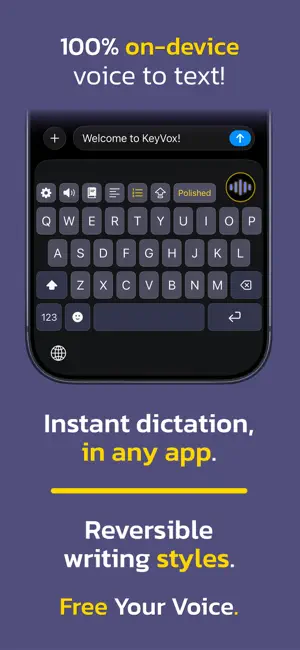
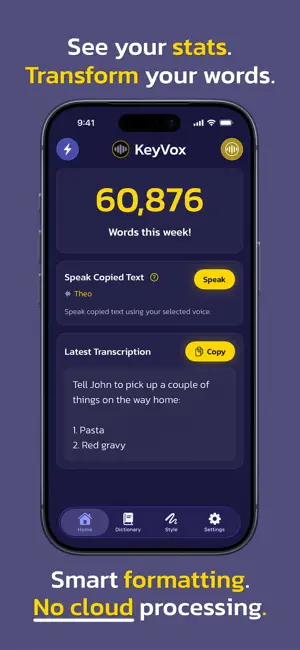
Talk. KeyVox types. KeyVox is an AI voice keyboard that turns your voice into polished, ready-to-send text, right inside any app on your iPhone. No switching apps. No copying and pasting. Just press the mic and start talking. Free Your Voice. Because dictation should always be free. Everything runs on your device. Works in any app. No accounts. No ads. No subscriptions. No servers. No tracking. Your words stay yours. SMARTER THAN A TRANSCRIPT Most voice tools give you a messy wall of text. KeyVox actually cleans up what you said: • Say "two plus two equals four" → you get "2 + 2 = 4" • Say "my email is dom at keyvox dot app" → you get [email protected] • Say "be home by eight PM" → you get 8:00 PM • Rattle off a list → you get a clean numbered list • Pause naturally → you get a new paragraph • Laugh mid-sentence → we clean that up too You talk like a human. KeyVox formats it like you typed it. The Paragraphs, List, and Caps Lock keys support long press to apply/undo formatting when available. This allows you to apply/revert lists, paragraphs, and caps with any untouched dictation. WORKS EVERYWHERE KeyVox lives as a keyboard, so it works in any app: Messages, Notes, Mail, wherever you write. Just switch to KeyVox and tap the mic. COMPLETELY PRIVATE This isn't "we promise we won't look at your data" private. This is "your voice and text never leaves your phone" private. KeyVox runs fully on-device. No internet required. No servers. No data collection. Works in airplane mode. Works anywhere. SIMPLE. NO NONSENSE. KeyVox is free and open source. We think dictation should just work... not come with strings attached. TWO VOICE ENGINES KeyVox includes two built-in speech engines: Whisper and Parakeet. Start with one and use whichever works best for you. KEYVOX VIBES: REVERSIBLE WRITING STYLES Your dictation has Vibes. KeyVox Vibes lets you rewrite the latest untouched dictation in different writing styles, right after you speak. Want something more casual? More polished? More chill? Change the vibe instantly without re-recording anything. And if you change your mind, undo it anytime. This is not copy-and-paste AI rewriting. Vibes is built directly into the KeyVox dictation flow, so it feels fast, natural, and actually useful while you're dictating. Everything runs on-device. Currently includes built-in Vibes like: • Casual • Polished • Chill Talk once. Vibe more. KEYVOX SPEAK: READ LESS. LISTEN MORE. KeyVox Speak turns anything you can copy or share into natural, spoken audio using on-device AI voices. Copy text, tap Speak, and your iPhone reads it out loud — from articles, messages, PDFs, websites, or even images with text. You can start Speak from the KeyVox keyboard, Home tab, Share Sheet, or Shortcuts, so it fits right into how you already use your phone. Everything runs locally after setup. No cloud processing, no sending text anywhere. Install the Speak engine and choose from multiple voices, then listen with full playback controls and replay. You get 2 free Speaks per day, and can unlock unlimited use with a one-time purchase. WHAT YOU GET • A Predictive Text and emoji keyboard that works in every app • Smart formatting for math, emails, times, dates, and lists • Paragraph detection from natural pauses • A custom dictionary for names and corrections • Dictation that supports multiple languages • Two built-in voice engines • Fully offline support • Guided setup • Dark mode & Light mode Keyboard design • No account required • No subscriptions • Quality text-to-speech when you need it List formatting, Vibes, Predictive Text, Speak, and Dictionary features are currently supported for English only. — KeyVox is also available on macOS, bringing the same fast, private dictation experience to your desktop. Visit keyvox.app to get it. KeyVox™ is built by a solo developer who believes that communication shouldn't come at the expense of accessibility, money, or privacy.
Ratings & reviews
4.7
16 ratings
What’s new
Version 1.6.1 · Updated October 29, 2026
KeyVox is back with another update and is definitely better than before!
App privacy
The developer, Dominic Esposito, reported these privacy practices to Apple.
Data Not Collected
The developer does not collect any data from this app.
Alternatives to KeyVox: AI Voice Keyboard
Looking for apps like KeyVox: AI Voice Keyboard? Here are 6 similar apps on the App Store. The highest rated is NanoVoice: AI Voice Keyboard (5.0/5), and all 6 are free to download.
-
 Murmur Keyboard - AI Powered
3.0
Murmur Keyboard - AI Powered
3.0
-
 VivaDicta - Speech to Text
4.6
VivaDicta - Speech to Text
4.6
-
 NanoVoice: AI Voice Keyboard
5.0
NanoVoice: AI Voice Keyboard
5.0
-
 Diction: Speech to Text
4.9
Diction: Speech to Text
4.9
-
 Doc Reader: Text to Speech
-
 AI ToneFix
| App | Rating | Price | Last updated | Compare |
|---|---|---|---|---|
| KeyVox: AI Voice Keyboard | 4.7 / 5 (16 ratings) | Free | October 29, 2026 | |
| Murmur Keyboard - AI Powered | 3.0 / 5 (2) | Free | Apr 3, 2026 | Compare |
| VivaDicta - Speech to Text | 4.6 / 5 (23) | Free | Oct 31, 2026 | Compare |
| NanoVoice: AI Voice Keyboard | 5.0 / 5 (10) | Free | Oct 28, 2026 | Compare |
| Diction: Speech to Text | 4.9 / 5 (21) | Free | Oct 3, 2026 | Compare |
| Doc Reader: Text to Speech | – | Free | Oct 13, 2026 | Compare |
| AI ToneFix | – | Free | Sep 30, 2026 | Compare |