

VivaDicta - Speech to Text
Anton Novoselov Productivity iPhoneiPadiPod touchApple Watch
VivaDicta - Speech to Text is a free Productivity app for iPhone and iPad by Anton Novoselov. Rated 4.6/5 from 23 ratings. Requires iOS 18.0.
- Rating
- 4.6
- 23 ratings
- Price
- Free
- on the App Store
- Size
- 109 MB
- Age 4+
- Updated
- Oct 24
- 2026 · v3.12.2
Screenshots

About VivaDicta - Speech to Text
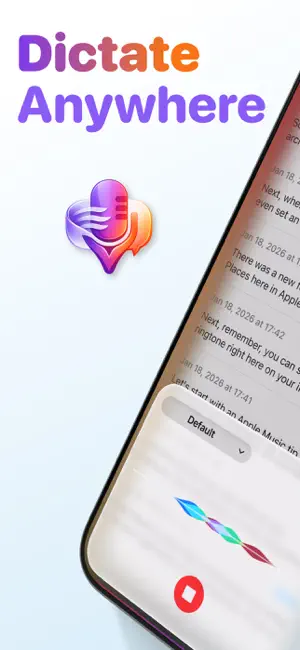
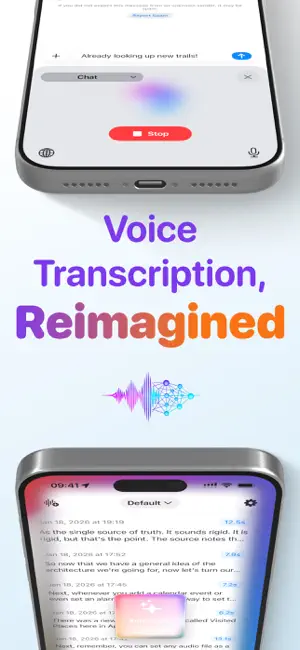
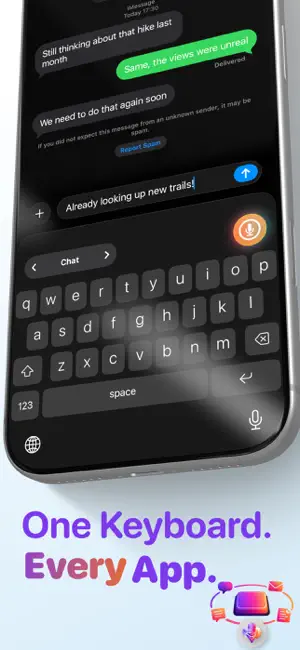
Dictate Anywhere You Type Type 4x faster with your voice. Just speak, and AI turns your words into polished, ready-to-send text. Completely free. WORKS EVERYWHERE YOU TYPE One keyboard for all your apps. Dictate into Messages, WhatsApp, Email, Notion, or anywhere else - no app switching required. Your voice becomes text instantly. Swipe to switch between modes right from the keyboard. AI THAT PROCESSES YOUR SPEECH Raw transcriptions become polished text automatically. AI removes filler words, fixes punctuation, and formats everything perfectly. Use your clipboard or selected text as additional context. RUN AI ON YOUR DEVICE Process your text with AI that runs entirely on your device. VivaDicta recommends Apple Foundation Model on devices that support Apple Intelligence. If yours doesn't, including many devices on iOS 18, you can use other on-device AI models, fully offline. No API key, no internet, nothing leaving your device. KEYBOARD AI PROCESSING Select text or place your cursor, then pick an AI preset - translate, rewrite, summarize, and more. Works in any app, right from the keyboard. COMPLETELY FREE, NO EXCEPTIONS No subscriptions, no paywalls, no limits. On-device AI, custom keyboard, unlimited transcriptions - all free. PRIVATE BY DESIGN Your voice can stay on your iPhone: - Transcription can run entirely on your device - AI processing can run on-device with Apple Foundation Model or a downloadable model - No analytics or tracking SDKs - No accounts or sign-ups required - Works in airplane mode Cloud AI is optional and always under your control. AI PRESETS 40+ built-in presets - rewrite, summarize, translate, and more. Create custom presets and mark favorites for quick access. SPEAKER LABELS Speaker-separated transcripts for meetings, interviews, and group chats - clear who said what. VIVA MODES Switch between AI-powered modes, each with its own AI settings. With Soniox, Gladia, or Speechmatics, transcripts can come back already translated. LIVE TRANSLATION Speak in one language and hear it back in another, in real time. Pick source and target, play it through your headphones, and adjust playback speed. 60+ languages, any-to-any. CHAT WITH YOUR NOTES Ask questions about one note, many, or across your entire library. Surface insights, action items, and key points. SMART AI SEARCH Find notes by meaning, not just keywords. Ask "what did I say about the pricing idea?" Fully on-device. REMINDERS AND EVENTS Turn notes into reminders and calendar events in the original language. Review and send approved items to Apple Reminders and Calendar. APPLE WATCH APP Record voice notes from your wrist. Tap and talk - they're transcribed on iPhone in the background. FULLY CUSTOMIZABLE - 16 AI transcription providers (local and cloud) - 20+ AI processing providers, including on-device models - Bring your own AI via any compatible API - Personal dictionary, word replacements, and custom tags - Save transcriptions to Obsidian automatically - Auto export to a folder of your choice KEY FEATURES - System-wide Voice keyboard with AI text processing - On-device Whisper and NVIDIA Parakeet - professional-grade transcription - Records through AirPods and Bluetooth headsets - On-device AI - Apple Foundation Model or a downloadable model you run offline - Live Translation - real-time speech-to-speech across 60+ languages - Chat with AI about one note or many, with Smart AI Search - Reminders and calendar events from your notes - iCloud sync across iPhone, Apple Watch, and Mac - Home screen widgets and Siri Shortcuts integration - Multi-language keyboard: Czech, French, German, Spanish, Russian - 100+ languages with auto-detection - Open source on GitHub PERFECT FOR - Quick messages and emails - Meeting notes and lectures - Voice memos and ideas - Journalists and writers - Developers and students - Anyone who thinks faster than they type Download VivaDicta. Your voice. Your words. Your device. Your privacy.
Ratings & reviews
4.6
23 ratings
What’s new
Version 3.12.2 · Updated October 24, 2026
No more analytics. Firebase Analytics and Crashlytics are gone, and VivaDicta no longer includes any analytics or crash-reporting SDK. The only thing the app ever sends is the identifier of an app the keyboard can't return you to yet, so support for it can be added. Never your recordings, your text or anything that identifies you or your device. The keyboard now returns you to 8 more apps: Element, Walmart, BlaBlaCar, leboncoin, Craft, Trello, Zulip and Orion.
App privacy
The developer, Anton Novoselov, reported these privacy practices to Apple.
Data Not Linked to You
The following data, which may be collected but is not linked to your identity, may be used for the following purposes:
- Usage Data: Other Usage Data
Used for: App Functionality
Alternatives to VivaDicta - Speech to Text
Looking for apps like VivaDicta - Speech to Text? Here are 6 similar apps on the App Store. The highest rated is Diction: Speech to Text (4.9/5), and all 6 are free to download.
-
 Reader Pro: Files Reader
4.0
Reader Pro: Files Reader
4.0
-
 Smart Notepad AI, Chat, Learn
3.7
Smart Notepad AI, Chat, Learn
3.7
-
 KeyVox: AI Voice Keyboard
4.7
KeyVox: AI Voice Keyboard
4.7
-
 Freezy Transcribe: Fast & Easy
4.5
Freezy Transcribe: Fast & Easy
4.5
-
 Diction: Speech to Text
4.9
Diction: Speech to Text
4.9
-
 Wortlaut AI
| App | Rating | Price | Last updated | Compare |
|---|---|---|---|---|
| VivaDicta - Speech to Text | 4.6 / 5 (23 ratings) | Free | October 24, 2026 | |
| Reader Pro: Files Reader | 4.0 / 5 (2) | Free | Oct 1, 2026 | Compare |
| Smart Notepad AI, Chat, Learn | 3.7 / 5 (3) | Free | Feb 27, 2026 | Compare |
| KeyVox: AI Voice Keyboard | 4.7 / 5 (16) | Free | Oct 29, 2026 | Compare |
| Freezy Transcribe: Fast & Easy | 4.5 / 5 (11) | Free | Oct 13, 2025 | Compare |
| Diction: Speech to Text | 4.9 / 5 (21) | Free | Oct 3, 2026 | Compare |
| Wortlaut AI | – | Free | Mar 17, 2026 | Compare |