

DictaWiz: AI Keyboard & Notes
CORDOC LLC Productivity iPhoneiPadiPod touchMacApple Watch
DictaWiz: AI Keyboard & Notes is a free Productivity app for iPhone and iPad by CORDOC LLC. Rated 4.8/5 from 22 ratings. Requires iOS 26.0.
- Rating
- 4.8
- 22 ratings
- Price
- Free
- on the App Store
- Size
- 87 MB
- Age 4+
- Updated
- Jul 30
- 2026 · v1.4.0
Screenshots


About DictaWiz: AI Keyboard & Notes
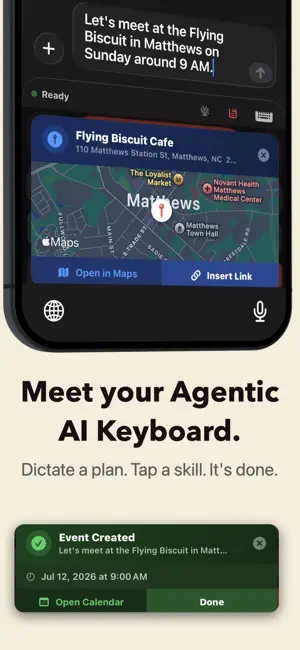
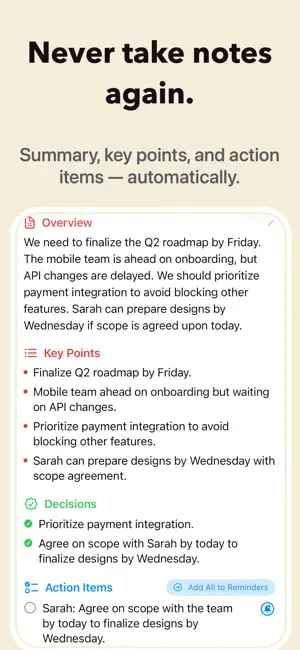
Talk instead of type, and never take notes again. DictaWiz is your agentic AI keyboard and notes manager: voice becomes clean text in any app, and every recording becomes an organized, searchable note. Every AI model runs on your device, so your voice never leaves your phone. STOP TYPING, START TALKING Speak naturally and get polished text back. DictaWiz cleans up grammar, punctuation, and formatting as you talk, so nobody can tell you dictated it. Works in Messages, Notes, Mail, and every other app on your phone. Pick from 16 keyboard layouts, including QWERTY, QWERTZ, AZERTY, and Cyrillic. AN AGENTIC AI KEYBOARD Tap AI Skills for dozens of built-in shortcuts: fix grammar, insert a map link, add a calendar event, draft a reply, get a quick answer, and more. Don't see what you need? Describe any skill and DictaWiz builds it. Chain skills together to run automatically after you dictate, so one recording triggers a whole sequence of actions. WORKS ANYWHERE, IN ANY LANGUAGE Dictate on a plane, in a tunnel, or anywhere with no signal at all. 25 languages with the fast engine, 99+ with the comprehensive one, all running locally on your iPhone. Auto-detect your language, or pick it yourself. Translate any language to English, on your device. NEVER TAKE NOTES AGAIN Record a meeting, lecture, or interview and get the transcript written for you, with each speaker labeled. AI writes the summary: key points, decisions, and action items, done automatically. Watch it fill in live as you record. Import an audio file or a URL if you already have one. TURN ANY RECORDING INTO STUDY MATERIAL Get flashcards, a quiz, or a mind map from any recording, ready to study right away. Canvas turns the transcript into an editable notes document: lists, callouts, and key points you can edit and save. AN AI ASSISTANT FOR ANY TEXT Copy any text, tap the AI key, and type what you want done: reply to an email, rewrite a paragraph, answer a question. STOP CORRECTING THE SAME WORDS Set up abbreviations that expand as you type, perfect for medical terms, legal phrases, or anything you type often, and fix names DictaWiz never quite gets right. START RECORDING IN ONE TAP Add a home screen widget to start recording instantly. Ask Siri to record and get a transcript without opening the app. A Live Activity keeps you posted from the lock screen and Dynamic Island. YOUR NOTES, WHEREVER YOU WORK Send transcripts straight to Obsidian, Notion, Bear, or Drafts, or any app that takes a webhook. Send everything, only tagged notes, or send manually. Also works with Zapier and Make. MORE POWER, IF YOU WANT IT Everything above works on-device with zero setup. Optionally connect your own API key for cloud transcription, speaker ID, or LLM features. Never required. EVERYTHING, EVERYWHERE Transcripts, dictionary, vocabulary, and snippets sync to the DictaWiz Mac app using your own iCloud account. YOUR VOICE STAYS YOURS Zero data collection. Nothing goes to the cloud unless you add your own key. No account, no tracking, no analytics. Works completely offline, and stays that way. WHO USES DICTAWIZ? Professionals: abbreviations keep specific terms right, every time. Students: lectures become flashcards, a quiz, a searchable transcript. Journalists: import interviews, get speakers identified, pull key quotes. Lawyers: legal clause snippets and custom summary prompts. Remote workers: meeting action items, exported to Notion or Slack. Multilingual users: switch languages mid-sentence, work offline. COMMON QUESTIONS Does it work offline? Yes, every AI model runs locally. What languages? 25 fast engine, 99+ comprehensive engine. Auto-detect included. Is my data private? Completely. Nothing leaves your device unless you add your own key. GET STARTED DictaWiz works out of the box, on-device, free. Upgrade to Pro for more integrations, cloud engines, and more. Privacy: https://freevoicereader.com/privacy EULA: https://www.apple.com/legal/internet-services/itunes/dev/stdeula/
Ratings & reviews
4.8
22 ratings
What’s new
Version 1.4.0 · Updated July 30, 2026
- On-device Gemma 4 added as an LLM option - Auto-Run Skills chains a skill automatically after dictation finishes - In-app AI Edit: Run any skill or custom command on selected text - Smarter AI cleanup with adjustable intensity and insights on your dictation history - Reliability fixes: mic dropouts, Action Button recording, iCloud audio backup, swipe between notes, email drafts, keyboard lock-loss - Storage optimized - Diarization improved with reduced word error rate (WER) - Faster, more accurate location and calendar skills - Bug fixes and performance improvements
App privacy
The developer, CORDOC LLC, reported these privacy practices to Apple.
Data Used to Track You
The following data may be used to track you across apps and websites owned by other companies:
- Identifiers: Device ID
Data Linked to You
The following data, which may be collected and linked to your identity, may be used for the following purposes:
- Identifiers: Device ID
Used for: Analytics
Alternatives to DictaWiz: AI Keyboard & Notes
Looking for apps like DictaWiz: AI Keyboard & Notes? Here are 6 similar apps on the App Store. The highest rated is copycopy: Copy & Paste History (5.0/5), and all 6 are free to download.
-
 Spanarc - Calendar At a Glance
4.8
Spanarc - Calendar At a Glance
4.8
-
 AI Keyboard – ClarifierAI
4.7
AI Keyboard – ClarifierAI
4.7
-
 copycopy: Copy & Paste History
5.0
copycopy: Copy & Paste History
5.0
-
 Capio: Work Log & Planner
5.0
Capio: Work Log & Planner
5.0
-
 Brio: Daily Planner, Todo List
4.4
Brio: Daily Planner, Todo List
4.4
-
 Quill Flow : AI Voice Keyboard
4.6
Quill Flow : AI Voice Keyboard
4.6
| App | Rating | Price | Last updated | Compare |
|---|---|---|---|---|
| DictaWiz: AI Keyboard & Notes | 4.8 / 5 (22 ratings) | Free | July 30, 2026 | |
| Spanarc - Calendar At a Glance | 4.8 / 5 (17) | Free | Aug 4, 2026 | Compare |
| AI Keyboard – ClarifierAI | 4.7 / 5 (14) | Free | Oct 21, 2026 | Compare |
| copycopy: Copy & Paste History | 5.0 / 5 (15) | Free | Aug 22, 2026 | Compare |
| Capio: Work Log & Planner | 5.0 / 5 (2) | Free | May 7, 2026 | Compare |
| Brio: Daily Planner, Todo List | 4.4 / 5 (5) | Free | May 26, 2026 | Compare |
| Quill Flow : AI Voice Keyboard | 4.6 / 5 (49) | Free | Oct 29, 2026 | Compare |