

Ai Calendar - Pocket Cal
Kevin Hall Productivity iPhoneiPadiPod touch
Ai Calendar - Pocket Cal is a free Productivity app for iPhone and iPad by Kevin Hall. Rated 4.5/5 from 8 ratings. Requires iOS 26.0.
- Rating
- 4.5
- 8 ratings
- Price
- Free
- on the App Store
- Size
- 158 MB
- Age 4+
- Updated
- Oct 6
- 2026 · v1.4.1
Screenshots


About Ai Calendar - Pocket Cal
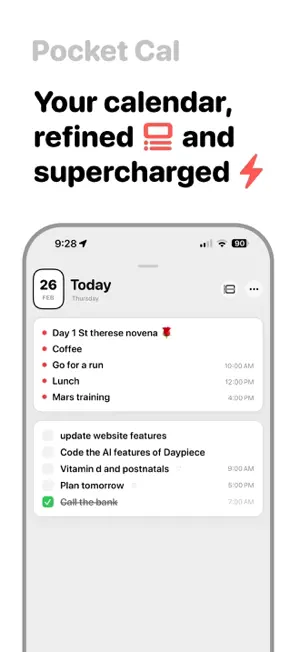
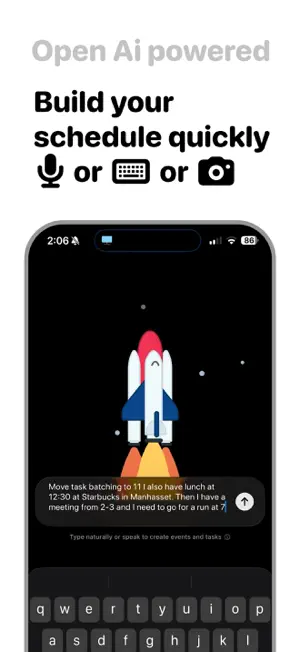
Pocket Cal is a fast, focused calendar built for people who value clarity. Schedule anything in seconds. See your day at a glance. Zoom out to the year without losing detail. Pocket Cal brings your events, tasks, and reminders into one clean, intelligent timeline — so everything feels organized without feeling overwhelming. Natural Language Scheduling Just say it. “Team standup Monday at 9. Client call at 11.” Pocket Cal understands and schedules it instantly. Type, speak, or scan. No forms. No friction. Designed for Focus • A refined timeline built for clarity • Minimal month and year overviews • All-day and timed events • Multiple calendars • Location support with maps • Smart repeat rules Everything feels fast. Nothing feels cluttered. Intelligent, Built In Get smart suggestions. Organize tasks effortlessly. Plan ahead without overthinking. Pocket Cal helps you stay ahead — without getting in your way. One Place for Everything • Events • Tasks • Reminders • Holidays • Personal and work calendars No switching apps. No scattered plans. Just one sharp, unified view of your time. Whether you’re planning tomorrow or mapping out the year, Pocket Cal keeps your schedule clear, calm, and always within reach. * Ai features require a monthly or yearly subscription Privacy policy: https://kevz.notion.site/Privacy-Policy-Pocket-Cal-25b5bac8118980148657cf3c77afffea
Ratings & reviews
4.5
8 ratings
What’s new
Version 1.4.1 · Updated October 6, 2026
Made for iPhone Duo. Folded or open, Pocket Cal fits: one glass rail beside the camera, and a split day view when you open it, list on the left and timeline on the right. • Landscape on iPad and open Duo: list and timeline side by side, editors as a floating window • Year view fits any screen, no scrolling • Plan today is now on for Pro members • Reschedule from Month + List with a small calendar • Catch Up can move overdue tasks to a day with no times • Dates on memory cards, in fourteen formats Fixed: • Pocket Cal on Mac can now ask for Calendar access, and opens again on launch • Launch crash on iPhone 17 Pro Max • A rare crash loading the month overview • Fewer AI service errors on busy days
App privacy
The developer, Kevin Hall, reported these privacy practices to Apple.
Data Not Collected
The developer does not collect any data from this app.
Alternatives to Ai Calendar - Pocket Cal
Looking for apps like Ai Calendar - Pocket Cal? Here are 6 similar apps on the App Store. The highest rated is ThisDay: Planner & Reminders (5.0/5), and all 6 are free to download.
-
 Anchor: Daily Planner & Focus
4.8
Anchor: Daily Planner & Focus
4.8
-
 Control: Home Screen Widgets
4.5
Control: Home Screen Widgets
4.5
-
 ThisDay: Planner & Reminders
5.0
ThisDay: Planner & Reminders
5.0
-
 Habit Tracker // init.Habits
4.8
Habit Tracker // init.Habits
4.8
-
 Habit Tracker - Dayrise
4.5
Habit Tracker - Dayrise
4.5
-
 Pomodoro Timer: Tempo Focus
5.0
Pomodoro Timer: Tempo Focus
5.0
| App | Rating | Price | Last updated | Compare |
|---|---|---|---|---|
| Ai Calendar - Pocket Cal | 4.5 / 5 (8 ratings) | Free | October 6, 2026 | |
| Anchor: Daily Planner & Focus | 4.8 / 5 (25) | Free | Oct 28, 2026 | Compare |
| Control: Home Screen Widgets | 4.5 / 5 (2) | Free | Oct 10, 2026 | Compare |
| ThisDay: Planner & Reminders | 5.0 / 5 (2) | Free | Nov 1, 2026 | Compare |
| Habit Tracker // init.Habits | 4.8 / 5 (30) | Free | Sep 10, 2026 | Compare |
| Habit Tracker - Dayrise | 4.5 / 5 (15) | Free | Oct 18, 2026 | Compare |
| Pomodoro Timer: Tempo Focus | 5.0 / 5 (6) | Free | Oct 13, 2026 | Compare |