

This 60: To-Dos in Your Repo
Gregory Edwards Productivity iPhoneiPadiPod touchMac
This 60: To-Dos in Your Repo is a free Productivity app for iPhone and iPad by Gregory Edwards. Requires iOS 15.0. Updated October 17, 2026.
- Price
- Free
- on the App Store
- Size
- 90 MB
- Age 4+
- Updated
- Oct 17
- 2026 · v3.1.3
Screenshots


About This 60: To-Dos in Your Repo
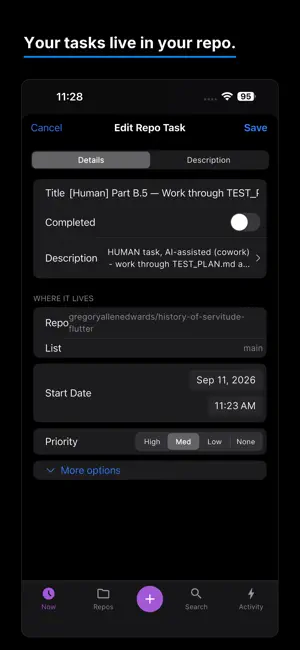
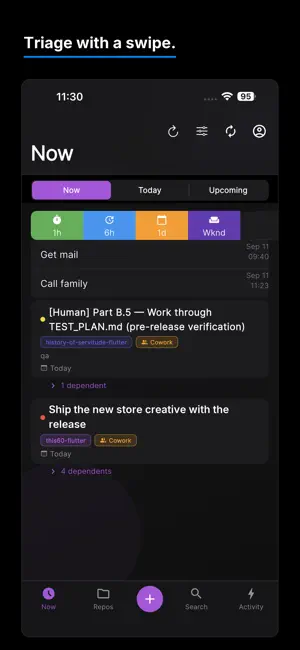
This60 keeps every task you have given a coding agent in one list — across every repo — and shows you what happened to each one. Five repos on the go, an agent doing most of the typing, and no single place that says what is actually in flight. One task is waiting on a review comment, another opened a PR two days ago, a third failed CI overnight and you have not noticed. This60 is that place. Every agent task, every repo, one list, each with its own state. TASKS THAT LIVE IN YOUR REPO Repo tasks are plain Markdown files inside each repository (.this60/*.md), committed through the GitHub API. That means the app, the agent, and you all read and write the same source of truth. No proprietary task database to sync, nothing to export, nothing stranded if you stop using the app — the tasks are already in your repo, in your git history. ONE LIST FOR EVERYTHING Two kinds of work sit side by side. World work — the calls, the signatures, the errands that only you can do — is stored privately and always dated. Repo work lives in the repo. The Now view interleaves both across every connected repository, so "what am I doing next" is one screen, not six tabs. AND WHEN YOU ADD ONE, HAND IT OVER WITHOUT RETYPING IT Tap a task and This60 opens Claude with that repo selected and the whole brief already written — title, description, task id, and instructions to work from the repo's own task file. No copying, no pasting, no re-explaining what you meant. You take it from there. On the Gemini side it goes further: This60 can start a Jules session that works the task on its own while you put the phone down. This60 holds no AI credential of any kind. It opens the app you already pay for, or talks to Jules with a key you connect yourself. That is a design rule, not a feature. THEN SEE WHAT CAME BACK Every task shows its own state — an open pull request, a running chain, a failed run, red CI — so you can tell what landed without opening a laptop. BUILT FOR HOW MOBILE WORK ACTUALLY GOES - Capture in two taps; swipe to reschedule, complete, or move into a repo. - Now / Today / Upcoming derive from one date — no buckets to maintain. - Task dependencies: a chain shows you only the next task, not all twelve. - Stub switch: a half-written task cannot be handed over until you say it is ready. - Activity: open PRs, review comments, and failing CI, per repo. - Out of Claude session? Hand the same task to Gemini and keep going — the context lives in the repo, so you lose the model, not the work. - On a Mac it does more: bind a repo to its local clone, and each task gets its own git worktree. - iPhone, iPad and Mac, signed in with Google or Apple. FREE AND PRO Free covers 3 repos, 3 recurring items, and 3 task dependencies — enough to run a real project. Pro lifts all three limits and adds CSV export of everything you have captured. You need a GitHub account for the repo features, the Claude app installed for the Claude hand-off, and a Jules API key for the Gemini one. This60 is not affiliated with GitHub, Anthropic or Google. On your home screen the app appears as This 60. Terms of Use (EULA): https://www.apple.com/legal/internet-services/itunes/dev/stdeula/
What’s new
Version 3.1.3 · Updated October 17, 2026
- New: Select. Move or complete many tasks at once, on every list. - Repo task edits save instantly and sync in the background, even offline. - Pick dependencies while creating a task. - Choose the model for each task: Claude, Gemini or ChatGPT. On Mac, "Run on" can send a task to the web version instead. - Reminders now arrive while the app is open, and a Done button closes the keyboard on iPhone. - Anonymous crash reports help us fix problems faster. No false crash reports when offline.
App privacy
The developer, Gregory Edwards, reported these privacy practices to Apple.
Data Not Linked to You
The following data, which may be collected but is not linked to your identity, may be used for the following purposes:
- Identifiers: Device ID
- Usage Data: Product Interaction
- Diagnostics: Crash Data
Used for: Analytics, App Functionality
Alternatives to This 60: To-Dos in Your Repo
Looking for apps like This 60: To-Dos in Your Repo? Here are 6 similar apps on the App Store. The highest rated is DayTime - Track Your Day (5.0/5), and all 6 are free to download.
-
 Paffie: ADHD Focus & Tasks
-
 DayTime - Track Your Day
5.0
DayTime - Track Your Day
5.0
-
 ADH Do It
-
 Fyndo – ADHD Focus & Tasks
-
 Tickwise
-
 Flowti: ADHD Focus Timer
| App | Rating | Price | Last updated | Compare |
|---|---|---|---|---|
| This 60: To-Dos in Your Repo | – | Free | October 17, 2026 | |
| Paffie: ADHD Focus & Tasks | – | Free | Jul 23, 2026 | Compare |
| DayTime - Track Your Day | 5.0 / 5 (1) | Free | Jul 16, 2025 | Compare |
| ADH Do It | – | Free | Jun 19, 2026 | Compare |
| Fyndo – ADHD Focus & Tasks | – | Free | Oct 12, 2026 | Compare |
| Tickwise | – | Free | May 7, 2026 | Compare |
| Flowti: ADHD Focus Timer | – | Free | Oct 10, 2026 | Compare |