
Bike n Go - GPS Bike Computer
Maps & Navigation In-app purchases Contains ads
Follow GPX routes, record your rides, and navigate with offline maps.
- Downloads
- 338+
- on Google Play
- Price
- Free
- In-app purchases
- Updated
- Sep 26
- 2026 · v1.2.0
Screenshots


About Bike n Go - GPS Bike Computer
Turn your smartphone into a GPS bike computer.
Bike n Go follows a GPX route, records your rides and shows your stats in real time, on road, gravel or MTB.
Download your maps ahead of time, mount your phone on the handlebar and ride, even with no mobile signal.
NAVIGATE YOUR GPX ROUTES
Import a route in GPX format, open it in Bike n Go and follow your progress on the map.
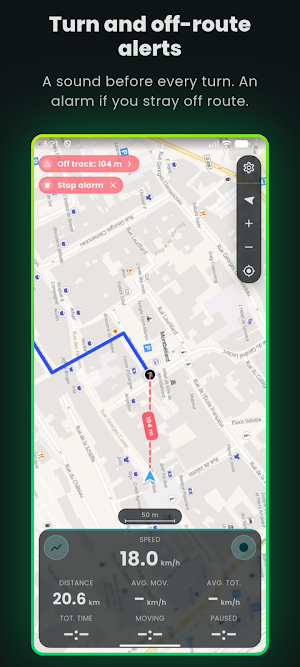
• Audio alerts before turns
• Off-route alert when you drift away from the track
• Next waypoint and remaining distance
• Map oriented to north or to your direction of travel
• Map style, track colour, position marker: almost everything is adjustable
RECORD YOUR RIDES
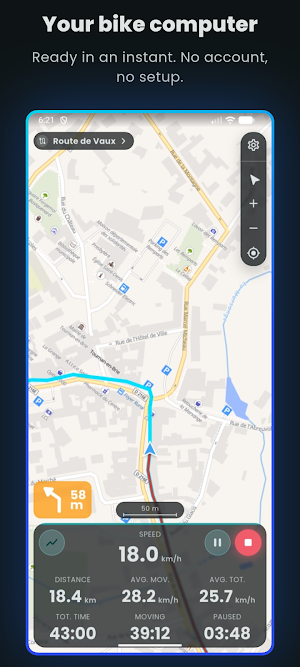
Start, pause or finish your activity from the main screen. During the ride, the screen shows:
• Distance covered, remaining distance, total route distance
• Percentage completed and remaining, next waypoint
• Current, maximum and average speed, overall or while moving
• Total time, moving time, paused time, clock
• Elevation gain and loss, for the ride and for the route
• Altitude, grade, VAM
• Heart rate and max heart rate with a Bluetooth sensor
PREPARE YOUR OFFLINE MAPS
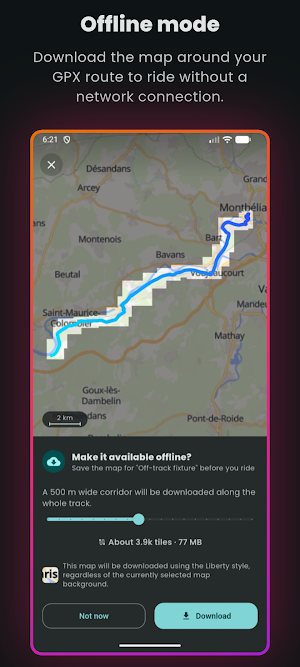
Download the maps before you leave. Bike n Go cuts a corridor around your GPX track instead of downloading the whole region.
You choose the corridor width and the level of detail; the storage space needed is estimated before the download. Saved areas can then be managed, added and deleted from the app.
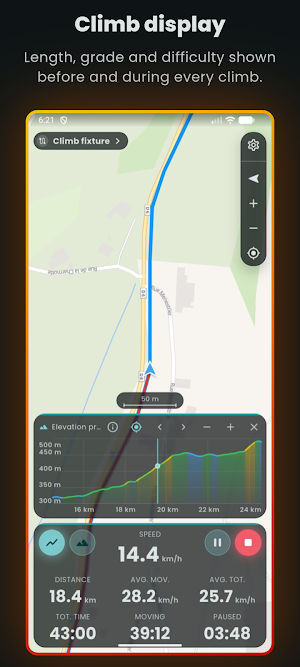
ANALYSE THE CLIMBS
Climbs on a route are detected on import, with their length, elevation gain, average and maximum grade.
While you follow the route, each climb is announced in advance, at the distance you set. A panel opens showing the climb profile, your position on it, the distance and elevation left to go, and the current grade. At the top, a summary gives you your time.
CUSTOMISE YOUR BIKE SCREEN
Choose the data shown above the map, its order and its size, for a dashboard you can read at a glance on your handlebar mount.
The display works in portrait and landscape.
Other settings: light or dark theme, metric or imperial units, time format, map styles and navigation preferences.
YOUR DATA STAYS ON YOUR PHONE
The main features need no account. Your rides, routes and settings are stored on your device. Connecting to Strava and downloading maps are optional.
Navigate. Record. Enjoy.
Bike n Go follows a GPX route, records your rides and shows your stats in real time, on road, gravel or MTB.
Download your maps ahead of time, mount your phone on the handlebar and ride, even with no mobile signal.
NAVIGATE YOUR GPX ROUTES
Import a route in GPX format, open it in Bike n Go and follow your progress on the map.
• Audio alerts before turns
• Off-route alert when you drift away from the track
• Next waypoint and remaining distance
• Map oriented to north or to your direction of travel
• Map style, track colour, position marker: almost everything is adjustable
RECORD YOUR RIDES
Start, pause or finish your activity from the main screen. During the ride, the screen shows:
• Distance covered, remaining distance, total route distance
• Percentage completed and remaining, next waypoint
• Current, maximum and average speed, overall or while moving
• Total time, moving time, paused time, clock
• Elevation gain and loss, for the ride and for the route
• Altitude, grade, VAM
• Heart rate and max heart rate with a Bluetooth sensor
PREPARE YOUR OFFLINE MAPS
Download the maps before you leave. Bike n Go cuts a corridor around your GPX track instead of downloading the whole region.
You choose the corridor width and the level of detail; the storage space needed is estimated before the download. Saved areas can then be managed, added and deleted from the app.
ANALYSE THE CLIMBS
Climbs on a route are detected on import, with their length, elevation gain, average and maximum grade.
While you follow the route, each climb is announced in advance, at the distance you set. A panel opens showing the climb profile, your position on it, the distance and elevation left to go, and the current grade. At the top, a summary gives you your time.
CUSTOMISE YOUR BIKE SCREEN
Choose the data shown above the map, its order and its size, for a dashboard you can read at a glance on your handlebar mount.
The display works in portrait and landscape.
Other settings: light or dark theme, metric or imperial units, time format, map styles and navigation preferences.
YOUR DATA STAYS ON YOUR PHONE
The main features need no account. Your rides, routes and settings are stored on your device. Connecting to Strava and downloading maps are optional.
Navigate. Record. Enjoy.
What’s new
Version 1.2.0 · Updated September 26, 2026
- New design across the whole app, in both light and dark themes. - The bottom panel of the navigation screen can now be collapsed by dragging it down, to free up the map. - Removed settings: opaque backgrounds, grid and stat icons.
User reviews

best app
Alternatives to Bike n Go - GPS Bike Computer
Looking for apps like Bike n Go - GPS Bike Computer? Here are 6 similar Android apps on Google Play. The highest rated is Toptracer Range (4.8/5), and 5 of the 6 are free to download.
-
Footpath Route Planner 4.6
-
Hikingbook: Hike, Bike & Run 3.8
-
Specialized 4.6
-
Toptracer Range 4.8
-
GPX Viewer PRO: Hike & Bike 4.6
-
Bike Citizens Cycling App GPS 4.2
| App | Rating | Price | Installs | Last updated | Compare |
|---|---|---|---|---|---|
| Bike n Go - GPS Bike Computer | – | Free | 100+ | Sep 26, 2026 | |
| Footpath Route Planner | 4.6 / 5 | Free | 1,000,000+ | Oct 21, 2026 | Compare |
| Hikingbook: Hike, Bike & Run | 3.8 / 5 | Free | 100,000+ | Oct 31, 2026 | Compare |
| Specialized | 4.6 / 5 | Free | 100,000+ | Oct 14, 2026 | Compare |
| Toptracer Range | 4.8 / 5 | Free | 1,000,000+ | Oct 19, 2026 | Compare |
| GPX Viewer PRO: Hike & Bike | 4.6 / 5 | 8.99 USD | 100,000+ | Oct 15, 2026 | Compare |
| Bike Citizens Cycling App GPS | 4.2 / 5 | Free | 500,000+ | Sep 25, 2026 | Compare |
Similar apps on Google Play
- Footpath Route Planner
- Hikingbook: Hike, Bike & Run
- Specialized
- Toptracer Range
- GPX Viewer PRO: Hike & Bike
- Bike Citizens Cycling App GPS
- Ride with GPS: Bike Navigation
- Cyclers: Bike Navigation & Map
- Bikemap: Cycling Tracker & GPS
- TrainerRoad
- Map My Ride With GPS Tracker
- RunGo: voice-guided run routes
- FarOut
- Cardo Ride - Motorcycle App
- TrailLink: Bike, Run, Walk
- Outdooractive. Hike and Ride
- Wahoo: Ride, Run, Train
- eBike Flow
- Garmin Jr.™
- Tacx Training™