

Player Music
Music & Audio
Mobile application for playing local music
- Downloads
- 10+
- on Google Play
- Price
- Free
- No in-app purchases
- Updated
- Jun 6
- 2026 · v1.7
Screenshots
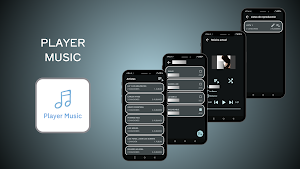
About Player Music
The app's user flow is designed to be intuitive and powerful, guiding the user through the following steps:
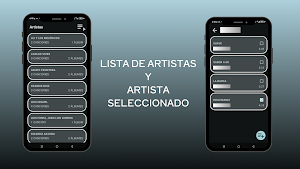
1. Exploring the Music Library: Upon launching the app, the user is greeted with the main view, the Artist List. This screen automatically organizes all the device's local music by artist, serving as the starting point for music exploration. From here, the user can:
- Select an artist to navigate to a detailed view of all their songs.
- Access playlist management via an icon in the top bar.
2. Managing and Creating Playlists: The app offers a comprehensive system for users to save their own music collections:
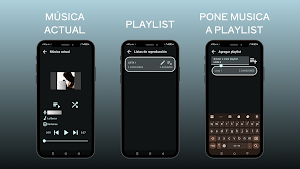
- Playlist View: From here, users can view all their created playlists. They have the ability to edit the name of any playlist or delete it entirely.
- Adding Music to a Playlist: While browsing an artist's music, the user can select a song and add it to a playlist. An interface is presented where you can search for an existing playlist or create a new one instantly. When creating a new playlist, the song is automatically added to it, streamlining the process.
- Manage Playlist Content: Upon entering a specific playlist, the user can view all the songs it contains and has the option to delete tracks individually.
3. Music Playback: The core of the experience is centered on the Current Music screen, the main player. The user can access this screen by selecting a song from an artist's list or from one of their playlists. This screen provides complete control over playback with the following features:
- Essential Controls: Pause, resume, and navigate to the next or previous song in the playback queue.
- Playback Modes: The user can personalize their listening experience by activating shuffle mode or configuring different repeat modes (repeat the entire playlist or the current song).
1. Exploring the Music Library: Upon launching the app, the user is greeted with the main view, the Artist List. This screen automatically organizes all the device's local music by artist, serving as the starting point for music exploration. From here, the user can:
- Select an artist to navigate to a detailed view of all their songs.
- Access playlist management via an icon in the top bar.
2. Managing and Creating Playlists: The app offers a comprehensive system for users to save their own music collections:
- Playlist View: From here, users can view all their created playlists. They have the ability to edit the name of any playlist or delete it entirely.
- Adding Music to a Playlist: While browsing an artist's music, the user can select a song and add it to a playlist. An interface is presented where you can search for an existing playlist or create a new one instantly. When creating a new playlist, the song is automatically added to it, streamlining the process.
- Manage Playlist Content: Upon entering a specific playlist, the user can view all the songs it contains and has the option to delete tracks individually.
3. Music Playback: The core of the experience is centered on the Current Music screen, the main player. The user can access this screen by selecting a song from an artist's list or from one of their playlists. This screen provides complete control over playback with the following features:
- Essential Controls: Pause, resume, and navigate to the next or previous song in the playback queue.
- Playback Modes: The user can personalize their listening experience by activating shuffle mode or configuring different repeat modes (repeat the entire playlist or the current song).
What’s new
Version 1.7 · Updated June 6, 2026
Segunda version de la app de PlayerMusic
Alternatives to Player Music
Looking for apps like Player Music? Here are 6 similar Android apps on Google Play. All of them are free to download.
-
Clasificador de peces
-
Zonas Turisticas El Guabo
-
Ortografia Plus
-
Calculadora de materiales
-
Emprendimiento Primaria
-
Login
| App | Rating | Price | Installs | Last updated | Compare |
|---|---|---|---|---|---|
| Player Music | – | Free | 10+ | Jun 6, 2026 | |
| Clasificador de peces | – | Free | 5+ | Sep 30, 2026 | Compare |
| Zonas Turisticas El Guabo | – | Free | 0+ | – | Compare |
| Ortografia Plus | – | Free | 1+ | – | Compare |
| Calculadora de materiales | – | Free | 50+ | – | Compare |
| Emprendimiento Primaria | – | Free | 5+ | Oct 12, 2026 | Compare |
| Login | – | Free | 100+ | – | Compare |
Compare Player Music with the top alternatives: ratings, updates, ASO score and keyword gaps →