

Accident Reporter
Maps & Navigation
This app reports incidents on a Google map.
- Downloads
- 23+
- on Google Play
- Price
- Free
- No in-app purchases
- Updated
- Oct 14
- 2026 · v1.6
Screenshots

About Accident Reporter
The application's user flow is designed to be straightforward and efficient, guiding the user through the following steps:
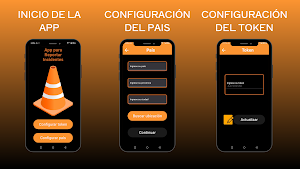
1. Simple Initial Setup: Upon launching the application for the first time, the user has two clear options:
- Configure Location: For new users, this is the starting point. They can define their country, state/province, and city. The application uses this information to obtain the exact geographic coordinates, customizing the map to their area of interest.
- Configure Token: For returning users, this feature allows them to re-enter a unique personal token. This gives them back control over the incidents they have previously reported, allowing them to edit or delete them.
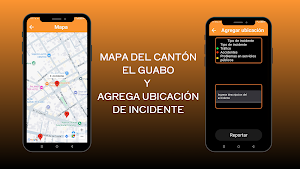
2. Interactive Map View: Once the location is configured, the user accesses the main view: an interactive map. On this map, all incidents reported by the community are displayed with red markers. By selecting a marker, a preview with basic information about the incident can be obtained.
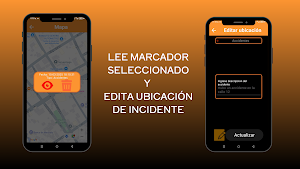
3. Incident Management: Clicking on an incident preview offers two options:
- Delete Report: If the user is the original "owner" of the report, they can delete it from the map.
- View/Edit Details: This option leads to a screen with all the incident information. For most users, the information is read-only. However, for the report owner, this screen becomes an editable form, allowing them to update the information as needed.
4. Creating a New Report: ARI's core feature is the ease of adding new incidents. The user simply clicks on any empty area of the map. This opens an "Add Location" form, where they can:
- Select the incident type from a predefined list (e.g., Traffic, Accidents, Utility Issues).
- Add a detailed description of the event.
Upon confirmation, the report is saved, the application automatically records the date, and the new incident appears on the map for the entire community to view.
1. Simple Initial Setup: Upon launching the application for the first time, the user has two clear options:
- Configure Location: For new users, this is the starting point. They can define their country, state/province, and city. The application uses this information to obtain the exact geographic coordinates, customizing the map to their area of interest.
- Configure Token: For returning users, this feature allows them to re-enter a unique personal token. This gives them back control over the incidents they have previously reported, allowing them to edit or delete them.
2. Interactive Map View: Once the location is configured, the user accesses the main view: an interactive map. On this map, all incidents reported by the community are displayed with red markers. By selecting a marker, a preview with basic information about the incident can be obtained.
3. Incident Management: Clicking on an incident preview offers two options:
- Delete Report: If the user is the original "owner" of the report, they can delete it from the map.
- View/Edit Details: This option leads to a screen with all the incident information. For most users, the information is read-only. However, for the report owner, this screen becomes an editable form, allowing them to update the information as needed.
4. Creating a New Report: ARI's core feature is the ease of adding new incidents. The user simply clicks on any empty area of the map. This opens an "Add Location" form, where they can:
- Select the incident type from a predefined list (e.g., Traffic, Accidents, Utility Issues).
- Add a detailed description of the event.
Upon confirmation, the report is saved, the application automatically records the date, and the new incident appears on the map for the entire community to view.
What’s new
Version 1.6 · Updated October 14, 2026
Esta app le permite al usuario elegir una ubicación en el mapa para reportar algún incidente. Ahora guarda datos en local para mayor rendimiento en bajos niveles de señal de internet.
Alternatives to Accident Reporter
Looking for apps like Accident Reporter? Here are 6 similar Android apps on Google Play. All of them are free to download.
-
Clasificador de peces
-
Player Music
-
Zonas Turisticas El Guabo
-
Ortografia Plus
-
Calculadora de materiales
-
Emprendimiento Primaria
| App | Rating | Price | Installs | Last updated | Compare |
|---|---|---|---|---|---|
| Accident Reporter | – | Free | 10+ | Oct 14, 2026 | |
| Clasificador de peces | – | Free | 5+ | Sep 30, 2026 | Compare |
| Player Music | – | Free | 10+ | – | Compare |
| Zonas Turisticas El Guabo | – | Free | 0+ | – | Compare |
| Ortografia Plus | – | Free | 1+ | – | Compare |
| Calculadora de materiales | – | Free | 50+ | – | Compare |
| Emprendimiento Primaria | – | Free | 5+ | – | Compare |
Compare Accident Reporter with the top alternatives: ratings, updates, ASO score and keyword gaps →