

Emprendimiento Primaria
Education
Educational app about entrepreneurship
- Downloads
- 5+
- on Google Play
- Price
- Free
- No in-app purchases
- Updated
- Jun 6
- 2026 · v1.8
Screenshots
About Emprendimiento Primaria
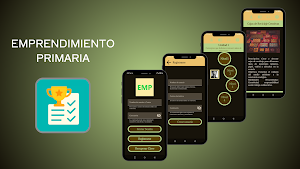
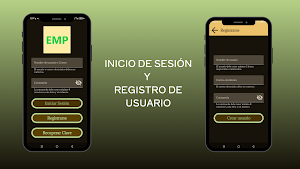
- When you open the app, the login screen is displayed, which contains three buttons: Login, Register, and Password Recovery. If you already have an account, you can log in directly from this screen by filling in the username/email and password fields.
- If you don't have an account, you must create one by clicking the Register button. A Registration screen will open where you must fill in the username, email, and password fields, and then click the Create User button.
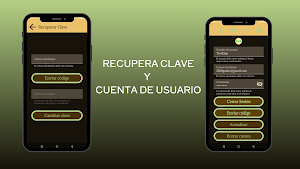
- If you forget your password, click the Recover Password button. A Password Recovery screen will open where you must enter your email address and then click the Send Code button. A code will be sent to your email address. Enter this code in the pop-up window that appears, then press Enter and enter your new password in the Password Recovery screen field. Finally, click the Change Password button. - If you are already logged in, you will see the "Menu" view, which contains four options in the top bar. Each selected option will display its corresponding view.
- Option 1 is the *User* view. Here you can see your profile picture, username, email address, and password (encrypted but viewable). You can also update this information or delete your account. To do so, a code will be sent to your email address, and you can use this code to verify the action.
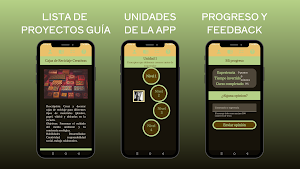
- Option 2 is the *Units* view. Here you can complete each lesson on the entrepreneurship topic. It includes true/false exercises, fill-in-the-blank questions, and matching pairs of cards (e.g., with the concept title). At the end of each level, your score is displayed.
- Option 3 is the *Projects* view. Here you can see a list of entrepreneurship projects with information about each one, which will help give you ideas on how to start your own business.
* - Option 4 is the *Score* view. There you can see the accumulated score, which includes your total score, the total study time in the app, and the percentage of progress in the entire course. You can also send feedback to the email address configured in the RESTful API.
- If you don't have an account, you must create one by clicking the Register button. A Registration screen will open where you must fill in the username, email, and password fields, and then click the Create User button.
- If you forget your password, click the Recover Password button. A Password Recovery screen will open where you must enter your email address and then click the Send Code button. A code will be sent to your email address. Enter this code in the pop-up window that appears, then press Enter and enter your new password in the Password Recovery screen field. Finally, click the Change Password button. - If you are already logged in, you will see the "Menu" view, which contains four options in the top bar. Each selected option will display its corresponding view.
- Option 1 is the *User* view. Here you can see your profile picture, username, email address, and password (encrypted but viewable). You can also update this information or delete your account. To do so, a code will be sent to your email address, and you can use this code to verify the action.
- Option 2 is the *Units* view. Here you can complete each lesson on the entrepreneurship topic. It includes true/false exercises, fill-in-the-blank questions, and matching pairs of cards (e.g., with the concept title). At the end of each level, your score is displayed.
- Option 3 is the *Projects* view. Here you can see a list of entrepreneurship projects with information about each one, which will help give you ideas on how to start your own business.
* - Option 4 is the *Score* view. There you can see the accumulated score, which includes your total score, the total study time in the app, and the percentage of progress in the entire course. You can also send feedback to the email address configured in the RESTful API.
What’s new
Version 1.8 · Updated June 6, 2026
Esta app está orientada a la educación, cuenta con varios ejercicios sobre la temática de emprendimiento, tiene cuatro modelos de actividades.
Alternatives to Emprendimiento Primaria
Looking for apps like Emprendimiento Primaria? Here are 6 similar Android apps on Google Play. All of them are free to download.
-
Clasificador de peces
-
Player Music
-
Zonas Turisticas El Guabo
-
Ortografia Plus
-
Calculadora de materiales
-
Login
| App | Rating | Price | Installs | Last updated | Compare |
|---|---|---|---|---|---|
| Emprendimiento Primaria | – | Free | 5+ | Jun 6, 2026 | |
| Clasificador de peces | – | Free | 5+ | Sep 30, 2026 | Compare |
| Player Music | – | Free | 10+ | – | Compare |
| Zonas Turisticas El Guabo | – | Free | 0+ | – | Compare |
| Ortografia Plus | – | Free | 1+ | – | Compare |
| Calculadora de materiales | – | Free | 50+ | – | Compare |
| Login | – | Free | 100+ | – | Compare |