
Photo Complication for Wear OS
Personalization
Photo Image Complication for watch faces. Choose any image from Gallery.
- Rating
- 4.1
- 83 ratings
- Downloads
- 7.5K+
- on Google Play
- Price
- $1.79
- No in-app purchases
- Updated
- Jul 14
- 2026
Screenshots


About Photo Complication for Wear OS
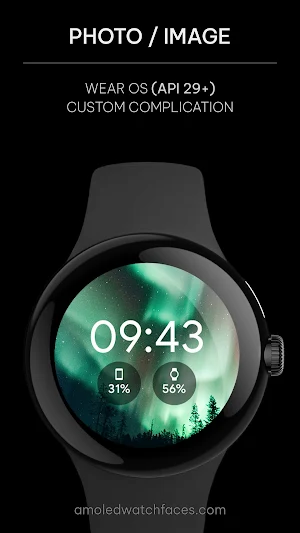
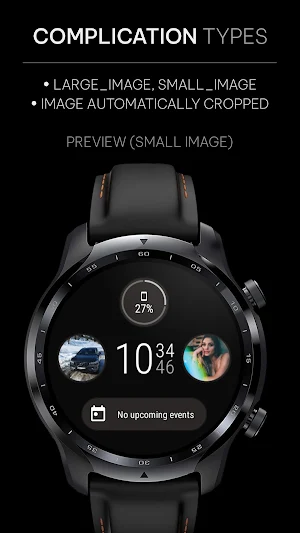
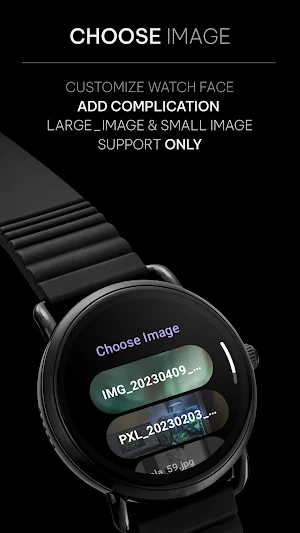
Do you have a watch face with background image customization or LARGE_IMAGE / SMALL_IMAGE complication slot? With this app, it is possible to choose any
image / photo from your watch internal storage as a background image. Just move some images to your watch, customize your watch face and add 'Select Image' or 'Shuffle images'
custom complication.
Note: Your watch face needs to have background image customization or provide LARGE_IMAGE/SMALL_IMAGE complication slot.
This app is not a watch face. This app is only a custom complication provider.
HOW TO SET UP COMPLICATION
1. long press Watch face center
2. tap 'customize' button
3. add custom complication - scroll down - choose one of the available complications
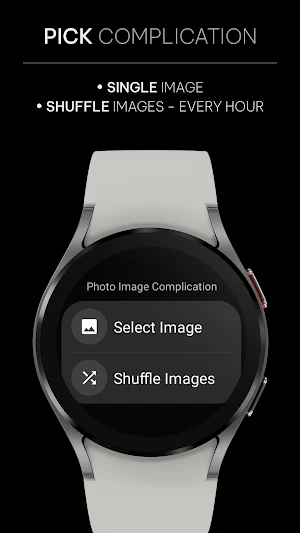
CUSTOM COMPLICATIONS & TYPES
• Select Image - this one serves only for static image / photo
• Shuffle Images - complication will show random image from gallery every 3600 seconds (1 hour)
INITIAL SETUP
App needs internal storage permission to have access to your images. 'Choose Image' button in the app UI serves for quick image change without need to customize watch face again.
Once you have complication set up and running, you can simply go into app UI and change complication image from there.
Note #2: Be sure to refresh Images list after you add new images to your watch internal storage. This can be done with 'Choose Image' button or by re-applying complication. This app does not have any background service so it can only fetch new images on choose image screen.
ADDITIONAL COMPLICATION APPS
Heart Rate: https://bit.ly/3OTRPCH
Distance, Calories, Floors: https://bit.ly/3OULtDb
Phone Battery: https://bit.ly/3c31hoz
OUR WATCH FACE PORTFOLIO
https://play.google.com/store/apps/dev?id=5591589606735981545
WEBSITE
https://amoledwatchfaces.com
Please send any issues reports or help requests to our support address
[email protected]
Join our Telegram group for live support and discussion
https://t.me/amoledwatchfaces
What’s new
Updated July 14, 2026
v1.4.8 • updated libraries version v1.4.6 • small fixes v1.4.4 • small complication service changes • updated libs • added crashlytics v1.4.2 • added tapAction to refresh Shuffle Image Complication • compressing images when using send to watch FAB • fixed chip widths v1.3.8 • updated libs • raised targetSdk to 34/35 v1.3.5 • updated mobile app UI • switched from glide to coil for image loading • improved permission requests ...
User reviews

Great work. The only app that I found that work with background image for watch face.

Beautiful compilation. A must.

love having a nice clean way to put a photo on a watch face (ones that support it at least, there's one free by the same dev). using circular pictures works especially well, like logos or emblems

🧡👍 Very useful for always seeing the face of my best friend, which fills my heart with empathy and love. Thank you.

🤩

Cool
Alternatives to Photo Complication for Wear OS
Looking for apps like Photo Complication for Wear OS? Here are 6 similar Android apps on Google Play. The highest rated is Heart Rate Complication (4.6/5), and 5 of the 6 are free to download.
-
Awf Gradient - Wear OS 3 face 4.2
-
Heart Rate Complication 4.6
-
Awf Lean Digital: Watch face 4.5
-
Awf Dash Digital: Watch face 4.5
-
Awf Active xV: Watch face 4.5
-
Athlete 2 Lite: Watch face 4.0
| App | Rating | Price | Installs | Last updated | Compare |
|---|---|---|---|---|---|
| Photo Complication for Wear OS | 4.1 / 5 | $1.79 | 5,000+ | Jul 14, 2026 | |
| Awf Gradient - Wear OS 3 face | 4.2 / 5 | Free | 10,000+ | Aug 4, 2026 | Compare |
| Heart Rate Complication | 4.6 / 5 | Free | 100+ | Jun 6, 2022 | Compare |
| Awf Lean Digital: Watch face | 4.5 / 5 | 1.49 USD | 10,000+ | Aug 4, 2026 | Compare |
| Awf Dash Digital: Watch face | 4.5 / 5 | Free | 50,000+ | Aug 4, 2026 | Compare |
| Awf Active xV: Watch face | 4.5 / 5 | Free | 10,000+ | Aug 4, 2026 | Compare |
| Athlete 2 Lite: Watch face | 4.0 / 5 | Free | 100,000+ | Aug 4, 2026 | Compare |
Similar apps on Google Play
- Awf Gradient - Wear OS 3 face
- Heart Rate Complication
- Awf Lean Digital: Watch face
- Awf Dash Digital: Watch face
- Awf Active xV: Watch face
- Athlete 2 Lite: Watch face
- Pacific E: watch face
- Wave: Wear OS Watch face
- Simple Digital: Watch face
- Complications Suite - Wear OS
- Phone Battery Complication
- MNML Thin: Watch face
- Digital Informer: Watch face
- Awf Analog xT: Watch face
- Photo Watch face for Wear OS
- Awf One: Watch face
- Rugged: Wear OS watch face
- TACT THREE: Wear OS watch face
- Material You 2: Watch face
- Material 4: Wear OS watch face
- Engine: Wear OS watch face
- Concentric 1: Wear OS face
- NANO [x1]: Hybrid watch face
- Tempo: Wear OS watch face
- Alpine: Wear OS watch face
- Photo Complication for Wear OS
- Nitrous: Wear OS watch face
- React: Wear OS watch face
- Guard: Wear OS watch face
- Marine Digital: Wear OS
- MNML Analog: Watch face
- x-Face Heart Rate: Wear OS
- TACT TWO: Wear OS Watch face
- InfoBlock: Wear OS Watch face
- Awf Circuit: Watch face
- Awf PROgress: Watch face
- Awf Analog PRO: Watch face
- Athlete 2: Wear OS Watch face
- Awf Pulse: Wear OS Watch face
- Pixel OLED: Watch face
- Awf HYB: Wear OS Hybrid face
- Awf Fit X: Wear OS 3 face
- Awf Slim Digital: Wear OS face
- Awf Simple Analog: Watch face
- Awf Widgets: Watch face
- Awf Big Digital: Wear OS face
- Awf Weather Digital: Wear OS
- Material You Watch Face
- Awf Health Face 2: Wear OS
- Awf xViper: Wear OS watch face
- Awf Pace 3: Wear OS face
- Awf Material 3: Watch face
- Awf TACT Q: Watch face
- Awf Retro Digital: Watch face
- Awf Edge: Watch face
- Awf Sportive: Watch face
- Awf Catalyst: Watch face
- Awf Athlete 1: Watch face
- Health Services Complications
- TACT ONE: Wear OS Watch face
- Awf Sport B: Watch face
- Awf Fusion: Watch face
- Awf e-Sport: Watch face
- Awf RUN 4: Watch face
- Awf Frontier 2: Watch face
- Awf Talon: Watch face
- Awf Glow Digital: Watch face
- Awf Classic 2: Watch face
- Awf OLED Analog: Watch face
- Awf OS 3 Digital: Watch face
- Awf Fit 3: Watch face
- Awf Hive - watch face
- Awf Fit OLED: Watch face
- Awf Rush E: Watch face
- Awf Binary: Watch face
- Awf Fit 5: Watch face
- Awf Informer X: Watch face
- Awf Pixel Analog: Watch face
- Awf Pear Analog - watch face
- Awf Fit Dash A: Watch face
- Awf UX Analog: Watch face
- Awf Pace 2: Watch face
- Modern Minimal: Watch face
- Awf Digital xR: Watch face
- Awf Fit TWO: Watch face
- Awf Fit ONE: Watch face
- Awf RUN 3: Watch face
- Awf LCD Digital: Watch face
- Awf Hike ONE: Watch face
- Awf Sporty Digital: Watch face
- Awf TRON Dark: Watch face
- Awf TACT x: Watch face
- Awf Infograph: Watch face
- Awf SPORT xR: Watch face
- Awf Owly: Watch face
- Awf Health Face: Wear OS
- Terminal: Watch face
- Awf Dash Analog: Watch face
- Awf Parts: Watch face
- Awf Casual: Watch face
- Awf Motion 0x: Watch face
- Awf MNML Glow: Watch face
- Awf Fit Dashboard: Watch face
- Awf Analog 2: Watch face
- Awf Minimal: Watch face
- Awf Classic: Watch face
- Awf Tic: Watch face
- Awf Clean Digital: Watch face
- Awf Digital 1: Watch face
- Awf Anjuna: Watch face
- Ladies RUN: Watch face
- Awf Polar Event: Watch face
- Awf Lines: Text Watch face
- Awf Active Analog: Watch face
- Awf Modern Analog: Watch face
- Awf RUN 2: Wear OS Watch face
- Awf Sporty Analog: Watch face
- Awf Mohawk: Watch face
- Awf Health Dx: Watch face
- Awf Polar Analog: Watch face
- Awf RUN PRO: Watch face
- Awf Pixel: Wear OS watch face
- Awf Outback: Watch face
- Awf Polar: Watch face
- Awf Dynamic PRO: Watch face
- Awf Move: Watch face
- Awf Pace PRO: Watch face
- Awf n-Digital 2: Watch face
- Awf Aeon e-BPM: Watch face
- Awf SPORT xDark: Watch face
- Awf n-Digital: Watch face