
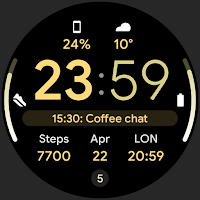
Digital Informer: Watch face
Personalization
Material design watch face for Wear OS devices. Battery friendly & customizable.
- Rating
- 4.4
- 3.3K ratings
- Downloads
- 311K+
- on Google Play
- Price
- Free
- No in-app purchases
- Updated
- Aug 5
- 2026
Screenshots


About Digital Informer: Watch face
Only for Wear OS devices - API 28+
https://amoledwatchfaces.com
BUY ONE GET ONE OFFER!
https://amoledwatchfaces.com/bogo
ADDITIONAL COMPLICATION APPS
Heart Rate: https://bit.ly/3OTRPCH
Distance, Calories, Floors: https://bit.ly/3OULtDb
Complications Suite: https://bit.ly/3yuRwr1
Phone Battery: https://bit.ly/3c31hoz
Photo Complication: bit.ly/3URpyQT
FEATURES
• digital style
• material you design
• mesh backgrounds
• 30 color themes
• true black background
• high resolution
• PNGQuant optimized layers > battery friendly
• 7x custom complications
• unique ambient mode with low OPR & adaptive color
IMPORTANT: Complications selection depends on your device manufacturer or 3rd party apps. Store listing screenshots serve just for watch face presentation.
CUSTOMIZATION
• long press watch center > open customization settings
1. White Hours(Color - Switch)
2. Mesh Background (5x)
3. AOD (Style - 2x)
4. Color (30x)
5. Custom complications
Installation and troubleshooting guide:
https://amoledwatchfaces.com/guide
For full functionality please manually enable 'Receive complication data' permission!
Phone app serves only as a placeholder to make it easier to install & find the watch face on your Wear OS watch. You have to select your watch device from the install drop-down menu
Please send any issues reports or help requests to our support address
[email protected]
Join our Telegram group for live support and discussion
https://t.me/amoledwatchfaces
amoledwatchfaces™ - Awf
https://amoledwatchfaces.com
BUY ONE GET ONE OFFER!
https://amoledwatchfaces.com/bogo
ADDITIONAL COMPLICATION APPS
Heart Rate: https://bit.ly/3OTRPCH
Distance, Calories, Floors: https://bit.ly/3OULtDb
Complications Suite: https://bit.ly/3yuRwr1
Phone Battery: https://bit.ly/3c31hoz
Photo Complication: bit.ly/3URpyQT
FEATURES
• digital style
• material you design
• mesh backgrounds
• 30 color themes
• true black background
• high resolution
• PNGQuant optimized layers > battery friendly
• 7x custom complications
• unique ambient mode with low OPR & adaptive color
IMPORTANT: Complications selection depends on your device manufacturer or 3rd party apps. Store listing screenshots serve just for watch face presentation.
CUSTOMIZATION
• long press watch center > open customization settings
1. White Hours(Color - Switch)
2. Mesh Background (5x)
3. AOD (Style - 2x)
4. Color (30x)
5. Custom complications
Installation and troubleshooting guide:
https://amoledwatchfaces.com/guide
For full functionality please manually enable 'Receive complication data' permission!
Phone app serves only as a placeholder to make it easier to install & find the watch face on your Wear OS watch. You have to select your watch device from the install drop-down menu
Please send any issues reports or help requests to our support address
[email protected]
Join our Telegram group for live support and discussion
https://t.me/amoledwatchfaces
amoledwatchfaces™ - Awf
What’s new
Updated August 5, 2026
v1.3.7 • added Icon Tint and Recolor Icons configurations (wff4+) v1.3.5 • added wff4 watchface.xml • switched fully to Google Sans Flex font • adjusted complication text areas v1.3.4 (Wear OS 5+) • added Blinking Colon toggle • fixed some default complication providers • added 'Full White' color theme • tapping Digital Clock now opens Alarm app v1.3.3 • notifications row fix ... NOTE: Please do a full reinstall in case there are some issues after recent update.
User reviews
Thanks, great face.

Excellent information layout. Nice easy to read design. Great custom complications. Superb quality and customization options.

Very cool 1 amazing design. Thank you

Excellent clarity, Modern Watchface. Thanks.
Frequently asked questions
What devices are compatible with the Digital Informer watch face?
The Digital Informer watch face is only compatible with Wear OS devices running API 28+.
Where can I purchase the Digital Informer watch face?
You can purchase the Digital Informer watch face at https://amoledwatchfaces.com.
Is there a buy one get one offer for the Digital Informer watch face?
Yes, there is a buy one get one offer available for the Digital Informer watch face at https://amoledwatchfaces.com/bogo.
Are there additional complication apps available for the Digital Informer watch face?
Yes, there are additional complication apps available including Heart Rate, Distance, Calories, Floors, Complications Suite, Phone Battery, and Photo Complication. You can find them at the following links:
What are the features of the Digital Informer watch face?
The features of the Digital Informer watch face include digital style, material design, mesh backgrounds, 30 color themes, true black background, high resolution, PNGQuant optimized layers for battery friendliness, 7x custom complications, and a unique ambient mode with low OPR and adaptive color.
How can I customize the Digital Informer watch face?
To customize the Digital Informer watch face, long press the watch center to open the customization settings. From there, you can customize the White Hours color, Mesh Background (5x), AOD style (2x), Color (30x), and custom complications.
Where can I find the installation and troubleshooting guide for the Digital Informer watch face?
The installation and troubleshooting guide for the Digital Informer watch face can be found at https://amoledwatchfaces.com/guide.
What permission do I need to enable for full functionality of the Digital Informer watch face?
For full functionality, please manually enable the 'Receive complication data' permission.
What is the purpose of the phone app for the Digital Informer watch face?
The phone app serves as a placeholder to make it easier to install and find the watch face on your Wear OS watch. You will need to select your watch device from the install drop-down menu.
How can I get support or report issues with the Digital Informer watch face?
Please send any issue reports or help requests to our support address at [email protected]. You can also join our Telegram group for live support and discussion at https://t.me/amoledwatchfaces.
Alternatives to Digital Informer: Watch face
Looking for apps like Digital Informer: Watch face? Here is 1 similar Android app on Google Play.
| App | Rating | Price | Installs | Last updated | Compare |
|---|---|---|---|---|---|
| Digital Informer: Watch face | 4.4 / 5 | Free | 100,000+ | Aug 5, 2026 | |
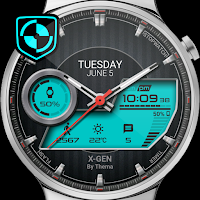
| X-Gen Watch Face | 4.3 / 5 | Free | 100,000+ | Sep 5, 2026 | Compare |