
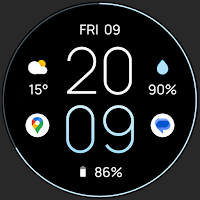
Awf MNML Thin - watch face
Personalization
Simple digital & minimal watch face with thin font for Wear OS
- Rating
- 4.5
- 13.6K ratings
- Downloads
- 950K+
- on Google Play
- Price
- Free
- No in-app purchases
- Updated
- Sep 1
- 2026
Screenshots


About Awf MNML Thin - watch face
---------------------------------------------------------------------------------------------------
Only for Wear OS devices - API 28+
https://amoledwatchfaces.com
FEATURES
• minimal look
• true black background
• thin & highly readable font
• high resolution
• PNGQuant optimized layers > battery friendly
• ambient mode with low OPR & adaptive color & two styles
• multilanguage
• 12/24 H
• 2x SHORT_TEXT complications
For full functionality please manually enable Sensors & Receive complication data permissions !
COLOR CUSTOMIZATIONS
• 10x - overall color style
CUSTOMIZATION OPTIONS
• long press watch middle spot > open customization settings
1. Hide seconds indicator
2. Switch between white minutes / hours
3. AOD Look (Time only / Dimmed Down)
4. Overall colors (10x)
6. Complications / app shortcuts
Phone app serves only as an placeholder to make it easier to install & find the watch face on your Wear OS watch. You have to select your watch device from the install dropdown menu
Please send any issues reports or help requests to our support address
[email protected]
We appreciate your feedback !
DEVELOPER PAGE
https://play.google.com/store/apps/dev?id=5591589606735981545
TELEGRAM
https://t.me/amoledwatchfaces
https://instagram.com/amoledwatchfaces
https://facebook.com/amoledwatchfaces
What’s new
Updated September 1, 2026
v1.7.5 • adjusted zero in monospaced font (12h) • fixed old (bad) font resource linking v1.7.3 • monospaced font fix (Wear OS 6+) v1.7.2 • added Monospaced Font option (Wear OS 6+) v1.7.1 • wff3, wff4 improvements • time only AOD animated transition (Wear OS 6+) ... NOTE: Remove watch face from favorites and add it back to ensure watch face runs smoothly after update. Visit our developer portfolio here: https://play.google.com/store/apps/dev?id=5591589606735981545
Frequently asked questions
What is Awf MNML Thin?
What devices is Awf MNML Thin compatible with?
Where can I download Awf MNML Thin?
What are the features of Awf MNML Thin?
How can I customize the colors on Awf MNML Thin?
What customization options are available for Awf MNML Thin?
What permissions are required for full functionality of Awf MNML Thin?
How do I install Awf MNML Thin on my Wear OS watch?
How can I contact support for Awf MNML Thin?
Where can I find more watch faces from the developer?
Is there a Telegram group or channel for Awf MNML Thin?
Does Awf MNML Thin have an Instagram account?
Does Awf MNML Thin have a Facebook page?
Alternatives to Awf MNML Thin - watch face
Looking for apps like Awf MNML Thin - watch face? Here are 6 similar Android apps on Google Play. The highest rated is Awf Motion [0x] - watch face (4.8/5), and 4 of the 6 are free to download.
-
Awf Motion [0x] - watch face 4.8
-
Awf Simple Digital - watchface 4.0
-
Awf Pear Analog - watch face
-
Awf Rush E - watch face 4.5
-
Awf Wave - watch face 3.9
-
Phone Battery Complication 4.2
| App | Rating | Price | Installs | Last updated | Compare |
|---|---|---|---|---|---|
| Awf MNML Thin - watch face | 4.5 / 5 | Free | 500,000+ | Sep 1, 2026 | |
| Awf Motion [0x] - watch face | 4.8 / 5 | Free | 5,000+ | Aug 4, 2026 | Compare |
| Awf Simple Digital - watchface | 4.0 / 5 | Free | 500,000+ | Oct 15, 2026 | Compare |
| Awf Pear Analog - watch face | – | 1.49 USD | 10,000+ | Aug 4, 2026 | Compare |
| Awf Rush E - watch face | 4.5 / 5 | 0.99 USD | 10,000+ | Aug 4, 2026 | Compare |
| Awf Wave - watch face | 3.9 / 5 | Free | 500,000+ | Oct 14, 2026 | Compare |
| Phone Battery Complication | 4.2 / 5 | Free | 100,000+ | Oct 20, 2026 | Compare |
Similar apps on Google Play
- Awf Motion [0x] - watch face
- Awf Simple Digital - watchface
- Awf MNML Thin - watch face
- Awf Pear Analog - watch face
- Awf Rush E - watch face
- Awf Wave - watch face
- Phone Battery Complication
- Complications Suite - Wear OS
- Awf One [Icons] - watch face
- Awf Analog [xT] - watch face
- Awf HYB - Wear OS hybrid face
- Awf Fit [X] - Wear OS 3 face
- Awf Slim Digital - WearOS face
- Awf Simple Analog - watch face
- Awf Widgets - watch face
- Awf Big Digital - Wear OS face
- Awf Weather Digital watch face
- Material You Watch Face
- Awf Health Face 2 - Wear OS
- Awf xViper - WearOS watch face
- Awf Pace 3 - Wear OS face
- Awf Gradient - Wear OS 3 face
- Awf Material 3 - watch face
- Awf TACT [Q] - watch face
- Awf Retro Digital - watch face
- Awf Edge - watch face
- Awf Sportive - watch face
- Awf Catalyst - watch face
- Awf Athlete 1 - watch face
- Health Services Complications
- Awf TACT ONE - watch face
- Awf Sport [B] - watch face
- Heart Rate Complication
- Awf Fusion - watch face
- Awf e-Sport - watch face
- Awf RUN 4 - watch face
- Awf Frontier 2 - watch face
- Awf Lean Digital - watch face
- Awf Talon - watch face
- Awf Glow Digital - watch face
- Awf Classic 2 - watch face
- Awf OLED Analog - watch face
- Awf OS 3 Digital - watch face
- Awf Fit 3 - watch face
- Awf Hive - watch face
- Awf Fit OLED - watch face
- Awf Binary - watch face
- Awf Fit 5 - watch face
- Awf Informer X - watch face
- Awf Pixel Analog - watch face
- Awf Fit Dash [A] - watch face
- Awf UX Analog - watch face
- Awf Pace 2 - watch face
- Awf Modern Minimal - watchface
- Awf Digital [xR] - watch face
- Awf Fit [TWO] - watch face
- Awf Fit [ONE] - watch face
- Awf RUN 3 - watch face
- Awf LCD Digital - watch face
- Awf HIKE [one] - watch face
- Awf Sporty Digital - watchface
- Awf TRON [dark] - watch face
- Awf TACT [x] - watch face
- Awf Active [xV] - watch face
- Awf Infograph - watch face
- Awf SPORT [xR] - watch face
- Awf Owly - watch face
- Awf Health - watch face
- Awf Terminal - watch face
- Awf Dash Digital - watch face
- Awf Dash Analog - watch face
- Awf Parts - watch face
- Awf Casual - watch face
- Awf Mnml Glow - watch face
- Awf Fit Dashboard - watch face
- Awf Analog 2 - watch face
- Awf Minimal - watch face
- Awf Classic - watch face
- Awf Tic - watch face
- Awf Clean Digital - watch face
- Awf Digital 1 - watch face
- Awf Anjuna - watch face
- Awf Ladies RUN - watch face
- Awf Polar Event - watch face
- Awf Lines - text time face
- Awf Active Analog - watch face
- Awf Modern Analog - watch face
- Awf RUN 2 - Wear OS watch face
- Awf Sporty Analog - watch face
- Awf Mohawk - watch face
- Awf Health [Dx] - watch face
- Awf Polar Analog - watch face
- Awf RUN [PRO] - watch face
- Awf Pixel - watch face
- Awf Outback - watch face
- Awf Polar - watch face
- Awf Dynamic [PRO] - watch face
- Awf Move - watch face
- Awf Pace [PRO] - watch face
- Awf n-Digital 2 - watch face
- Awf Aeon [e-BPM] - watch face
- Awf Sport [xDark] - watch face
- Awf n-Digital - watch face