

Sift
YORO- Productivity In-app purchases
Clear your camera roll. Keep the moments that matter.
- Downloads
- 5+
- on Google Play
- Price
- Free
- In-app purchases
- Updated
- Sep 22
- 2026 · v1.1
Screenshots


About Sift
Your camera roll holds thousands of photos. Most of them you'll never look at again — but deleting feels risky, so nothing gets cleared.
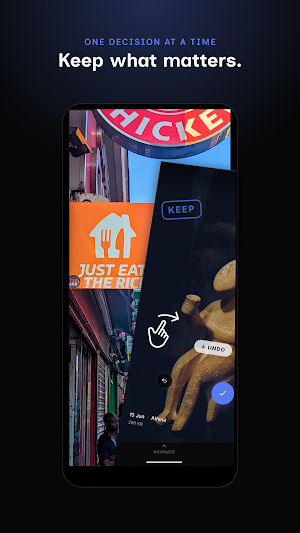
Sift makes it simple: swipe right to keep, swipe left to delete. One photo at a time, at your own pace. What you're really doing is deciding which moments matter — and Sift makes that feel easy rather than overwhelming.
Designed so nothing is gone for good the moment you swipe.
Deleted, not gone
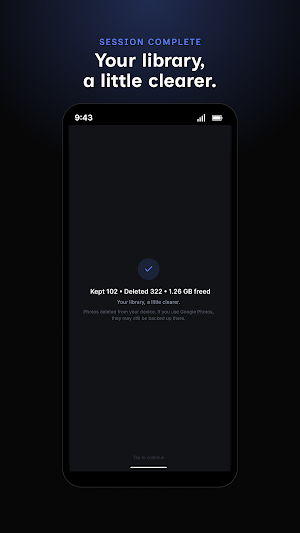
Deleted photos go to your phone's Trash automatically — recoverable for about 30 days, so nothing is lost the instant you swipe. Want the space back right away? Premium lets you permanently delete and free storage instantly.
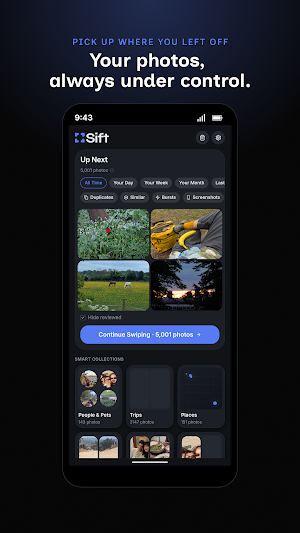
Smart Collections
Sift organises your photos automatically so you can review them in context:
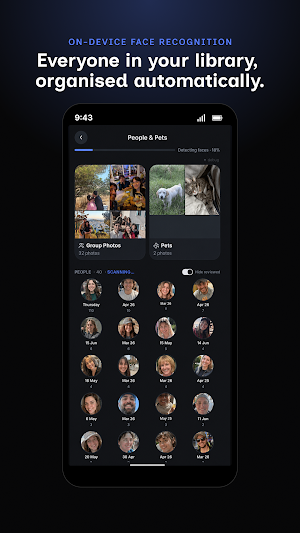
• People & Pets — turn it on to group photos by face, so you can clear duplicates of the same person in one go
• Trips — photos from the same location and time window, grouped as a journey
• Places — your most-visited spots, surfaced automatically
• Food, Selfies, Screenshots, and more
All grouping happens on your device using on-device machine learning. Your photos never leave your phone.
Your privacy, by design
Sift processes everything on your device. No photos are uploaded, no face data is transmitted, no account required. Opt-in usage statistics contain no photos, no personal information, and nothing that identifies you or your device.
Free and Premium
Sift is free to use. Your first session covers the last 30 days of photos. After that, a new session unlocks every 7 days covering that week's new photos — so your library stays current as you shoot.
Upgrade to Premium for:
• Unlimited sessions — review whenever you want
• Your full photo library, not just the last week
• All Smart Collections — People & Pets, Places, Trips, and more
• All time filters — browse by any month or date range
• Permanently delete to free storage space instantly — no waiting for Trash to clear
Try Premium free for 14 days, then billed yearly — cancel anytime in Google Play. Subscription and lifetime prices are shown in the app, localized to your region.
Sift manages photos on your device. Photos backed up to Google Photos or other cloud services are not affected.
Sift makes it simple: swipe right to keep, swipe left to delete. One photo at a time, at your own pace. What you're really doing is deciding which moments matter — and Sift makes that feel easy rather than overwhelming.
Designed so nothing is gone for good the moment you swipe.
Deleted, not gone
Deleted photos go to your phone's Trash automatically — recoverable for about 30 days, so nothing is lost the instant you swipe. Want the space back right away? Premium lets you permanently delete and free storage instantly.
Smart Collections
Sift organises your photos automatically so you can review them in context:
• People & Pets — turn it on to group photos by face, so you can clear duplicates of the same person in one go
• Trips — photos from the same location and time window, grouped as a journey
• Places — your most-visited spots, surfaced automatically
• Food, Selfies, Screenshots, and more
All grouping happens on your device using on-device machine learning. Your photos never leave your phone.
Your privacy, by design
Sift processes everything on your device. No photos are uploaded, no face data is transmitted, no account required. Opt-in usage statistics contain no photos, no personal information, and nothing that identifies you or your device.
Free and Premium
Sift is free to use. Your first session covers the last 30 days of photos. After that, a new session unlocks every 7 days covering that week's new photos — so your library stays current as you shoot.
Upgrade to Premium for:
• Unlimited sessions — review whenever you want
• Your full photo library, not just the last week
• All Smart Collections — People & Pets, Places, Trips, and more
• All time filters — browse by any month or date range
• Permanently delete to free storage space instantly — no waiting for Trash to clear
Try Premium free for 14 days, then billed yearly — cancel anytime in Google Play. Subscription and lifetime prices are shown in the app, localized to your region.
Sift manages photos on your device. Photos backed up to Google Photos or other cloud services are not affected.
What’s new
Version 1.1 · Updated September 22, 2026
New app icon. Improved AI Suggestions collection.
Alternatives to Sift
Looking for apps like Sift? Here are 6 similar Android apps on Google Play. The highest rated is Arc Search – Find it, Faster (4.5/5), and all 6 are free to download.
-
CallHub 4.4
-
Albert: Budgeting and Banking 4.4
-
EasyGet: shipping from China 2.9
-
YoYo Novel 3.3
-
Vestwell 3.7
-
Arc Search – Find it, Faster 4.5
| App | Rating | Price | Installs | Last updated | Compare |
|---|---|---|---|---|---|
| Sift | – | Free | 5+ | Sep 22, 2026 | |
| CallHub | 4.4 / 5 | Free | 10,000+ | Oct 14, 2026 | Compare |
| Albert: Budgeting and Banking | 4.4 / 5 | Free | 10,000,000+ | Oct 28, 2026 | Compare |
| EasyGet: shipping from China | 2.9 / 5 | Free | 50,000+ | Aug 11, 2025 | Compare |
| YoYo Novel | 3.3 / 5 | Free | 100,000+ | Aug 27, 2026 | Compare |
| Vestwell | 3.7 / 5 | Free | 10,000+ | Oct 20, 2026 | Compare |
| Arc Search – Find it, Faster | 4.5 / 5 | Free | 500,000+ | Oct 19, 2026 | Compare |
Compare Sift with the top alternatives: ratings, updates, ASO score and keyword gaps →
Similar apps on Google Play
- CallHub
- Albert: Budgeting and Banking
- EasyGet: shipping from China
- YoYo Novel
- Vestwell
- Arc Search – Find it, Faster
- KeepCalling International
- CoffeeSpace: Connect & Build
- Givt
- Current - Mobile Banking
- The RealReal: Luxury Resale
- My Grameen
- Marché M
- Gravy: Homebuying for renters
- SubX - Subscription Manager
- Nav Business Funding Roadmap
- The Criterion Channel
- Azazie: Bridesmaid&Formal Wear
- Vy
- Perpay - Shop and Build Credit
- Reebok®
- Mobile Link for Generators
- Mila Air
- Payactiv
- Gusto Mobile
- Tiqets - Museums & Attractions
- Boot Barn
- Hollister Co.
- Yami: Shop All of Asia’s Best
- PostNord: Track & Send Parcels
- LightInTheBox Online Shopping
- Trendy Transfers
- FSF NYC
- CIDER - Clothing & Fashion
- Affirm: Buy now, pay over time
- POPLOOK - Modest Fashion Label
- Stone Street Coffee
- Voghion - Online shopping app
- Weee! Asian Grocery Delivery
- Mytheresa: Exclusive Luxury
- Tottini