
Pocket Pal: Note Jot
WIELPOL SP Z O O Lifestyle
Jot down thoughts instantly, filter categories, organize your daily notes!
- Downloads
- 4+
- on Google Play
- Price
- Free
- No in-app purchases
- Updated
- Jul 3
- 2026
Screenshots
About Pocket Pal: Note Jot
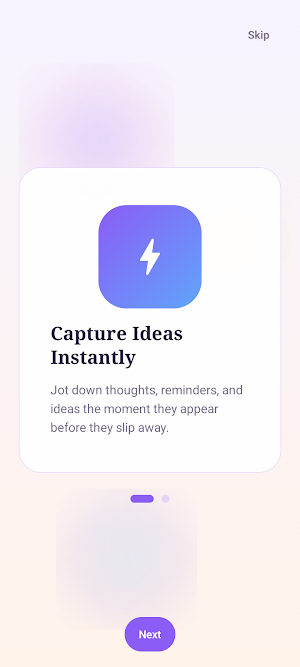
Capture your ideas instantly and keep your daily thoughts organized with Pocket Pal: Note Jot! Serving as your reliable digital notebook, this application provides a distraction-free, seamless space to jot down immediate insights, reminders, draft lists, and track tasks before they slip away.
Whether you need a quick canvas for professional project brainstorming or a simple daily diary for personal thoughts, your minimalist writing assistant is always within reach.
Key Note-Taking & Category Features:
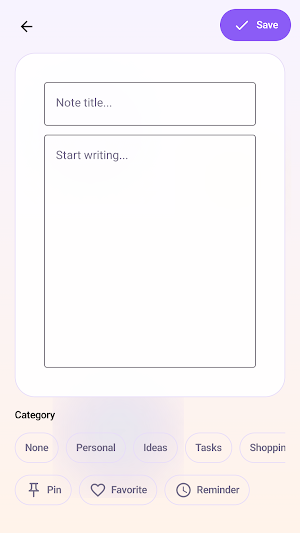
Quick Content Creation: Effortlessly compose your entries using clean, dedicated text fields designed for typing out your Note Title and main note content.
Thematic Custom Categories: Keep your desktop workspace organized by assigning entries to specialized custom classification tags including Personal, Ideas, Tasks, and Shopping.
One-Tap Priority Badges: Secure your most vital ideas directly inside the creator layout. Select from quick-action utility options to instantly Pin a note, label it as a Favorite, or flag it with a Reminder icon.
Interactive Grid Cards: Review saved notes dynamically rendered on clean lavender-accented information blocks. Note cards show the exact timestamp logging the last edit date and time. Use rapid tap shortcuts straight from the card grid to adjust pin states, toggle favorite status, or discard entries directly into the trash can.
Dashboard Navigation & Custom Sorting:
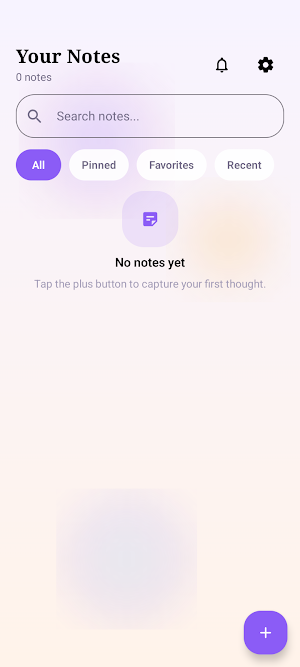
Fast Filter Tabs: Browse through your library collection smoothly by sorting your view between dedicated timeline filters for All, Pinned, Favorites, and Recent items.
Instant Keyword Search Bar: Locate text contents or specific old records in seconds using an integrated keyword search index tool at the top of your main feed.
Dynamic Sorting Criteria: Arrange your primary interface layout to match your current tracking routine. Calibrate your feed listing behavior using sorting options to display Newest First, Oldest First, or Favorites First.
Personalized Preferences Deck: Customize your layout configurations inside the settings panel. Switch independent toggle parameters to show or hide visual Show Timestamps or enable or disable in-app Reminder Notifications.
Whether you need a quick canvas for professional project brainstorming or a simple daily diary for personal thoughts, your minimalist writing assistant is always within reach.
Key Note-Taking & Category Features:
Quick Content Creation: Effortlessly compose your entries using clean, dedicated text fields designed for typing out your Note Title and main note content.
Thematic Custom Categories: Keep your desktop workspace organized by assigning entries to specialized custom classification tags including Personal, Ideas, Tasks, and Shopping.
One-Tap Priority Badges: Secure your most vital ideas directly inside the creator layout. Select from quick-action utility options to instantly Pin a note, label it as a Favorite, or flag it with a Reminder icon.
Interactive Grid Cards: Review saved notes dynamically rendered on clean lavender-accented information blocks. Note cards show the exact timestamp logging the last edit date and time. Use rapid tap shortcuts straight from the card grid to adjust pin states, toggle favorite status, or discard entries directly into the trash can.
Dashboard Navigation & Custom Sorting:
Fast Filter Tabs: Browse through your library collection smoothly by sorting your view between dedicated timeline filters for All, Pinned, Favorites, and Recent items.
Instant Keyword Search Bar: Locate text contents or specific old records in seconds using an integrated keyword search index tool at the top of your main feed.
Dynamic Sorting Criteria: Arrange your primary interface layout to match your current tracking routine. Calibrate your feed listing behavior using sorting options to display Newest First, Oldest First, or Favorites First.
Personalized Preferences Deck: Customize your layout configurations inside the settings panel. Switch independent toggle parameters to show or hide visual Show Timestamps or enable or disable in-app Reminder Notifications.
What’s new
Updated July 3, 2026
The first release of our app Pocket Pal: Note Jot
Alternatives to Pocket Pal: Note Jot
Looking for apps like Pocket Pal: Note Jot? Here are 6 similar Android apps on Google Play. The highest rated is Pocket Prep Nursing School (4.5/5), and all 6 are free to download.
-
Tap to Sleep: Bedtime Stories 4.2
-
Aardvark Book Club 3.5
-
Joon: Behavior Improvement App
-
Fable - Kids' Story Creator 3.2
-
Pocket Prep Nursing School 4.5
-
DayDew - Daily Journal, Diary 3.4
| App | Rating | Price | Installs | Last updated | Compare |
|---|---|---|---|---|---|
| Pocket Pal: Note Jot | – | Free | 1+ | Jul 3, 2026 | |
| Tap to Sleep: Bedtime Stories | 4.2 / 5 | Free | 10,000+ | – | Compare |
| Aardvark Book Club | 3.5 / 5 | Free | 10,000+ | Jul 22, 2026 | Compare |
| Joon: Behavior Improvement App | – | Free | 10,000+ | Sep 14, 2026 | Compare |
| Fable - Kids' Story Creator | 3.2 / 5 | Free | 1,000+ | Jul 22, 2026 | Compare |
| Pocket Prep Nursing School | 4.5 / 5 | Free | 50,000+ | Oct 27, 2026 | Compare |
| DayDew - Daily Journal, Diary | 3.4 / 5 | Free | 10,000+ | Sep 3, 2026 | Compare |
Similar apps on Google Play
- Tap to Sleep: Bedtime Stories
- Aardvark Book Club
- Joon: Behavior Improvement App
- Fable - Kids' Story Creator
- Pocket Prep Nursing School
- DayDew - Daily Journal, Diary
- Wondaer Interactive Kids Books
- Nooksy: Childrens Story Time
- DICE: Live Shows
- MindBuddy: Mood Journal & CBT
- Pelago
- Huion Note : Easy note-taking
- DrawNote: Drawing Notepad Memo
- HiNotes by HiDock
- UpNote - notes, diary, journal
- Easy Diary
- myReach - AI Assistant
- Nested Folder Notes - Folino
- Rocketbook
- Mood Journal - MoodPath
- SCRIBZEE®
- Deputy: Employee Scheduling
- JobNimbus: All-In-One Roof App
- MyScript Notes: AI Note Taking
- CrowdHealth
- Miro: your visual workspace