

Bunker PDF: Merge, Split & OCR
Tools In-app purchases
Merge, split, compress & redact PDFs. Zero network access. Pay once.
- Price
- Free
- In-app purchases
- Updated
- Jul 25
- 2026 · v1.0.0
Screenshots


About Bunker PDF: Merge, Split & OCR
Most PDF apps quietly upload your file to a server to process it — merge, split, compress, whatever you asked for happens somewhere else, on someone else's computer. Bunker PDF doesn't request network access at all. Not "we promise not to upload your files" — the app is structurally incapable of it, because the permission was never asked for. You can check this yourself in your phone's app permissions in about ten seconds.
MERGE, SPLIT, AND ORGANIZE — FREE, NO LIMIT
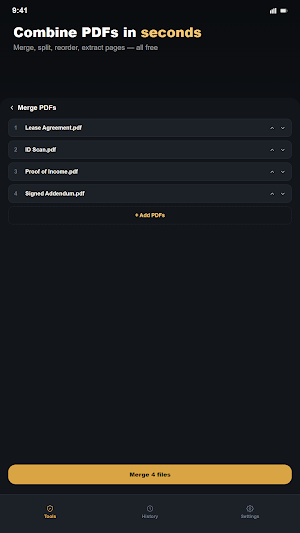
Combine PDFs, split by page range, reorder or rotate pages, extract specific pages into a new file, and turn photos into a PDF. No cap, no watermark, no time limit.
PRIVATE BY DESIGN, NOT BY PROMISE
Every operation runs entirely on your device. Nothing is uploaded, nothing is logged, there's no account and no server that could see your documents even if it wanted to. Tax forms, contracts, IDs — whatever you're working with stays on your phone.
COMPRESS WITHOUT GUESSING
See the exact before-and-after file size every time you compress a document — a real number for your actual file, not a marketing claim.
REDACT — GENUINELY, NOT JUST VISUALLY
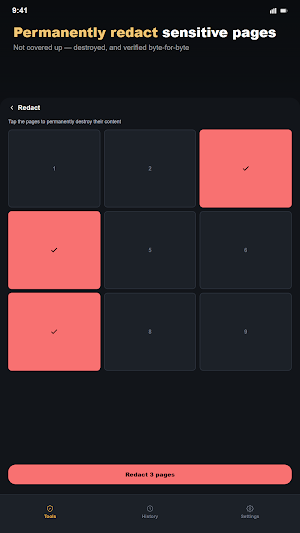
Select pages to permanently destroy the content on them — text, images, everything — replaced with a solid black page, not just covered up. The original content is removed from the file itself, not hidden behind a box someone could see through.
MORE WHEN YOU NEED IT
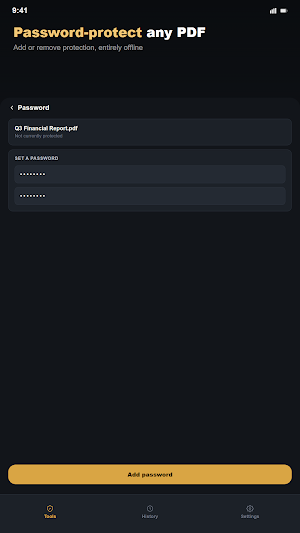
- Password protect or remove a password from a PDF
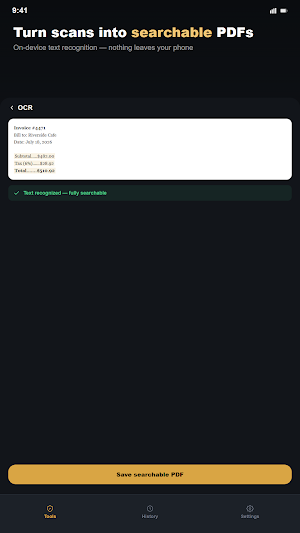
- On-device text recognition (OCR) — pull searchable text out of a scanned document, entirely offline
- Export your file history to CSV
RECEIVE AND SEND WITHOUT LEAVING YOUR OTHER APPS
Share a PDF straight into Bunker PDF from Gmail, Files, or anywhere else, then share the result back out the same way.
PAY ONCE, NOT MONTHLY
PDF tool subscriptions in this category are common and often expensive — $5.99/month and up is typical, frequently sold through a short free trial that starts charging automatically. A single one-time purchase unlocks compression, password tools, redaction, OCR, and history export. No trial, no recurring charge, no subscription of any kind.
Built by a solo developer who thinks a PDF tool shouldn't need your internet connection to merge two files.
MERGE, SPLIT, AND ORGANIZE — FREE, NO LIMIT
Combine PDFs, split by page range, reorder or rotate pages, extract specific pages into a new file, and turn photos into a PDF. No cap, no watermark, no time limit.
PRIVATE BY DESIGN, NOT BY PROMISE
Every operation runs entirely on your device. Nothing is uploaded, nothing is logged, there's no account and no server that could see your documents even if it wanted to. Tax forms, contracts, IDs — whatever you're working with stays on your phone.
COMPRESS WITHOUT GUESSING
See the exact before-and-after file size every time you compress a document — a real number for your actual file, not a marketing claim.
REDACT — GENUINELY, NOT JUST VISUALLY
Select pages to permanently destroy the content on them — text, images, everything — replaced with a solid black page, not just covered up. The original content is removed from the file itself, not hidden behind a box someone could see through.
MORE WHEN YOU NEED IT
- Password protect or remove a password from a PDF
- On-device text recognition (OCR) — pull searchable text out of a scanned document, entirely offline
- Export your file history to CSV
RECEIVE AND SEND WITHOUT LEAVING YOUR OTHER APPS
Share a PDF straight into Bunker PDF from Gmail, Files, or anywhere else, then share the result back out the same way.
PAY ONCE, NOT MONTHLY
PDF tool subscriptions in this category are common and often expensive — $5.99/month and up is typical, frequently sold through a short free trial that starts charging automatically. A single one-time purchase unlocks compression, password tools, redaction, OCR, and history export. No trial, no recurring charge, no subscription of any kind.
Built by a solo developer who thinks a PDF tool shouldn't need your internet connection to merge two files.
Alternatives to Bunker PDF: Merge, Split & OCR
Looking for apps like Bunker PDF: Merge, Split & OCR? Here are 6 similar Android apps on Google Play. The highest rated is All Document Reader: PDF, Word (4.7/5), and all 6 are free to download.
-
Invoice Maker - Simple Invoice 4.7
-
Smallpdf: Scanner & PDF Editor 4.5
-
All Document Reader: PDF, Word 4.7
-
PDF Merge: Scan, Sign & Edit 3.8
-
PDF Editor – Edit Everything! 4.4
-
PDF Scanner app - TapScanner 4.5
| App | Rating | Price | Installs | Last updated | Compare |
|---|---|---|---|---|---|
| Bunker PDF: Merge, Split & OCR | – | Free | 0+ | Jul 25, 2026 | |
| Invoice Maker - Simple Invoice | 4.7 / 5 | Free | 500,000+ | Jul 2, 2026 | Compare |
| Smallpdf: Scanner & PDF Editor | 4.5 / 5 | Free | 5,000,000+ | Oct 7, 2026 | Compare |
| All Document Reader: PDF, Word | 4.7 / 5 | Free | 10,000,000+ | Jul 19, 2026 | Compare |
| PDF Merge: Scan, Sign & Edit | 3.8 / 5 | Free | 5,000,000+ | Feb 2, 2026 | Compare |
| PDF Editor – Edit Everything! | 4.4 / 5 | Free | 10,000,000+ | Oct 29, 2026 | Compare |
| PDF Scanner app - TapScanner | 4.5 / 5 | Free | 100,000,000+ | Oct 25, 2026 | Compare |
Similar apps on Google Play
- Invoice Maker - Simple Invoice
- Smallpdf: Scanner & PDF Editor
- All Document Reader: PDF, Word
- PDF Merge: Scan, Sign & Edit
- PDF Editor – Edit Everything!
- PDF Scanner app - TapScanner
- Foxit PDF Editor
- PDF Scanner - Document Scanner
- ConstructionOnline
- Table Notes - Mobile Excel
- vFlat Scan - PDF Scanner, OCR
- AI Email, Reply Writer: Xemail
- Fill and Sign Easy PDF Editor
- Regula Document Reader
- ProBooks: Invoice Maker
- Office Reader - PDF,Word,Excel
- PDFelement-PDF Editor & Reader
- MobiOffice: Word, Sheets, PDF
- Clear Scan - PDF Scanner App
- Nested Folder Notes - Folino
- Smartsheet: Projects & Teams
- Jotform - Form, Sign & Survey
- Falcon PDF - Editor & Tools
- pdfFiller Edit, fill, sign PDF
- Quotation Maker
- PDF Scanner Plus - Doc Scanner
- FAX Desk: Send Fax from Phone
- Rocketbook
- Mobi PDF・Editor・Scanner・Reader
- SCRIBZEE®
- PDF Reader Zone
- Notesnook Secure Private Notes
- PDF Scanner - Document Scanner
- PDF Reader(KDAN PDF): Edit PDF
- Polaris Office: Edit&View, PDF
- DOCX Editor: PDF, DOC, XLSX
- UPDF - AI-Powered PDF Editor
- CS PDF Reader - PDF Editor
- Inkpad Notepad & To do list
- Tiny Scanner - PDF Scanner App
- ONLYOFFICE Documents
- FastField: Field Service Forms
- Mobile Scanner App - Scan PDF
- CSV File Viewer - Smart CSV
- Genius Scan - PDF Scanner
- iLovePDF: PDF Editor & Scanner
- PDF Reader & Editor: Xodo
- Docusign - Upload & Sign Docs
- SignNow: Sign & Fill PDF Docs