
Video Transcriber: VidNotes
Productivity In-app purchases
Transcribe Youtube Videos To Text and Use AI Summary Notes & Flashcards
- Rating
- 4.3
- 124 ratings
- Downloads
- 15.2K+
- on Google Play
- Price
- Free
- In-app purchases
- Updated
- Oct 9
- 2026 · v1.5.6
Screenshots


About Video Transcriber: VidNotes
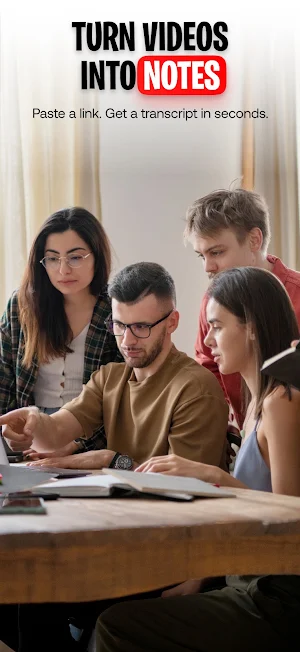
VidNotes turns supported video links, local files, and voice recordings into searchable text you can use. Start with video transcription and audio to text, then use the AI video summarizer to create summaries and notes for lectures, meetings, tutorials, interviews, and creator research. Find the moment you need, ask questions, and build flashcards, quizzes, and study guides from the same source.
Skip replaying a long lesson, webinar, or interview to recover one idea. Move from the original media to a timestamped record and reusable output, with each result kept beside its source.
What you can do
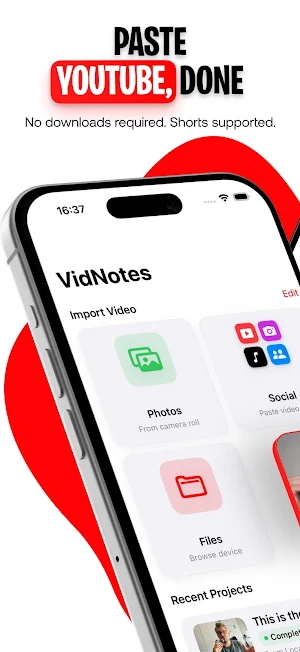
• Transcribe your way: Paste supported links from YouTube, TikTok, Instagram, X, or Vimeo; choose a local file from Photos or Files; or record a voice memo.
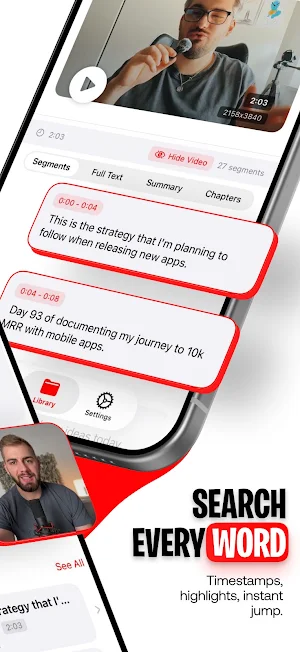
• Searchable timestamps: Switch between segments and full text, search for a phrase, and jump back to the matching moment.
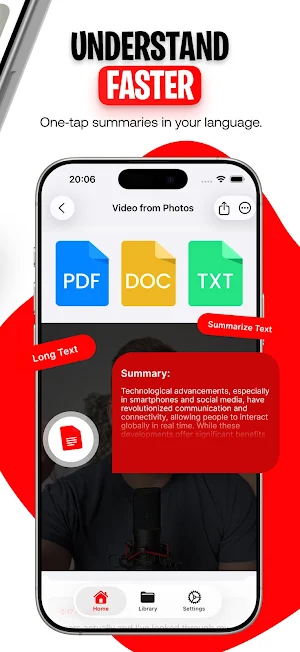
• Summaries and structured notes: Generate quick or in-depth recaps, key points, and action items in outline, Cornell, or expanded formats.
• Complete study toolkit: Create flashcards from video content, multiple-choice quizzes, study guides, review questions, FAQs, glossaries, and timelines.
• Turn transcripts into content: Produce a YouTube description with chapters and hashtags, an X thread, a blog post, or a visual share card.
• Chat with your source: Ask questions using the full transcript as context and keep the conversation inside the project.
• Save what matters: Collect quotes, ideas, actions, and highlights in Moments, including suggested verbatim excerpts tied to source segments.
• Export and share: Save selected content as TXT, Markdown, or PDF; export study cards to Anki-ready CSV; or create visual cards and multi-image stories.
Transcribe video to text from links, files, and recordings
Use YouTube transcription for a lesson or tutorial, import a supported social link, select saved media, or use speech to text with the microphone. The result is organized into time-based segments and full text. Search for a name, definition, quote, or decision, then return to the matching point. Automatic language detection can follow the spoken language, while recognition and generated output can use your chosen settings. Processing time varies with source length, connection, and access.
Learn and remember more
Turn lecture notes, training, or meeting transcription into a practical learning set. Generate a quick video summary or in-depth explanation, key points, an outline, action items, and a timeline. Build study cards, a quiz, review questions, a study guide, an FAQ, or a glossary. Check important facts against the original transcript because generated output can vary.
Create content without the blank page
With Premium creator tools, repurpose the source into a YouTube description with chapters and hashtags, a connected X thread, or a blog post. Turn a quote or takeaway into a visual card, or arrange several cards as a story sequence. Keep the original material close while adapting an idea for a new audience.
Ask, save, and reuse
Chat with the source to clarify a passage or explore a topic. Save excerpts to Moments as quotes, ideas, actions, or highlights. Continue review in Anki with CSV, or keep a portable copy in TXT, Markdown, or PDF. PDF export and some creation features require Premium.
Paste a supported link, choose a file, or record audio, then turn what you watched or heard into something you can search, study, create, and share.
Access and purchases
VidNotes includes limited access with usage and feature limits. Auto-renewing subscriptions are offered through in-app purchases. Optional credit packs may be offered when enabled. Access and limits vary by plan, region, source, and configuration. Creator tools, PDF export, and some generation features may require Premium.
Support: https://vidnotes.app/support
Terms: https://vidnotes.app/terms
Privacy: https://vidnotes.app/privacy
Skip replaying a long lesson, webinar, or interview to recover one idea. Move from the original media to a timestamped record and reusable output, with each result kept beside its source.
What you can do
• Transcribe your way: Paste supported links from YouTube, TikTok, Instagram, X, or Vimeo; choose a local file from Photos or Files; or record a voice memo.
• Searchable timestamps: Switch between segments and full text, search for a phrase, and jump back to the matching moment.
• Summaries and structured notes: Generate quick or in-depth recaps, key points, and action items in outline, Cornell, or expanded formats.
• Complete study toolkit: Create flashcards from video content, multiple-choice quizzes, study guides, review questions, FAQs, glossaries, and timelines.
• Turn transcripts into content: Produce a YouTube description with chapters and hashtags, an X thread, a blog post, or a visual share card.
• Chat with your source: Ask questions using the full transcript as context and keep the conversation inside the project.
• Save what matters: Collect quotes, ideas, actions, and highlights in Moments, including suggested verbatim excerpts tied to source segments.
• Export and share: Save selected content as TXT, Markdown, or PDF; export study cards to Anki-ready CSV; or create visual cards and multi-image stories.
Transcribe video to text from links, files, and recordings
Use YouTube transcription for a lesson or tutorial, import a supported social link, select saved media, or use speech to text with the microphone. The result is organized into time-based segments and full text. Search for a name, definition, quote, or decision, then return to the matching point. Automatic language detection can follow the spoken language, while recognition and generated output can use your chosen settings. Processing time varies with source length, connection, and access.
Learn and remember more
Turn lecture notes, training, or meeting transcription into a practical learning set. Generate a quick video summary or in-depth explanation, key points, an outline, action items, and a timeline. Build study cards, a quiz, review questions, a study guide, an FAQ, or a glossary. Check important facts against the original transcript because generated output can vary.
Create content without the blank page
With Premium creator tools, repurpose the source into a YouTube description with chapters and hashtags, a connected X thread, or a blog post. Turn a quote or takeaway into a visual card, or arrange several cards as a story sequence. Keep the original material close while adapting an idea for a new audience.
Ask, save, and reuse
Chat with the source to clarify a passage or explore a topic. Save excerpts to Moments as quotes, ideas, actions, or highlights. Continue review in Anki with CSV, or keep a portable copy in TXT, Markdown, or PDF. PDF export and some creation features require Premium.
Paste a supported link, choose a file, or record audio, then turn what you watched or heard into something you can search, study, create, and share.
Access and purchases
VidNotes includes limited access with usage and feature limits. Auto-renewing subscriptions are offered through in-app purchases. Optional credit packs may be offered when enabled. Access and limits vary by plan, region, source, and configuration. Creator tools, PDF export, and some generation features may require Premium.
Support: https://vidnotes.app/support
Terms: https://vidnotes.app/terms
Privacy: https://vidnotes.app/privacy
User reviews

This VidNotes is amazing 😍

Good 👍

super fast and reliable

supposed to own all this it work

Only app that's honest and free ong

it does more then I even downloaded it for, all I had to do was put my video in and "ok" then it gave me a summery and a half, time staples of when said something, and ect.
Alternatives to Video Transcriber: VidNotes
Looking for apps like Video Transcriber: VidNotes? Here are 6 similar Android apps on Google Play. The highest rated is Metronome & BPM - Camtronome (4.7/5), and 5 of the 6 are free to download.
-
TicNote: AI Recorder & Agent 3.2
-
USB Audio Player PRO 4.0
-
Music Worx: Play Like a DJ 3.9
-
Musis - Rate Music for Spotify 4.4
-
Metronome & BPM - Camtronome 4.7
-
MyTunes : AI Music Generator 4.5
| App | Rating | Price | Installs | Last updated | Compare |
|---|---|---|---|---|---|
| Video Transcriber: VidNotes | 4.3 / 5 | Free | 10,000+ | Oct 9, 2026 | |
| TicNote: AI Recorder & Agent | 3.2 / 5 | Free | 10,000+ | Aug 14, 2026 | Compare |
| USB Audio Player PRO | 4.0 / 5 | 8.99 USD | 100,000+ | Oct 14, 2026 | Compare |
| Music Worx: Play Like a DJ | 3.9 / 5 | Free | 100,000+ | Oct 15, 2026 | Compare |
| Musis - Rate Music for Spotify | 4.4 / 5 | Free | 100,000+ | Oct 25, 2026 | Compare |
| Metronome & BPM - Camtronome | 4.7 / 5 | Free | 100,000+ | Sep 9, 2026 | Compare |
| MyTunes : AI Music Generator | 4.5 / 5 | Free | 500+ | Aug 14, 2024 | Compare |
Similar apps on Google Play
- TicNote: AI Recorder & Agent
- USB Audio Player PRO
- Music Worx: Play Like a DJ
- Musis - Rate Music for Spotify
- Metronome & BPM - Camtronome
- MyTunes : AI Music Generator
- Listening: Text to Speech
- Penguin Random House Audio
- Podcast Guru - Podcast App
- WallStream
- Spoken – Tap to Talk AAC
- Dolby On: Record Audio & Music
- Sword And Scale
- Tomplay Sheet Music
- Rewind: Music Discovery
- Songstats: Music Analytics
- Beatport: Music for DJs App
- DI.FM: Electronic Music Radio
- Transcribe Speech to Text
- FiiO Music
- LANDR - Master & Release Music
- TouchTunes: Bar Jukebox
- Radio Me: Live Radio, Podcasts
- MyMixtapez: Playlists 24/7
- Napster - AI Music & Experts
- Teleprompter.com
- IDAGIO Stream Classical Music
- CraftNote – AI Note Taker
- Splice: Make music now
- Shoom・AI Music Video Generator
- Transkriptor - Speech to Text
- Recorder
- rova – radio, music, podcasts
- AI Transcribe. Speech to Text
- HiNotes by HiDock
- Yoto: Music, Stories, Sleep
- Nested Folder Notes - Folino
- Notta-Transcribe Audio to Text
- Plaud: AI Note Taker
- Pelago
- Sonos
- EdrawMind: AI Mind map & Note
- Mureka: AI Radio & Music Maker
- Ava: Transcribe Voice to Text
- Snipd | AI Podcast Player
- OtterAI Transcribe Voice Notes
- Podcast Republic - Podcast app
- ExpertVoice
- Coast To Coast AM Insider
- Fireflies: AI notetaker
- Set List Maker
- Promeo - Story & Reels Maker
- OnStage: Worship Team Planner
- Video Converter Pro
- Amuse Music Distribution
- Brother Artspira
- NaturalReader - Text to Speech
- The Metronome by Soundbrenner
- MagPie - Native speech
- Zoho Show: Presentation Maker
- Sony | Music Center
- Simple Voice Recorder
- Fit Radio: Train Inspired
- Clony: AI Voice & Face Cloning
- NebulaBuds
- Remind: School Communication
- Apple Music Classical
- SongbookPro
- Freed: AI Medical Scribe
- myReach - AI Assistant
- Bandsintown Concerts
- Riverside: Record, Clip, Share
- musicat: Music, Stats, Reviews
- Teleprompter for Video
- Musixmatch Dynamic Lyrics
- TF STUDIO
- Talk & Translate AI Translator
- Toast Now
- Musora: The Music Lessons App
- Offtop Rap Studio & Song Maker
- Genius — Song Lyrics Finder
- Hyph: Create With Real Music