

Boring Volume Control
Boring Cat Tools
Volume booster, sound profiles and per-stream volume control. No ads.
- Downloads
- 262+
- on Google Play
- Price
- Free
- No in-app purchases
- Updated
- Oct 18
- 2026 · v1.0.2
Screenshots

About Boring Volume Control
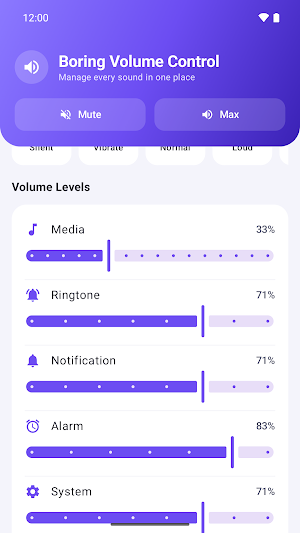
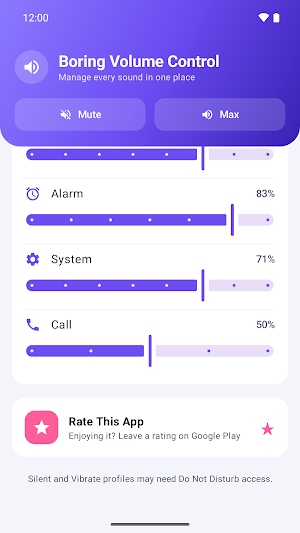
Boring Volume Control is a plain, no-nonsense volume manager. Every sound your phone makes — media, ringtone, notifications, alarm, system and in-call audio — sits on one screen, each on its own slider. No launcher, no wallpapers, no search bar, no ads.
VOLUME BOOSTER
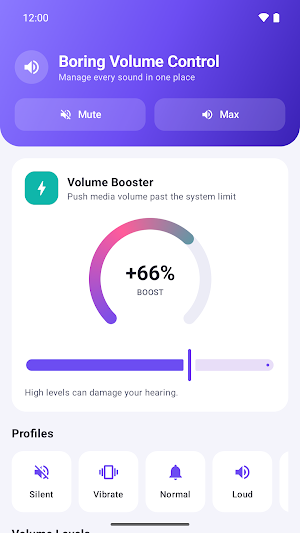
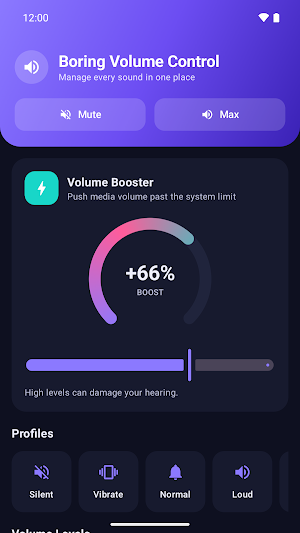
Media already at 100% and still too quiet? The built-in booster adds up to +15 dB of extra gain on top of the system limit, using Android's own LoudnessEnhancer audio effect. A circular gauge shows exactly how much boost is applied, and your level is remembered until you change it.
Please listen responsibly: sustained high volume can damage your hearing, and heavy boost can distort small speakers.
SIX AUDIO STREAMS, ONE SCREEN
• Media — music, video, games
• Ringtone
• Notification
• Alarm
• System sounds
• In-call voice
Each slider shows a live percentage and stays in sync when you press the hardware volume keys.
ONE-TAP SOUND PROFILES
• Silent — ringer off, ring/notification/system muted
• Vibrate — vibrate-only ringer
• Normal — every stream back to a comfortable 70%
• Loud — every stream to maximum
• Outdoor — every stream to maximum plus 60% booster
QUICK ACTIONS
Mute everything, or push everything to maximum, straight from the header.
PRIVACY
No account. No internet permission. No analytics, no trackers, no ads. The app stores exactly one thing on your device: your last booster level.
PERMISSIONS
• Modify audio settings — required to change volume levels and to attach the booster effect.
• Notification policy access (Do Not Disturb) — Android requires this before any app can switch the ringer to Silent or Vibrate. You are only asked for it when you tap those two profiles, and everything else works without it.
• Vibrate — used by the Vibrate profile.
Works on Android 8.0 and newer. Light and dark themes follow your system setting.
A note on the booster: it relies on a hardware audio effect. A small number of devices and custom ROMs refuse to attach it. On those, the app says so and disables the slider instead of pretending it worked.
VOLUME BOOSTER
Media already at 100% and still too quiet? The built-in booster adds up to +15 dB of extra gain on top of the system limit, using Android's own LoudnessEnhancer audio effect. A circular gauge shows exactly how much boost is applied, and your level is remembered until you change it.
Please listen responsibly: sustained high volume can damage your hearing, and heavy boost can distort small speakers.
SIX AUDIO STREAMS, ONE SCREEN
• Media — music, video, games
• Ringtone
• Notification
• Alarm
• System sounds
• In-call voice
Each slider shows a live percentage and stays in sync when you press the hardware volume keys.
ONE-TAP SOUND PROFILES
• Silent — ringer off, ring/notification/system muted
• Vibrate — vibrate-only ringer
• Normal — every stream back to a comfortable 70%
• Loud — every stream to maximum
• Outdoor — every stream to maximum plus 60% booster
QUICK ACTIONS
Mute everything, or push everything to maximum, straight from the header.
PRIVACY
No account. No internet permission. No analytics, no trackers, no ads. The app stores exactly one thing on your device: your last booster level.
PERMISSIONS
• Modify audio settings — required to change volume levels and to attach the booster effect.
• Notification policy access (Do Not Disturb) — Android requires this before any app can switch the ringer to Silent or Vibrate. You are only asked for it when you tap those two profiles, and everything else works without it.
• Vibrate — used by the Vibrate profile.
Works on Android 8.0 and newer. Light and dark themes follow your system setting.
A note on the booster: it relies on a hardware audio effect. A small number of devices and custom ROMs refuse to attach it. On those, the app says so and disables the slider instead of pretending it worked.
What’s new
Version 1.0.2 · Updated October 18, 2026
Bug fixes: • If the booster failed twice it used to stay off until you restarted the app. It now keeps retrying on its own, and the slider stays usable so you can ask again. • A profile that could not raise the volume no longer reports itself as fully applied — it says partly applied instead. • In silent mode the app no longer opens the Do Not Disturb screen when granting access would not have helped anyway.
Alternatives to Boring Volume Control
Looking for apps like Boring Volume Control? Here are 6 similar Android apps on Google Play. All of them are free to download.
-
Boring Video Compress
-
Boring Remove Water: Cleaner
-
Senkron: Sync Music Party
-
Get My Ex Back: 99 Methods
-
Boring Ringtone Maker & Cut
-
DriveTest
| App | Rating | Price | Installs | Last updated | Compare |
|---|---|---|---|---|---|
| Boring Volume Control | – | Free | 100+ | Oct 18, 2026 | |
| Boring Video Compress | – | Free | 10+ | Sep 16, 2026 | Compare |
| Boring Remove Water: Cleaner | – | Free | 1+ | – | Compare |
| Senkron: Sync Music Party | – | Free | 5+ | Oct 18, 2026 | Compare |
| Get My Ex Back: 99 Methods | – | Free | 10+ | Sep 29, 2026 | Compare |
| Boring Ringtone Maker & Cut | – | Free | 10+ | Oct 18, 2026 | Compare |
| DriveTest | – | Free | 5+ | Oct 18, 2026 | Compare |
Similar apps on Google Play
- Boring Video Compress
- Boring Remove Water: Cleaner
- Senkron: Sync Music Party
- Get My Ex Back: 99 Methods
- Boring Ringtone Maker & Cut
- DriveTest
- FixCV: AI CV & Resume Builder
- Dose-1: GLP-1 Shot Tracker
- Next Million Dollar Idea
- HumanFix - AI Humanizer
- ObdScan: OBD2 Car Scanner
- Boring Portable WiFi Hotspot
- Boring Snore Sleep Tracker
- Boring AR Measure & Plan
- Battery Style: Status Bar Icon
- Boring Printer
- Citizenship Test Prep 2026
- Boring Bird Sound Identifier
- Boring Video Player
- Boring Guitar Tuner
- Boring Auto Clicker: Auto Tap
- Boring Record Screen Recorder
- Boring Gallery: Photo Album
- Boring Data Recovery
- Roadspeed: Speed Camera Alert
- Tripfolk: Travel Friends
- Boring Notepad
- All TCG Card Scanner
- Boring Applocker - App Lock
- Card Wallet Holder