
Battery Style: Status Bar Icon
Boring Cat Personalization
Put a custom battery icon in your status bar. 17 styles, colours, percentage.
- Downloads
- 1.4K+
- on Google Play
- Price
- Free
- No in-app purchases
- Updated
- Oct 17
- 2026 · v1.0.2
Screenshots
About Battery Style: Status Bar Icon
Your battery. Your icon.
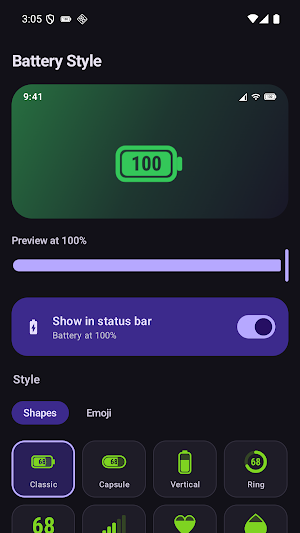
Battery Style swaps the plain battery in your status bar for one you actually picked - a ring, a heart, a moon that waxes as you charge, or a cat whose mood sinks along with the last 20%.
HOW IT WORKS
The icon rides along on a silent, ongoing notification. That is the one place Android lets an app draw into the status bar, so there is no root, no ADB command and no accessibility permission involved. One switch turns it on; the same switch - or the notification itself - turns it off.
17 STYLES
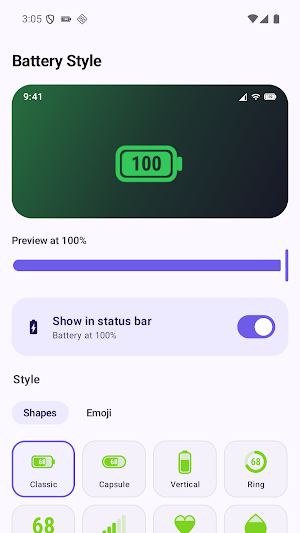
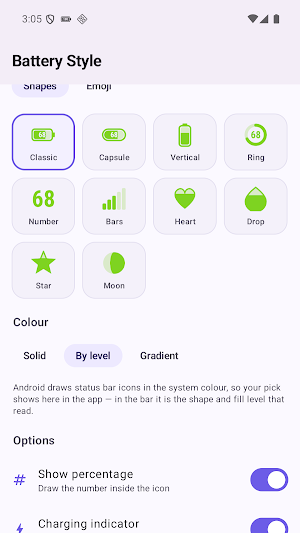
Shapes: Classic, Capsule, Vertical, Ring, Number, Bars, Heart, Drop, Star, and a Moon that fills through its real phases.
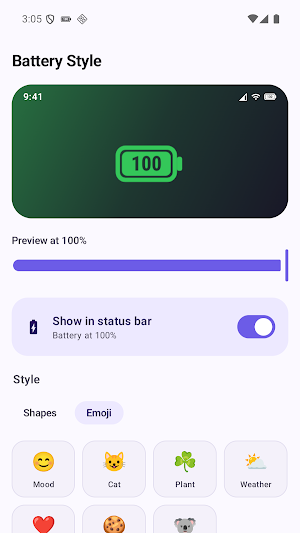
Emoji: Mood, Cat, Plant, Weather, Hearts, Snacks and Animals. Each runs a full ramp from empty to full, with its own glyph while charging.
MAKE IT YOURS
- Colour by level: green when healthy, amber when it slips, red when it matters
- Or pick one solid colour, or a gradient
- Show the exact percentage inside the icon
- A charging mark that stays readable at status bar size
- Size the icon to sit right in your bar
- A live preview of your real status bar, plus a slider to see any battery level before you commit
HONEST ABOUT ONE THING
Android paints every status bar icon in the system's own colour. Your colour choice shows throughout the app; in the bar itself it is the shape and the fill level that do the talking. The preview shows you both, so nothing is a surprise later.
QUIET BY DESIGN
No account. No ads. No analytics. No internet permission at all - the app cannot phone home because it has no way to reach the network. Your battery level never leaves your phone.
The icon comes back on its own after a restart.
Battery Style swaps the plain battery in your status bar for one you actually picked - a ring, a heart, a moon that waxes as you charge, or a cat whose mood sinks along with the last 20%.
HOW IT WORKS
The icon rides along on a silent, ongoing notification. That is the one place Android lets an app draw into the status bar, so there is no root, no ADB command and no accessibility permission involved. One switch turns it on; the same switch - or the notification itself - turns it off.
17 STYLES
Shapes: Classic, Capsule, Vertical, Ring, Number, Bars, Heart, Drop, Star, and a Moon that fills through its real phases.
Emoji: Mood, Cat, Plant, Weather, Hearts, Snacks and Animals. Each runs a full ramp from empty to full, with its own glyph while charging.
MAKE IT YOURS
- Colour by level: green when healthy, amber when it slips, red when it matters
- Or pick one solid colour, or a gradient
- Show the exact percentage inside the icon
- A charging mark that stays readable at status bar size
- Size the icon to sit right in your bar
- A live preview of your real status bar, plus a slider to see any battery level before you commit
HONEST ABOUT ONE THING
Android paints every status bar icon in the system's own colour. Your colour choice shows throughout the app; in the bar itself it is the shape and the fill level that do the talking. The preview shows you both, so nothing is a surprise later.
QUIET BY DESIGN
No account. No ads. No analytics. No internet permission at all - the app cannot phone home because it has no way to reach the network. Your battery level never leaves your phone.
The icon comes back on its own after a restart.
What’s new
Version 1.0.2 · Updated October 17, 2026
- The battery percentage no longer rounds down by one - The charging bolt is back on styles that show it - The app no longer crashes if its saved settings are damaged
Alternatives to Battery Style: Status Bar Icon
Looking for apps like Battery Style: Status Bar Icon? Here are 6 similar Android apps on Google Play. All of them are free to download.
-
Boring Video Compress
-
Boring Remove Water: Cleaner
-
Senkron: Sync Music Party
-
Get My Ex Back: 99 Methods
-
Boring Ringtone Maker & Cut
-
DriveTest
| App | Rating | Price | Installs | Last updated | Compare |
|---|---|---|---|---|---|
| Battery Style: Status Bar Icon | – | Free | 1,000+ | Oct 17, 2026 | |
| Boring Video Compress | – | Free | 10+ | Sep 16, 2026 | Compare |
| Boring Remove Water: Cleaner | – | Free | 10+ | Oct 17, 2026 | Compare |
| Senkron: Sync Music Party | – | Free | 5+ | Oct 18, 2026 | Compare |
| Get My Ex Back: 99 Methods | – | Free | 10+ | Sep 29, 2026 | Compare |
| Boring Ringtone Maker & Cut | – | Free | 10+ | Oct 18, 2026 | Compare |
| DriveTest | – | Free | 5+ | Oct 18, 2026 | Compare |
Similar apps on Google Play
- Boring Video Compress
- Boring Remove Water: Cleaner
- Senkron: Sync Music Party
- Get My Ex Back: 99 Methods
- Boring Ringtone Maker & Cut
- DriveTest
- FixCV: AI CV & Resume Builder
- Dose-1: GLP-1 Shot Tracker
- Next Million Dollar Idea
- HumanFix - AI Humanizer
- ObdScan: OBD2 Car Scanner
- Boring Portable WiFi Hotspot
- Boring Snore Sleep Tracker
- Boring AR Measure & Plan
- Boring Printer
- Citizenship Test Prep 2026
- Boring Bird Sound Identifier
- Boring Volume Control
- Boring Video Player
- Boring Guitar Tuner
- Boring Auto Clicker: Auto Tap
- Boring Record Screen Recorder
- Boring Gallery: Photo Album
- Boring Data Recovery
- Roadspeed: Speed Camera Alert
- Tripfolk: Travel Friends
- Boring Notepad
- All TCG Card Scanner
- Boring Applocker - App Lock
- Card Wallet Holder