
Clipr: Smart Clipboard Manager
JKingAPPS Productivity In-app purchases
Clipboard manager with templates, custom keyboard, home widget, and OCR.
- Rating
- 4.1
- 116 ratings
- Downloads
- 4.4K+
- on Google Play
- Price
- Free
- In-app purchases
- Updated
- Oct 14
- 2026 · v1.5.1
Screenshots
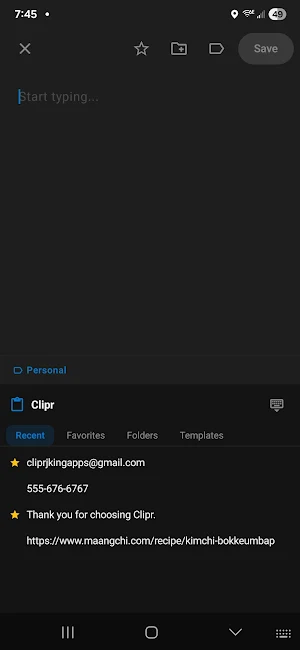


About Clipr: Smart Clipboard Manager
Clipr — Clipboard Manager
Never lose something you copied again. Clipr automatically saves
everything you copy and puts it all at your fingertips.
──────────────────────────────
CLIPBOARD MANAGEMENT
──────────────────────────────
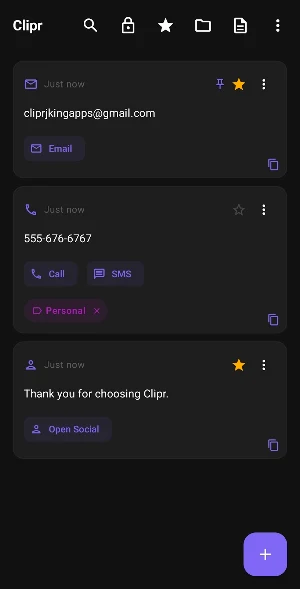
• Automatically captures everything you copy in the background
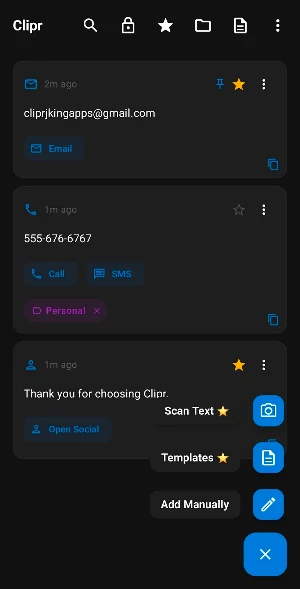
• Add clips manually by typing — no need to copy at all
• Full-screen clip viewer with character, word, and line counts
• Edit, share, delete, or copy any clip in one tap
• Smart content detection: URLs, phone numbers, emails, addresses,
color codes, OTPs, and more — each with quick-action buttons
• Swipe gestures, multi-select, merge, and batch operations
──────────────────────────────
STAY ORGANIZED
──────────────────────────────
• Folders — create unlimited custom folders with emoji icons
• Favorites — star important clips for instant access
• Vault — lock sensitive clips behind PIN or biometrics
• Trash — recover accidentally deleted clips any time
• Notes & categories on individual clips
• Smart Tags — automatic content-type labels
• Sort by newest, oldest, or custom order
──────────────────────────────
TEMPLATES
──────────────────────────────
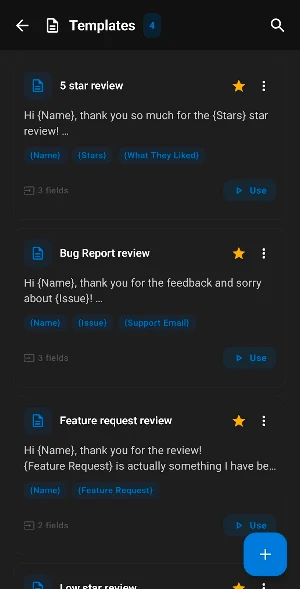
Create reusable text templates with {fill-in} placeholders. Perfect
for signatures, replies, addresses, or any text you type repeatedly.
Fill in all fields with one tap.
──────────────────────────────
PREMIUM FEATURES
──────────────────────────────
• Home Screen Widget — access recent clips and favorites without
opening the app
• Clipr Keyboard — insert any saved clip from any app, no
switching required
• Google Drive Sync — back up and restore all your clips, folders,
and templates across devices
• Scan to Text — point your camera at any text and save it instantly
──────────────────────────────
POWERFUL & CUSTOMIZABLE
──────────────────────────────
• Sequential Paste — queue multiple clips and paste them one by one
• Configurable tap actions — choose what tapping a clip does: copy,
view, edit, share, or toggle favorite
• Toggle any feature on or off from Settings > Features
• Dark and light themes
• Export and import your clips as JSON
• Auto-delete old clips after a set number of days
• Achievements for power users
──────────────────────────────
PRIVACY FIRST
──────────────────────────────
All clips are stored locally on your device. Nothing is uploaded
without your permission. Google Drive Sync is optional and uses
your own account.
──────────────────────────────
PRICING
──────────────────────────────
Clipr is free to use. Premium features (Widget, Keyboard, Google
Drive Sync, Scan to Text) are available as a one-time purchase —
no subscription, ever.
Never lose something you copied again. Clipr automatically saves
everything you copy and puts it all at your fingertips.
──────────────────────────────
CLIPBOARD MANAGEMENT
──────────────────────────────
• Automatically captures everything you copy in the background
• Add clips manually by typing — no need to copy at all
• Full-screen clip viewer with character, word, and line counts
• Edit, share, delete, or copy any clip in one tap
• Smart content detection: URLs, phone numbers, emails, addresses,
color codes, OTPs, and more — each with quick-action buttons
• Swipe gestures, multi-select, merge, and batch operations
──────────────────────────────
STAY ORGANIZED
──────────────────────────────
• Folders — create unlimited custom folders with emoji icons
• Favorites — star important clips for instant access
• Vault — lock sensitive clips behind PIN or biometrics
• Trash — recover accidentally deleted clips any time
• Notes & categories on individual clips
• Smart Tags — automatic content-type labels
• Sort by newest, oldest, or custom order
──────────────────────────────
TEMPLATES
──────────────────────────────
Create reusable text templates with {fill-in} placeholders. Perfect
for signatures, replies, addresses, or any text you type repeatedly.
Fill in all fields with one tap.
──────────────────────────────
PREMIUM FEATURES
──────────────────────────────
• Home Screen Widget — access recent clips and favorites without
opening the app
• Clipr Keyboard — insert any saved clip from any app, no
switching required
• Google Drive Sync — back up and restore all your clips, folders,
and templates across devices
• Scan to Text — point your camera at any text and save it instantly
──────────────────────────────
POWERFUL & CUSTOMIZABLE
──────────────────────────────
• Sequential Paste — queue multiple clips and paste them one by one
• Configurable tap actions — choose what tapping a clip does: copy,
view, edit, share, or toggle favorite
• Toggle any feature on or off from Settings > Features
• Dark and light themes
• Export and import your clips as JSON
• Auto-delete old clips after a set number of days
• Achievements for power users
──────────────────────────────
PRIVACY FIRST
──────────────────────────────
All clips are stored locally on your device. Nothing is uploaded
without your permission. Google Drive Sync is optional and uses
your own account.
──────────────────────────────
PRICING
──────────────────────────────
Clipr is free to use. Premium features (Widget, Keyboard, Google
Drive Sync, Scan to Text) are available as a one-time purchase —
no subscription, ever.
What’s new
Version 1.5.1 · Updated October 14, 2026
New Clip Expiry system. Clip color labels now in 3 dot menu. Bug issue fixed when opening app.
User reviews

it is fast and very easy to use!

I like this, please fix the bug, there are many bugs especially when I try to switch into quick folder bar my clipboard is none but the folder is there

Finally, I found the ultimate app. Thanks.

Great app and the developer responds to you fast. He even added in a floating icon size changer in a few minutes. Highly recommend.

That duplicate display warning is something that's made this a game changer for me, I like the app, you just made it better.

Excellent update ❣️💓
Alternatives to Clipr: Smart Clipboard Manager
Looking for apps like Clipr: Smart Clipboard Manager? Here are 6 similar Android apps on Google Play. The highest rated is Nested Folder Notes - Folino (4.2/5), and 5 of the 6 are free to download.
-
Nested Folder Notes - Folino 4.2
-
Alive Check: Email Alert
-
DayDew - Daily Journal, Diary 3.3
-
Mobile Hotel PMS by Hotel Sync
-
AppDash: App Manager & Backup
-
ConnectPlayers: Find Chat Play 4.0
| App | Rating | Price | Installs | Last updated | Compare |
|---|---|---|---|---|---|
| Clipr: Smart Clipboard Manager | 4.1 / 5 | Free | 1,000+ | Oct 14, 2026 | |
| Nested Folder Notes - Folino | 4.2 / 5 | Free | 50,000+ | Oct 20, 2026 | Compare |
| Alive Check: Email Alert | – | – | – | Apr 9, 2026 | Compare |
| DayDew - Daily Journal, Diary | 3.3 / 5 | Free | 10,000+ | Sep 3, 2026 | Compare |
| Mobile Hotel PMS by Hotel Sync | – | Free | 10,000+ | Oct 5, 2026 | Compare |
| AppDash: App Manager & Backup | – | Free | 100,000+ | Oct 21, 2026 | Compare |
| ConnectPlayers: Find Chat Play | 4.0 / 5 | Free | 10,000+ | Oct 17, 2026 | Compare |
Similar apps on Google Play
- Nested Folder Notes - Folino
- Alive Check: Email Alert
- DayDew - Daily Journal, Diary
- Mobile Hotel PMS by Hotel Sync
- AppDash: App Manager & Backup
- ConnectPlayers: Find Chat Play
- Square Invoices: Invoice Maker
- Inkpad Notepad & To do list
- Square Appointments Beta
- MyBlock: Tax Docs & Refund
- Howtotalk: Practical Parenting
- Connecteam Team Management App
- Notes : Color Folders & To-dos
- Liquid Notes
- Notesnook Secure Private Notes
- Homebot
- WaiverForever - Online Waiver
- Reno Gazette Journal
- Tradify - Easy Job Management
- Encompass One
- Swift Backup
- Humanity Schedule by TCP
- Easy Diary
- PocketSuite Client Booking App
- Express Scripts
- SimplyWise: Receipts, Expenses
- Fullscript
- YouMail: Block Spam on Android
- Freed: AI Clinician Assistant
- Lena Icon Pack Shapeless Icons
- Nozbe: Tasks & Projects
- ProBooks: Invoice Maker
- AI Email, Reply Writer: Xemail
- Microhealth Bleeding Disorders
- UpNote - notes, diary, journal
- SynkedUP
- Office Depot®- Rewards & Deals
- AI Keyboard: Smart Oki
- Daily Habit Tracker & Streaks