

Code Editor - Text & Notepad
Tools In-app purchases Contains ads
Multi-tab code editor with syntax highlighting for 14 languages. Open any file.
- Downloads
- 1K+
- on Google Play
- Price
- Free
- In-app purchases
- Updated
- Sep 20
- 2026 · v1.2.0
Screenshots


About Code Editor - Text & Notepad
Code Editor is a multi-tab code and text editor for Android. Open, edit, and create files in 14 programming languages — all in one app.
MULTI-TAB EDITING
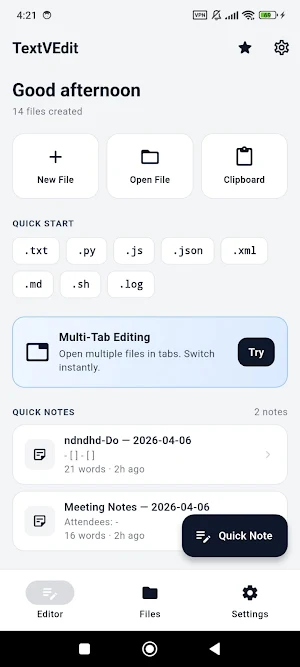
Open multiple files at once. Each tab remembers its scroll position, cursor, and syntax mode. Switch between files without losing your place.
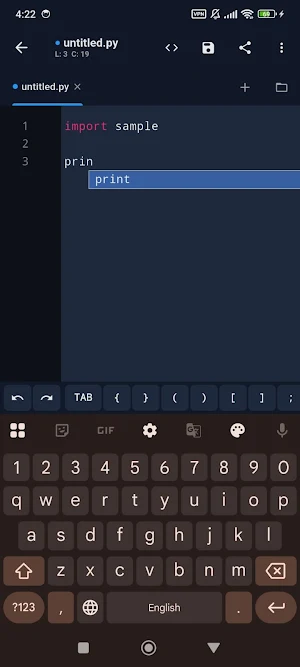
SYNTAX HIGHLIGHTING — 14 LANGUAGES
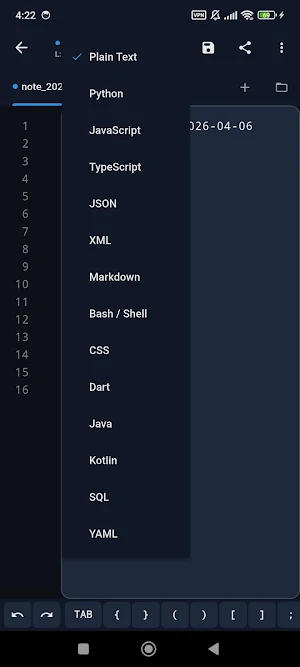
Python, JavaScript, TypeScript, Dart, Java, Kotlin, HTML, CSS, XML, JSON, YAML, SQL, Markdown, Shell — all with color-coded syntax highlighting.
OPEN ANY CODE FILE
Tap any code file on your phone and Code Editor opens it. Supports .py, .js, .json, .xml, .html, .css, .dart, .yaml, .sql, .md, .sh, .txt, and 20+ more file types. Auto-detects the language and applies the correct syntax highlighting.
CODE EDITOR FEATURES
• Multi-tab editing with independent scroll and cursor
• Syntax highlighting for 14 programming languages
• Auto language detection from file extension
• Built-in templates for common file types
• File browser — browse and open from device storage
• Create, rename, and organize project files
• Share and export code via any app
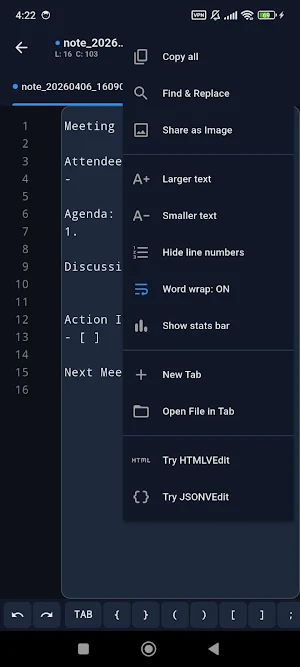
• Undo and redo support
NOTEPAD & QUICK NOTES
Jot down quick notes, save code snippets, or edit configuration files. Perfect for editing config files, viewing log files, or taking quick notes on the go.
THEMES
Dark mode, light mode, or system theme. Your choice.
SUPPORTED FILE TYPES
.py .js .ts .dart .java .kt .html .css .xml .json .yaml .yml .sql .md .sh .bash .txt .log .csv .toml .ini .cfg .conf .env .properties .graphql .dockerfile .gitignore .editorconfig and more.
LOCALIZATION
Available in English, Hindi, Spanish, French, German, Portuguese, Japanese, Korean, Chinese, Arabic, Russian, Turkish, Indonesian, Bengali, and Urdu.
No account required. No sign-up needed.
MULTI-TAB EDITING
Open multiple files at once. Each tab remembers its scroll position, cursor, and syntax mode. Switch between files without losing your place.
SYNTAX HIGHLIGHTING — 14 LANGUAGES
Python, JavaScript, TypeScript, Dart, Java, Kotlin, HTML, CSS, XML, JSON, YAML, SQL, Markdown, Shell — all with color-coded syntax highlighting.
OPEN ANY CODE FILE
Tap any code file on your phone and Code Editor opens it. Supports .py, .js, .json, .xml, .html, .css, .dart, .yaml, .sql, .md, .sh, .txt, and 20+ more file types. Auto-detects the language and applies the correct syntax highlighting.
CODE EDITOR FEATURES
• Multi-tab editing with independent scroll and cursor
• Syntax highlighting for 14 programming languages
• Auto language detection from file extension
• Built-in templates for common file types
• File browser — browse and open from device storage
• Create, rename, and organize project files
• Share and export code via any app
• Undo and redo support
NOTEPAD & QUICK NOTES
Jot down quick notes, save code snippets, or edit configuration files. Perfect for editing config files, viewing log files, or taking quick notes on the go.
THEMES
Dark mode, light mode, or system theme. Your choice.
SUPPORTED FILE TYPES
.py .js .ts .dart .java .kt .html .css .xml .json .yaml .yml .sql .md .sh .bash .txt .log .csv .toml .ini .cfg .conf .env .properties .graphql .dockerfile .gitignore .editorconfig and more.
LOCALIZATION
Available in English, Hindi, Spanish, French, German, Portuguese, Japanese, Korean, Chinese, Arabic, Russian, Turkish, Indonesian, Bengali, and Urdu.
No account required. No sign-up needed.
What’s new
Version 1.2.0 · Updated September 20, 2026
Line numbers are readable again. Past line 9 the gutter was too narrow to hold two digits, so "10" was drawn as a 1 above a 0. The hex viewer, log viewer, find/replace and compare now use a real monospaced face, so columns line up like they do in the editor. Pro is a one-time purchase or a monthly plan. The old text said "no subscriptions" next to the monthly price.
User reviews

Abide::Tell:.
Alternatives to Code Editor - Text & Notepad
Looking for apps like Code Editor - Text & Notepad? Here are 6 similar Android apps on Google Play. All of them are free to download.
-
Markdown Editor & MD Viewer
-
JavaScript Editor — React IDE
-
WebEva: Build Websites & Code
-
HTML Viewer & Editor - Code
-
XML Viewer & Editor
-
SVG Editor — Image to Vector
| App | Rating | Price | Installs | Last updated | Compare |
|---|---|---|---|---|---|
| Code Editor - Text & Notepad | – | Free | 1,000+ | Sep 20, 2026 | |
| Markdown Editor & MD Viewer | – | Free | 10,000+ | Sep 27, 2026 | Compare |
| JavaScript Editor — React IDE | – | Free | 5,000+ | Sep 29, 2026 | Compare |
| WebEva: Build Websites & Code | – | Free | 10,000+ | – | Compare |
| HTML Viewer & Editor - Code | – | Free | 10,000+ | Oct 20, 2026 | Compare |
| XML Viewer & Editor | – | Free | 10,000+ | Oct 11, 2026 | Compare |
| SVG Editor — Image to Vector | – | Free | 5,000+ | Oct 14, 2026 | Compare |