
SVG Editor — Image to Vector
Tools In-app purchases Contains ads
Edit SVG, vectorize PNG and JPG to SVG on your phone. Offline and private.
- Downloads
- 6K+
- on Google Play
- Price
- Free
- In-app purchases
- Updated
- Oct 14
- 2026 · v1.3.2
Screenshots



About SVG Editor — Image to Vector
Edit SVG files on your Android phone or tablet and convert any PNG or JPG into a clean, scalable vector graphic — fully offline, on-device.
SVG Editor — Image to Vector is a two-in-one tool for designers, crafters, web developers, and students. No cloud uploads. No internet needed once the app is installed. No subscription.
WHAT YOU CAN DO
• Write SVG code directly with syntax highlighting and a side-by-side live preview
• Open any .svg file from your device — Downloads, Drive, storage, SD card
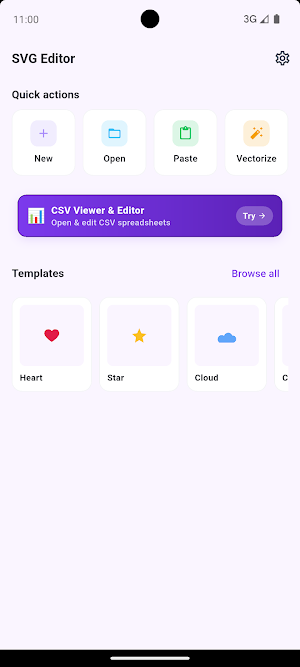
• Pick any shape or path in the visual editor, change its fill colour from a curated palette, toggle visibility, and reorder layers
• Convert PNG and JPG images into SVG with the built-in on-device vectorizer — trace logos, icons, signatures, and line art into clean scalable paths
• Browse a templates gallery with icon packs, geometric shapes, Cricut-friendly presets, and logo starter kits
• Export as SVG, PNG, or JPG via the system SaveAs dialog — save anywhere, including cloud sync folders
SVG CODE EDITOR
Write XML-based SVG by hand with syntax highlighting tuned for dark mode, a symbols bar for quick angle brackets, auto-indent, find and replace, and undo/redo with deep history. The live preview pane renders every keystroke so you can see what you build as you build it.
VISUAL EDITOR
Tap any element in the preview and the inspector opens with its attributes. Change the fill from a curated colour palette, hide or show a layer, or drag it up and down the stack to reorder paths. Perfect for quick tweaks without touching code.
IMAGE VECTORIZER (PNG and JPG to SVG)
Import any raster image and the on-device vectorizer traces it into paths. Works entirely offline — no image ever leaves your phone. Works cleanest on logos, icons, signatures, and line art; photos and gradients produce stylised rather than exact traces, and we tell you so up front. Free users get three vectorizer runs per day; the Pro upgrade removes that limit.
TEMPLATES GALLERY
Start from a curated set of icon packs, common geometric shapes, Cricut-friendly presets for crafters, and logo starter templates. Open a template, tweak it, export it — a full design cycle without opening a browser.
EXPORT ANYWHERE
Export as SVG for designers, PNG for the web, or JPG for documents. The system SaveAs dialog lets you drop the file in Downloads, Drive, Dropbox, OneDrive, or any mounted cloud folder.
WHO IT IS FOR
• Web developers editing SVG icons on the go
• Cricut and Silhouette crafters who want to turn a logo or signature into a cut file
• Graphic designers sketching shapes away from the desktop
• Students learning XML, SVG, and vector graphics
• Anyone who needs a reliable offline SVG editor and vectorizer
FREE WITH OPTIONAL PRO UPGRADE
The app is free to install and use. It shows ads to support development. A one-time Pro upgrade removes ads, unlocks unlimited vectorizer runs, adds Cricut export presets, and unlocks Pro themes. No subscription, no recurring charges.
LANGUAGES
UI available in 15 languages: English, Spanish, Portuguese, French, German, Russian, Hindi, Bengali, Indonesian, Turkish, Urdu, Arabic, Chinese (Simplified), Japanese, and Korean.
SVG Editor — Image to Vector is a two-in-one tool for designers, crafters, web developers, and students. No cloud uploads. No internet needed once the app is installed. No subscription.
WHAT YOU CAN DO
• Write SVG code directly with syntax highlighting and a side-by-side live preview
• Open any .svg file from your device — Downloads, Drive, storage, SD card
• Pick any shape or path in the visual editor, change its fill colour from a curated palette, toggle visibility, and reorder layers
• Convert PNG and JPG images into SVG with the built-in on-device vectorizer — trace logos, icons, signatures, and line art into clean scalable paths
• Browse a templates gallery with icon packs, geometric shapes, Cricut-friendly presets, and logo starter kits
• Export as SVG, PNG, or JPG via the system SaveAs dialog — save anywhere, including cloud sync folders
SVG CODE EDITOR
Write XML-based SVG by hand with syntax highlighting tuned for dark mode, a symbols bar for quick angle brackets, auto-indent, find and replace, and undo/redo with deep history. The live preview pane renders every keystroke so you can see what you build as you build it.
VISUAL EDITOR
Tap any element in the preview and the inspector opens with its attributes. Change the fill from a curated colour palette, hide or show a layer, or drag it up and down the stack to reorder paths. Perfect for quick tweaks without touching code.
IMAGE VECTORIZER (PNG and JPG to SVG)
Import any raster image and the on-device vectorizer traces it into paths. Works entirely offline — no image ever leaves your phone. Works cleanest on logos, icons, signatures, and line art; photos and gradients produce stylised rather than exact traces, and we tell you so up front. Free users get three vectorizer runs per day; the Pro upgrade removes that limit.
TEMPLATES GALLERY
Start from a curated set of icon packs, common geometric shapes, Cricut-friendly presets for crafters, and logo starter templates. Open a template, tweak it, export it — a full design cycle without opening a browser.
EXPORT ANYWHERE
Export as SVG for designers, PNG for the web, or JPG for documents. The system SaveAs dialog lets you drop the file in Downloads, Drive, Dropbox, OneDrive, or any mounted cloud folder.
WHO IT IS FOR
• Web developers editing SVG icons on the go
• Cricut and Silhouette crafters who want to turn a logo or signature into a cut file
• Graphic designers sketching shapes away from the desktop
• Students learning XML, SVG, and vector graphics
• Anyone who needs a reliable offline SVG editor and vectorizer
FREE WITH OPTIONAL PRO UPGRADE
The app is free to install and use. It shows ads to support development. A one-time Pro upgrade removes ads, unlocks unlimited vectorizer runs, adds Cricut export presets, and unlocks Pro themes. No subscription, no recurring charges.
LANGUAGES
UI available in 15 languages: English, Spanish, Portuguese, French, German, Russian, Hindi, Bengali, Indonesian, Turkish, Urdu, Arabic, Chinese (Simplified), Japanese, and Korean.
What’s new
Version 1.3.2 · Updated October 14, 2026
• Limited-time Pro offers: unlock SVG Editor Pro for less while a sale is running • Stability and performance improvements
Frequently asked questions
What does SVG Editor do?
It edits SVG files and converts PNG or JPG images to vectors on your device.
Does it need internet?
No.
Alternatives to SVG Editor — Image to Vector
Looking for apps like SVG Editor — Image to Vector? Here are 6 similar Android apps on Google Play. All of them are free to download.
-
Markdown Editor & MD Viewer
-
WebEva: Build Websites & Code
-
XML Viewer & Editor
-
JavaScript Editor — React IDE
-
Python Editor & Code Runner
-
HTML Viewer & Editor - Code
| App | Rating | Price | Installs | Last updated | Compare |
|---|---|---|---|---|---|
| SVG Editor — Image to Vector | – | Free | 5,000+ | Oct 14, 2026 | |
| Markdown Editor & MD Viewer | – | Free | 10,000+ | – | Compare |
| WebEva: Build Websites & Code | – | Free | 10,000+ | Oct 14, 2026 | Compare |
| XML Viewer & Editor | – | Free | 10,000+ | Oct 11, 2026 | Compare |
| JavaScript Editor — React IDE | – | Free | 5,000+ | – | Compare |
| Python Editor & Code Runner | – | Free | 10,000+ | Sep 29, 2026 | Compare |
| HTML Viewer & Editor - Code | – | Free | 10,000+ | Oct 20, 2026 | Compare |