
Markdown Editor & MD Viewer
Tools In-app purchases Contains ads
Write, preview, and export markdown files with a clean, distraction-free editor.
- Rating
- 3.7
- 226 ratings
- Downloads
- 24.9K+
- on Google Play
- Price
- Free
- In-app purchases
- Updated
- Sep 27
- 2026 · v1.6.9
Screenshots


About Markdown Editor & MD Viewer
Markdown Editor & MD Viewer is a markdown editor and md file viewer built for developers, writers, and anyone who works with documentation. Whether you're drafting a
README, writing blog posts, or taking meeting notes in markdown format, Markdown Editor & MD Viewer gives you a focused, reliable environment with no learning curve.
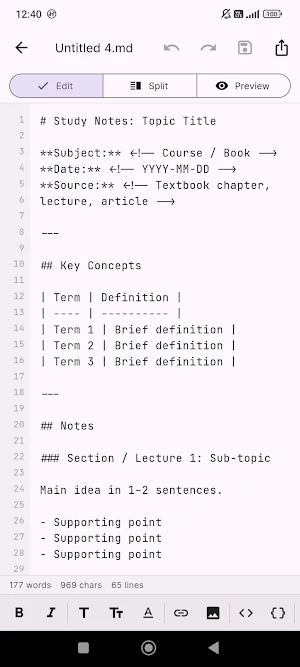
Live Split-Screen Preview
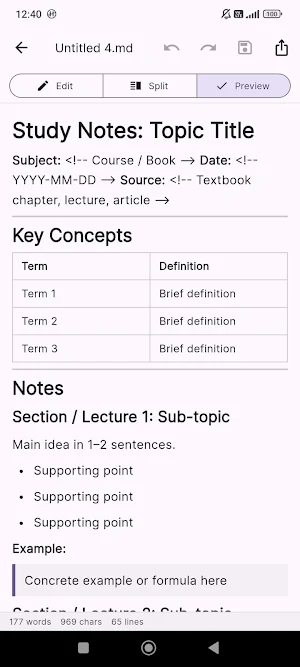
See your rendered markdown alongside your raw text as you type. The split-screen preview updates in real time, so you never lose sight of the final
result while editing.
Markdown Toolbar
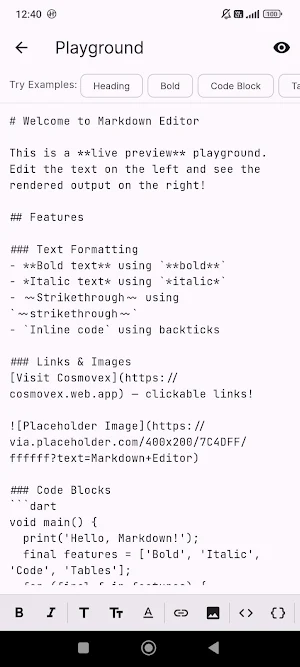
A dedicated toolbar puts common formatting at your fingertips:
• Bold and italic
• Headings: H1, H2, H3
• Links and images
• Inline code and code blocks
• Bullet lists, numbered lists, and checkboxes
• Blockquotes, tables, horizontal rules
Templates to Start Faster
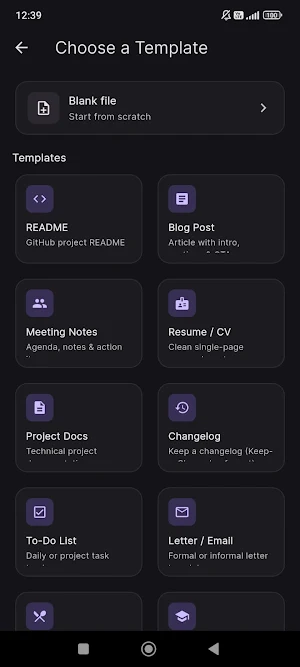
Ready-to-use templates for README files, meeting notes, blog posts, and more. Pick a template, fill in your content, done.
Export to HTML
Export to a styled HTML file with one tap. The output respects your current theme — dark or light. Share the .md file or exported HTML directly from
the app.
Editor Features
• Syntax-aware line numbers
• Word, character, and line count in status bar
• Recent files list for quick access
• File rename support
• Dark and light theme options
Works Fully Offline
No internet connection required. Write, preview, and export entirely offline. Your files stay on your device.
Markdown Editor & MD Viewer is ideal for:
• Developers writing README and documentation files
• Writers drafting notes or blog posts in markdown
• Students managing structured notes
• Anyone who works with .md files and needs a capable viewer and editor
Download Markdown Editor & MD Viewer and start editing markdown files with a tool that keeps up with you.
README, writing blog posts, or taking meeting notes in markdown format, Markdown Editor & MD Viewer gives you a focused, reliable environment with no learning curve.
Live Split-Screen Preview
See your rendered markdown alongside your raw text as you type. The split-screen preview updates in real time, so you never lose sight of the final
result while editing.
Markdown Toolbar
A dedicated toolbar puts common formatting at your fingertips:
• Bold and italic
• Headings: H1, H2, H3
• Links and images
• Inline code and code blocks
• Bullet lists, numbered lists, and checkboxes
• Blockquotes, tables, horizontal rules
Templates to Start Faster
Ready-to-use templates for README files, meeting notes, blog posts, and more. Pick a template, fill in your content, done.
Export to HTML
Export to a styled HTML file with one tap. The output respects your current theme — dark or light. Share the .md file or exported HTML directly from
the app.
Editor Features
• Syntax-aware line numbers
• Word, character, and line count in status bar
• Recent files list for quick access
• File rename support
• Dark and light theme options
Works Fully Offline
No internet connection required. Write, preview, and export entirely offline. Your files stay on your device.
Markdown Editor & MD Viewer is ideal for:
• Developers writing README and documentation files
• Writers drafting notes or blog posts in markdown
• Students managing structured notes
• Anyone who works with .md files and needs a capable viewer and editor
Download Markdown Editor & MD Viewer and start editing markdown files with a tool that keeps up with you.
What’s new
Version 1.6.9 · Updated September 27, 2026
Fixed: the Pro purchase screen could get cut off with no way to scroll on devices using a larger Android display (Screen Zoom) setting. New: choose your default view (Edit, Split, or Preview) in Settings. New: search now works in Preview mode too, not just Edit.
User reviews

soo cool
Alternatives to Markdown Editor & MD Viewer
Looking for apps like Markdown Editor & MD Viewer? Here are 6 similar Android apps on Google Play. All of them are free to download.
-
JavaScript Editor — React IDE
-
WebEva: Build Websites & Code
-
HTML Viewer & Editor - Code
-
XML Viewer & Editor
-
SVG Editor — Image to Vector
-
Python Editor & Code Runner
| App | Rating | Price | Installs | Last updated | Compare |
|---|---|---|---|---|---|
| Markdown Editor & MD Viewer | 3.7 / 5 | Free | 10,000+ | Sep 27, 2026 | |
| JavaScript Editor — React IDE | – | Free | 5,000+ | Sep 29, 2026 | Compare |
| WebEva: Build Websites & Code | – | Free | 10,000+ | – | Compare |
| HTML Viewer & Editor - Code | – | Free | 10,000+ | Oct 20, 2026 | Compare |
| XML Viewer & Editor | – | Free | 10,000+ | Oct 11, 2026 | Compare |
| SVG Editor — Image to Vector | – | Free | 5,000+ | Oct 14, 2026 | Compare |
| Python Editor & Code Runner | – | Free | 10,000+ | Sep 29, 2026 | Compare |