
JavaScript Editor — React IDE
Tools In-app purchases Contains ads
Write JavaScript and React on your phone. Live preview.
- Downloads
- 7.4K+
- on Google Play
- Price
- Free
- In-app purchases
- Updated
- Sep 29
- 2026 · v1.1.4
Screenshots


About JavaScript Editor — React IDE
Write JavaScript and React components on your Android phone. Run them offline, on-device, with a live preview.
JavaScript Editor — React IDE is a mobile playground for web developers, students, and interview preppers. No cloud, no remote execution, no internet needed once the app is installed.
WHAT YOU CAN DO
• Write JavaScript and run it with console output — logs, warnings, and errors, inline
• Write React components with JSX and see a live preview render on your device
• Works fully offline — the React runtime is bundled inside the app
• Open .js and .jsx files from anywhere on your device
• Save your work to the app or export to Downloads, Drive, or anywhere via the system file picker
• Code in 15 languages with a dark-first editor built for small screens
EDITOR
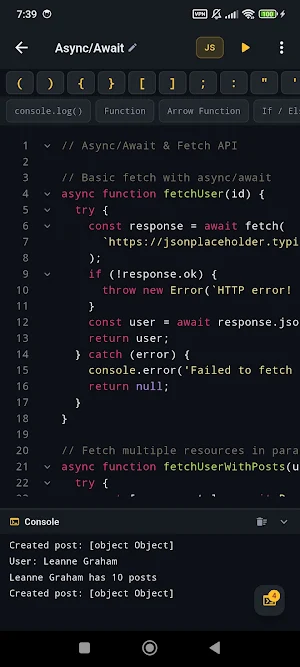
Syntax highlighting, a symbols bar for common punctuation, a React hooks shortcut bar, find and replace, undo/redo with deep history, and monospace typography tuned for phone screens.
REACT PREVIEW
Tap Run and your component mounts to a live preview pane below the editor. Edit CSS with one tap. Tap fullscreen to inspect the result on the whole screen. Open your preview in a real browser if you want — the app exposes a loopback URL for you.
JAVASCRIPT CONSOLE
Run any JavaScript snippet and watch the console below the editor. Colour-coded log levels (log, info, warn, error), timestamps, and a one-tap clear. Perfect for learning, testing a function, or practising algorithms on the go.
EXAMPLES GALLERY
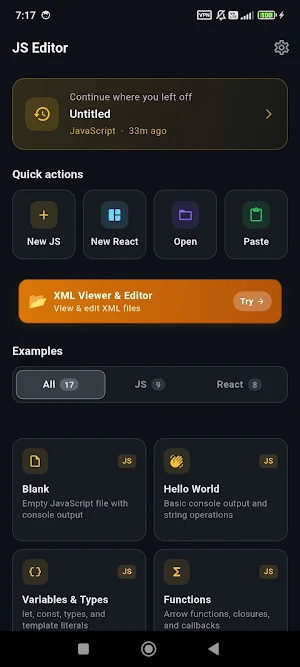
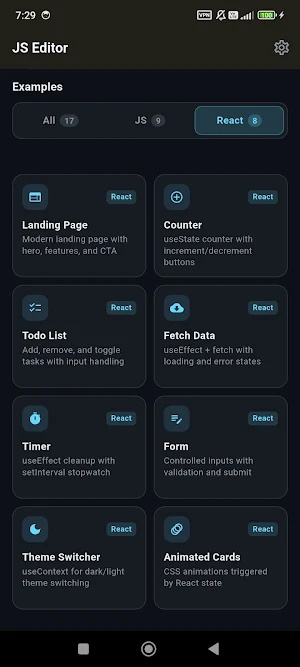
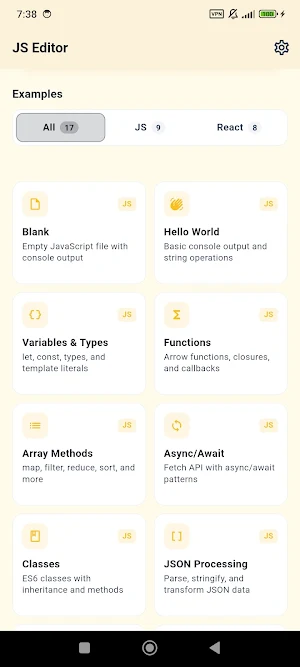
Curated JavaScript and React examples — Hello World, arrays and iteration, async/await, closures, classes, fetch, and more; React examples cover hooks, state management, dynamic lists, forms, and visual effects. Filter by JS or React with a tab.
SAVE AND IMPORT
Save as .js or .jsx based on the mode you're in. "Save to device" opens the system SaveAs dialog — put the file in Downloads, a cloud sync folder, or external storage. Open existing files straight from your device — .jsx opens in React mode, .js in JavaScript mode. The extension picks the right mode for you.
THEMES AND CUSTOMIZATION
Dark-first theming out of the box. Adjustable font size and indent width. Session history remembers what you were last working on so you can pick up where you left off.
WHO IT'S FOR
• Web developers who want to sketch a component while away from their laptop
• Computer science students learning JavaScript, React, or the DOM
• Interview preppers practising algorithms in real JS
• Self-taught coders following tutorials on the go
• Anyone who wants a reliable mobile JavaScript playground
FREE AND OPTIONAL PRO UPGRADE
The app is free to install and use. It shows ads to support development. A one-time Pro upgrade removes ads — no subscription, no recurring charges.
LANGUAGES
UI available in 15 languages including English, Spanish, Portuguese, French, German, Russian, Hindi, Bengali, Indonesian, Turkish, Urdu, Arabic, Chinese (Simplified), Japanese, and Korean.
JavaScript Editor — React IDE is a mobile playground for web developers, students, and interview preppers. No cloud, no remote execution, no internet needed once the app is installed.
WHAT YOU CAN DO
• Write JavaScript and run it with console output — logs, warnings, and errors, inline
• Write React components with JSX and see a live preview render on your device
• Works fully offline — the React runtime is bundled inside the app
• Open .js and .jsx files from anywhere on your device
• Save your work to the app or export to Downloads, Drive, or anywhere via the system file picker
• Code in 15 languages with a dark-first editor built for small screens
EDITOR
Syntax highlighting, a symbols bar for common punctuation, a React hooks shortcut bar, find and replace, undo/redo with deep history, and monospace typography tuned for phone screens.
REACT PREVIEW
Tap Run and your component mounts to a live preview pane below the editor. Edit CSS with one tap. Tap fullscreen to inspect the result on the whole screen. Open your preview in a real browser if you want — the app exposes a loopback URL for you.
JAVASCRIPT CONSOLE
Run any JavaScript snippet and watch the console below the editor. Colour-coded log levels (log, info, warn, error), timestamps, and a one-tap clear. Perfect for learning, testing a function, or practising algorithms on the go.
EXAMPLES GALLERY
Curated JavaScript and React examples — Hello World, arrays and iteration, async/await, closures, classes, fetch, and more; React examples cover hooks, state management, dynamic lists, forms, and visual effects. Filter by JS or React with a tab.
SAVE AND IMPORT
Save as .js or .jsx based on the mode you're in. "Save to device" opens the system SaveAs dialog — put the file in Downloads, a cloud sync folder, or external storage. Open existing files straight from your device — .jsx opens in React mode, .js in JavaScript mode. The extension picks the right mode for you.
THEMES AND CUSTOMIZATION
Dark-first theming out of the box. Adjustable font size and indent width. Session history remembers what you were last working on so you can pick up where you left off.
WHO IT'S FOR
• Web developers who want to sketch a component while away from their laptop
• Computer science students learning JavaScript, React, or the DOM
• Interview preppers practising algorithms in real JS
• Self-taught coders following tutorials on the go
• Anyone who wants a reliable mobile JavaScript playground
FREE AND OPTIONAL PRO UPGRADE
The app is free to install and use. It shows ads to support development. A one-time Pro upgrade removes ads — no subscription, no recurring charges.
LANGUAGES
UI available in 15 languages including English, Spanish, Portuguese, French, German, Russian, Hindi, Bengali, Indonesian, Turkish, Urdu, Arabic, Chinese (Simplified), Japanese, and Korean.
What’s new
Version 1.1.4 · Updated September 29, 2026
Limited-time Pro discount, with bonus AI credits included. Stability and performance improvements.
Alternatives to JavaScript Editor — React IDE
Looking for apps like JavaScript Editor — React IDE? Here are 6 similar Android apps on Google Play. All of them are free to download.
-
Markdown Editor & MD Viewer
-
WebEva: Build Websites & Code
-
HTML Viewer & Editor - Code
-
XML Viewer & Editor
-
SVG Editor — Image to Vector
-
Python Editor & Code Runner
| App | Rating | Price | Installs | Last updated | Compare |
|---|---|---|---|---|---|
| JavaScript Editor — React IDE | – | Free | 5,000+ | Sep 29, 2026 | |
| Markdown Editor & MD Viewer | – | Free | 10,000+ | Sep 27, 2026 | Compare |
| WebEva: Build Websites & Code | – | Free | 10,000+ | – | Compare |
| HTML Viewer & Editor - Code | – | Free | 10,000+ | Oct 20, 2026 | Compare |
| XML Viewer & Editor | – | Free | 10,000+ | Oct 11, 2026 | Compare |
| SVG Editor — Image to Vector | – | Free | 5,000+ | Oct 14, 2026 | Compare |
| Python Editor & Code Runner | – | Free | 10,000+ | Sep 29, 2026 | Compare |