
DLL File Viewer & EXE Viewer
Tools In-app purchases Contains ads
Inspect DLL and EXE files. View PE headers, imports, exports, strings and hashes
- Downloads
- 10K+
- on Google Play
- Price
- Free
- In-app purchases
- Updated
- Sep 25
- 2026 · v2.0.1
Screenshots


About DLL File Viewer & EXE Viewer
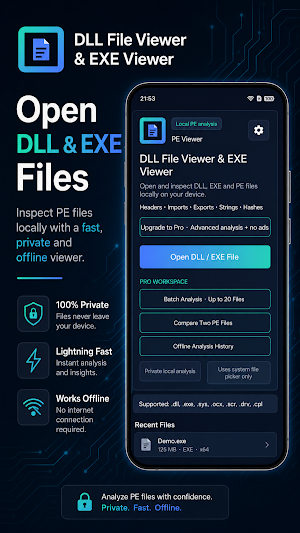
DLL File Viewer & EXE Viewer helps you open, inspect and analyze DLL and EXE files directly on your device.
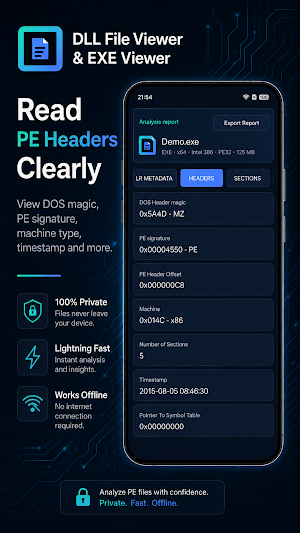
Use it to inspect DLL, EXE and PE files and view headers, architecture, sections, imports, exports, readable strings and file hashes.
This app is designed for developers, students, reverse engineering learners and users who want to quickly inspect technical information from PE files.
Key Features
Open DLL and EXE Files
Open DLL and EXE files and inspect their file structure and metadata.
View PE Headers
Check PE header information, file type, machine type, entry point, image base, subsystem and other PE details when available.
Detect Architecture
Detect common PE architectures, including x86, x64, ARM and ARM64.
View Sections
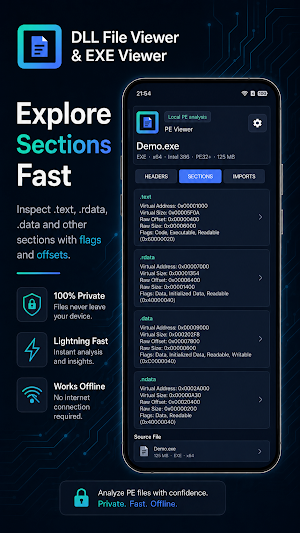
Browse PE sections such as code, data, resources and other section entries. View section names, sizes, offsets and flags when available.
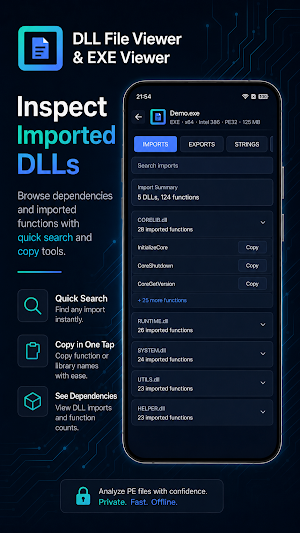
View Imports
Inspect imported DLL names and imported functions. Useful for understanding file dependencies and API usage.
View Exports
View exported functions when they are available in a DLL or EXE file.
Extract Readable Strings
Extract readable ASCII and Unicode strings from DLL and EXE files.
Calculate File Hashes
Calculate and copy common file hashes, including MD5, SHA-1 and SHA-256.
Export Analysis Report
Export basic analysis information as a text report when supported.
Local Processing
Your DLL and EXE files are processed locally on your device. File contents are not uploaded to any server for analysis.
Useful For
• Inspecting DLL files
• Inspecting EXE files
• Viewing PE header information
• Checking x86, x64, ARM or ARM64 architecture
• Viewing imports and exported functions
• Extracting readable strings from PE files
• Calculating MD5, SHA-1 and SHA-256 hashes
• Learning about PE file structure
• Quickly checking file metadata
Important Notice
DLL File Viewer & EXE Viewer is a file viewer and analysis tool. It does not run EXE or DLL files.
This app is not an antivirus app and does not provide malware scanning, malware removal or complete security analysis.
Any technical information shown by this app is for file inspection and learning purposes only. Please only open files from trusted sources.
Use it to inspect DLL, EXE and PE files and view headers, architecture, sections, imports, exports, readable strings and file hashes.
This app is designed for developers, students, reverse engineering learners and users who want to quickly inspect technical information from PE files.
Key Features
Open DLL and EXE Files
Open DLL and EXE files and inspect their file structure and metadata.
View PE Headers
Check PE header information, file type, machine type, entry point, image base, subsystem and other PE details when available.
Detect Architecture
Detect common PE architectures, including x86, x64, ARM and ARM64.
View Sections
Browse PE sections such as code, data, resources and other section entries. View section names, sizes, offsets and flags when available.
View Imports
Inspect imported DLL names and imported functions. Useful for understanding file dependencies and API usage.
View Exports
View exported functions when they are available in a DLL or EXE file.
Extract Readable Strings
Extract readable ASCII and Unicode strings from DLL and EXE files.
Calculate File Hashes
Calculate and copy common file hashes, including MD5, SHA-1 and SHA-256.
Export Analysis Report
Export basic analysis information as a text report when supported.
Local Processing
Your DLL and EXE files are processed locally on your device. File contents are not uploaded to any server for analysis.
Useful For
• Inspecting DLL files
• Inspecting EXE files
• Viewing PE header information
• Checking x86, x64, ARM or ARM64 architecture
• Viewing imports and exported functions
• Extracting readable strings from PE files
• Calculating MD5, SHA-1 and SHA-256 hashes
• Learning about PE file structure
• Quickly checking file metadata
Important Notice
DLL File Viewer & EXE Viewer is a file viewer and analysis tool. It does not run EXE or DLL files.
This app is not an antivirus app and does not provide malware scanning, malware removal or complete security analysis.
Any technical information shown by this app is for file inspection and learning purposes only. Please only open files from trusted sources.
What’s new
Version 2.0.1 · Updated September 25, 2026
• Explore native x86/x64 code directly on Android • Search imports, exports, strings, resources and .NET metadata in one place • New Code workspace and improved PE file navigation • Deeper dependency and PE structure analysis • Improved Hex navigation, performance and stability
Alternatives to DLL File Viewer & EXE Viewer
Looking for apps like DLL File Viewer & EXE Viewer? Here are 6 similar Android apps on Google Play. The highest rated is Solid Explorer File Manager (4.5/5), and all 6 are free to download.
-
Solid Explorer File Manager 4.5
-
RAR 4.2
-
AdGuard: Content Blocker 3.1
-
Deleted Photo & Video Recovery 3.8
-
Spck Editor / Git Client 4.1
-
FX File Explorer 3.8
| App | Rating | Price | Installs | Last updated | Compare |
|---|---|---|---|---|---|
| DLL File Viewer & EXE Viewer | – | Free | 10,000+ | Sep 25, 2026 | |
| Solid Explorer File Manager | 4.5 / 5 | Free | 10,000,000+ | Sep 22, 2026 | Compare |
| RAR | 4.2 / 5 | Free | 100,000,000+ | – | Compare |
| AdGuard: Content Blocker | 3.1 / 5 | Free | 10,000,000+ | Oct 17, 2024 | Compare |
| Deleted Photo & Video Recovery | 3.8 / 5 | Free | 1,000,000+ | Sep 5, 2026 | Compare |
| Spck Editor / Git Client | 4.1 / 5 | Free | 1,000,000+ | Oct 17, 2026 | Compare |
| FX File Explorer | 3.8 / 5 | Free | 10,000,000+ | Apr 9, 2023 | Compare |
Similar apps on Google Play
- Solid Explorer File Manager
- RAR
- AdGuard: Content Blocker
- Deleted Photo & Video Recovery
- Spck Editor / Git Client
- FX File Explorer
- Reading mode
- TrebEdit - Mobile HTML Editor
- RealVNC Viewer: Remote Desktop
- Total Drive - Cloud Storage
- Macrorify - Image Auto Clicker
- Total Commander - file manager
- FeedFlow - RSS Feed Reader
- Super File Manager Explorer
- pdfFiller Edit, fill, sign PDF
- Private Screenshots
- CSV File Viewer - Smart CSV
- WeTransfer : File Transfer
- NaturalReader - Text to Speech
- Termius - Modern SSH Client
- TAP Kiln Control Mobile
- MediaFire
- Falcon PDF - Editor & Tools
- PDF Reader(KDAN PDF): Edit PDF
- Sensi
- nzb360 - Media Server Manager
- Google Automotive Keyboard
- Rocketbook
- Cyberpunk Red Companion
- Mobi PDF・Editor・Scanner・Reader
- PRIVARY Secure Photo Vault
- JotterPad - Writer, Screenplay
- One Key: password manager
- QuickEdit Text Editor Pro
- IronVest - Security & Privacy