
Amazon Cloud Cam
Amazon Mobile LLC Video Players & Editors
With the Cloud Cam app, you can access your Cloud Cam feed, anywhere you go.
- Rating
- 2.7
- 823 ratings
- Downloads
- 100K+
- on Google Play
- Price
- Free
- No in-app purchases
- Updated
- Mar 3
- 2020 · v1.13.110.0_1192651
Screenshots


About Amazon Cloud Cam
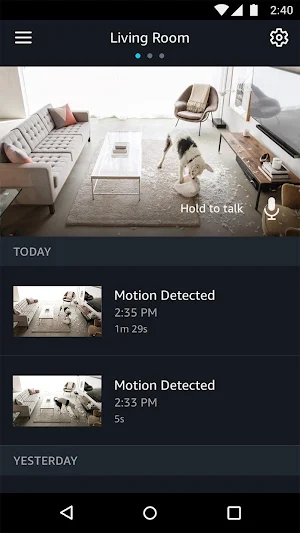
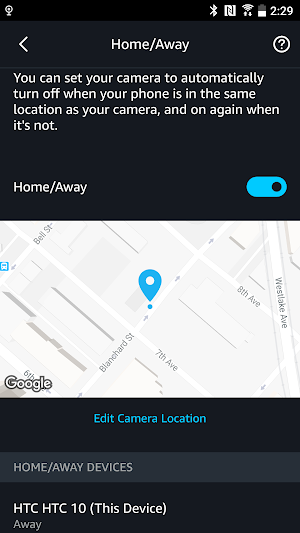
With the Cloud Cam app, you can access your Cloud Cam feed, anywhere you go. Use the Cloud Cam app to check in 24/7 and catch every activity. Replay important activities that were captured throughout the day. Name your cameras to easily differentiate monitoring views, like the kitchen vs. the living room. Listen in or let your kids know when it’s time for bed with two-way audio. You can even customize alerts by highlighting zones that are most important.
Catch every moment
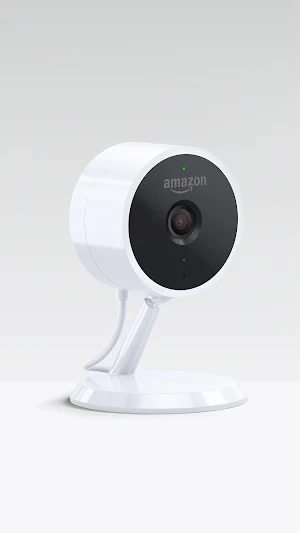
Amazon’s indoor security camera features everything you need to help keep your home safe. With Cloud Cam, you get only the alerts that matter. As soon as activity is detected you’ll be notified through real-time notifications, allowing you to keep a tab on your home from anywhere.
24/7 monitoring
Stay connected 24/7 to your home, family, and pets in crisp 1080p HD, and catch activities as they happen. Cloud Cam captures up to 30 frames per second, ensuring every moment is secured. Use the Cloud Cam app to drop in on your home anytime by viewing live video streams, replay motion alert videos, and more.
See clearly in the dark
Cloud Cam features eight infrared LEDs that let you see clearly in the dark. Cloud Cam’s computer vision algorithms automatically activates night vision when lighting is dim. See the entire room throughout the night—not just a spotlight.
Two-way audio
Cloud Cam’s built-in mic and speaker lets you stay in touch with your household. Check in with the kids after school, tell your dog to stop barking, or say hello through the Cloud Cam app.
Intelligent alerts
Cloud Cam’s computer vision algorithms analyze video clips in real time. Unlock additional features such as person alerts to get notified when someone’s actually there. Zones lets you set areas that Cloud Cam should ignore, like a fish tank or a tree outside a window, so Cloud Cam can focus on activities you care about. And since Cloud Cam’s intelligence lives in the cloud so it automatically adds new features and functionality.
Catch every moment
Amazon’s indoor security camera features everything you need to help keep your home safe. With Cloud Cam, you get only the alerts that matter. As soon as activity is detected you’ll be notified through real-time notifications, allowing you to keep a tab on your home from anywhere.
24/7 monitoring
Stay connected 24/7 to your home, family, and pets in crisp 1080p HD, and catch activities as they happen. Cloud Cam captures up to 30 frames per second, ensuring every moment is secured. Use the Cloud Cam app to drop in on your home anytime by viewing live video streams, replay motion alert videos, and more.
See clearly in the dark
Cloud Cam features eight infrared LEDs that let you see clearly in the dark. Cloud Cam’s computer vision algorithms automatically activates night vision when lighting is dim. See the entire room throughout the night—not just a spotlight.
Two-way audio
Cloud Cam’s built-in mic and speaker lets you stay in touch with your household. Check in with the kids after school, tell your dog to stop barking, or say hello through the Cloud Cam app.
Intelligent alerts
Cloud Cam’s computer vision algorithms analyze video clips in real time. Unlock additional features such as person alerts to get notified when someone’s actually there. Zones lets you set areas that Cloud Cam should ignore, like a fish tank or a tree outside a window, so Cloud Cam can focus on activities you care about. And since Cloud Cam’s intelligence lives in the cloud so it automatically adds new features and functionality.
What’s new
Version 1.13.110.0_1192651 · Updated March 3, 2020
* Bug fixes and general performance improvements.
User reviews

I have had trouble recently getting live video feeds to work on my phone. After digging into it, I discovered that Verizon is throttling traffic to Amazon's cloud cam servers so severely that it can't even function. Turning on a VPN fixes it. If you have this problem and are on Verizon, I suggest contacting their su...

Use it everyday

Best Ever!!!

Great for spying on my dad

Works great

Great video quality, easy to use, Peace of mind on security and safety.
Alternatives to Amazon Cloud Cam
Looking for apps like Amazon Cloud Cam? Here are 6 similar Android apps on Google Play. The highest rated is Amazon Shopping (4.5/5), and all 6 are free to download.
-
Amazon Shopping 4.5
-
Amazon Prime Video 4.1
-
Amazon Alexa 4.3
-
Amazon Fire TV 4.0
-
Amazon Music: Songs & Podcasts 3.7
-
Amazon Freevee 3.9
| App | Rating | Price | Installs | Last updated | Compare |
|---|---|---|---|---|---|
| Amazon Cloud Cam | 2.7 / 5 | Free | 100,000+ | Mar 3, 2020 | |
| Amazon Shopping | 4.5 / 5 | Free | 1,000,000,000+ | Sep 16, 2026 | Compare |
| Amazon Prime Video | 4.1 / 5 | Free | 500,000,000+ | Oct 17, 2026 | Compare |
| Amazon Alexa | 4.3 / 5 | Free | 100,000,000+ | Sep 25, 2026 | Compare |
| Amazon Fire TV | 4.0 / 5 | Free | 50,000,000+ | Sep 17, 2026 | Compare |
| Amazon Music: Songs & Podcasts | 3.7 / 5 | Free | 100,000,000+ | Oct 8, 2026 | Compare |
| Amazon Freevee | 3.9 / 5 | Free | 100,000+ | Jul 28, 2021 | Compare |
Compare Amazon Cloud Cam with the top alternatives: ratings, updates, ASO score and keyword gaps →
Similar apps on Google Play
- Amazon Shopping
- Amazon Prime Video
- Amazon Alexa
- Amazon Fire TV
- Amazon Music: Songs & Podcasts
- Amazon Freevee
- Amazon Photos
- Amazon Freevee
- Amazon Kindle
- Amazon A to Z
- Amazon Halo
- Amazon Business: Shop and Save
- Amazon Seller
- Amazon Kids+: Books, Videos…
- Amazon Music
- Luna Controller
- Amazon Shopper Panel
- Amazon for Tablets
- Super Spy Ryan: Rumble Arena
- Amazon Chime
- Transparency
- Amazon Relay
- Prime Video - Android TV
- AWS Events
- Amazon Music for Artists
- Amazon Key
- AEA – Amazon Employees
- Amazon Music
- Amazon Astro
- Amazon WorkDocs
- Amazon Glow
- Amazon Hub Counter
- Inside Amazon News
- Amazon Care
- Amazon WorkSpaces
- Selling Services on Amazon
- Amazon QuickSight
- Amazon Alexa for Smart Watches
- Amazon WorkingWell
- AWS IoT 1-Click
- Amazon Honeycode
- KfB Install
- Amazon Monitron
- AWS Outposts
- Amazon Communities
- Amazon Alexa - Show Mode for L
- AWS Snow Family Verification