

Authenticator App - 2FA
ArtemisLab Productivity In-app purchases Contains ads
2-Step Verification:Enable Two Factor Authentication(2FA) for all your accounts.
- Rating
- 3.8
- 10.1K ratings
- Downloads
- 2.8M+
- on Google Play
- Price
- Free
- In-app purchases
- Updated
- Sep 7
- 2026 · v1.0.19
Screenshots


About Authenticator App - 2FA
Welcome to a new era of digital security with our Authenticator App - 2FA dedicated two-factor authentication solution designed for all of your account.
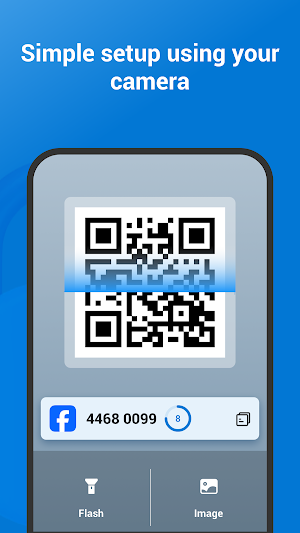
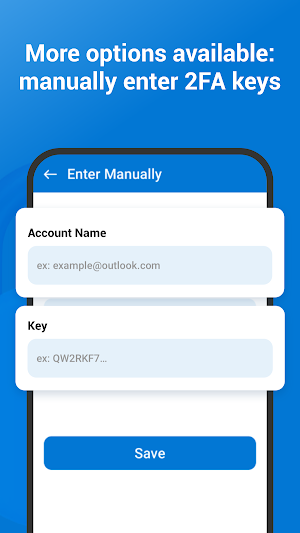
So what is 2FA authenticator app? This 2FA authenticator app generates a one-time password (OTP or TOTP) for two-factor authentication (2FA) or multi-factor authentication (MFA) by scanning a QR code without manual input. The dynamic verification code has a 30-second validity period, offering enhanced security compared to traditional passwords.
In an online world where security breaches are increasingly common, the necessity of using 2FA to protect your social media accounts cannot be overstated. Our Authenticator App is your trusted companion in safeguarding your accounts.
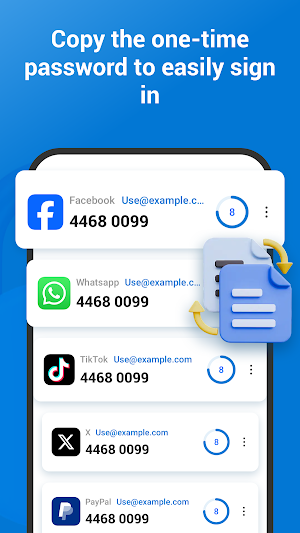
2FA authentication is more than just an optional feature; it's an essential layer of protection for your online identity. By generating unique one-time passwords (OTPs) for all your accounts, this Authenticator App - 2FA ensures that only you have access to your accounts. These OTPs add a critical second layer of security, making it much harder for intruders to breach your private information.
Understanding the diverse nature of the most online service: Finance, Crypto, Bank, Insurance, Social, Dating, eCommerce, Business, IT including Facebook, Instagram, Google, Twitter, Microsoft, Salesforce, WhatsApp, Outlook, Amazon, Discord, Walmart, PlayStation, Steam, Binance, Coinbase, Crypto.com, ..., any online services, our app seamlessly integrates with each platform. Whether you're sharing life updates on Facebook, capturing moments on Instagram, connecting through WhatsApp, or chatting on Messenger, the Facebook 2FA Authenticator is designed to provide unyielding security. With just a few simple steps, you can set up 2-StepVerification/ 2FA authentication for each of these apps, fortifying your accounts against unauthorized access.
Privacy and convenience are at the heart of the Authenticator App - 2FA. The app operates offline, ensuring that your OTPs for all your accounts are always accessible, even without an internet connection. Our focus on privacy means that all your data is stored securely on your device, with no third-party access.
In summary, the Authenticator App -2FA is not just an app; it's a commitment to safeguard your online presence across all of your accounts. Embrace the power of two-factor authentication and take a significant step towards securing your digital life. It can easily backup and restore all your accounts offline, a great alternative to Microsoft Authenticator.
Implementing 2FA Authentication or two-factor authentication (2FA or MFA) or 2-step verification is one of the most effective and straightforward measures to safeguard your accounts from hacking attempts. It is highly recommended by security experts to enable 2FA Authentication, especially for Finance, Crypto, Bank, Insurance, Social, Dating, eCommerce, Business, IT applications. It is the right OTP Authenticator App or 2FA Authenticator App for you to do 2-step verification.
You may find 2FA Authentication is adopted by many platforms:
- Instagram authentication app
- Authentication app for Facebook
- Playstation authenticator app, PS5 Authentication, PS4 Authenticaton
So what is 2FA authenticator app? This 2FA authenticator app generates a one-time password (OTP or TOTP) for two-factor authentication (2FA) or multi-factor authentication (MFA) by scanning a QR code without manual input. The dynamic verification code has a 30-second validity period, offering enhanced security compared to traditional passwords.
In an online world where security breaches are increasingly common, the necessity of using 2FA to protect your social media accounts cannot be overstated. Our Authenticator App is your trusted companion in safeguarding your accounts.
2FA authentication is more than just an optional feature; it's an essential layer of protection for your online identity. By generating unique one-time passwords (OTPs) for all your accounts, this Authenticator App - 2FA ensures that only you have access to your accounts. These OTPs add a critical second layer of security, making it much harder for intruders to breach your private information.
Understanding the diverse nature of the most online service: Finance, Crypto, Bank, Insurance, Social, Dating, eCommerce, Business, IT including Facebook, Instagram, Google, Twitter, Microsoft, Salesforce, WhatsApp, Outlook, Amazon, Discord, Walmart, PlayStation, Steam, Binance, Coinbase, Crypto.com, ..., any online services, our app seamlessly integrates with each platform. Whether you're sharing life updates on Facebook, capturing moments on Instagram, connecting through WhatsApp, or chatting on Messenger, the Facebook 2FA Authenticator is designed to provide unyielding security. With just a few simple steps, you can set up 2-StepVerification/ 2FA authentication for each of these apps, fortifying your accounts against unauthorized access.
Privacy and convenience are at the heart of the Authenticator App - 2FA. The app operates offline, ensuring that your OTPs for all your accounts are always accessible, even without an internet connection. Our focus on privacy means that all your data is stored securely on your device, with no third-party access.
In summary, the Authenticator App -2FA is not just an app; it's a commitment to safeguard your online presence across all of your accounts. Embrace the power of two-factor authentication and take a significant step towards securing your digital life. It can easily backup and restore all your accounts offline, a great alternative to Microsoft Authenticator.
Implementing 2FA Authentication or two-factor authentication (2FA or MFA) or 2-step verification is one of the most effective and straightforward measures to safeguard your accounts from hacking attempts. It is highly recommended by security experts to enable 2FA Authentication, especially for Finance, Crypto, Bank, Insurance, Social, Dating, eCommerce, Business, IT applications. It is the right OTP Authenticator App or 2FA Authenticator App for you to do 2-step verification.
You may find 2FA Authentication is adopted by many platforms:
- Instagram authentication app
- Authentication app for Facebook
- Playstation authenticator app, PS5 Authentication, PS4 Authenticaton
What’s new
Version 1.0.19 · Updated September 7, 2026
- Minor fix to improve launching speed.
Alternatives to Authenticator App - 2FA
Looking for apps like Authenticator App - 2FA? Here are 6 similar Android apps on Google Play. The highest rated is 2FA Authenticator (2FAS) (4.4/5), and all 6 are free to download.
-
Authenticator App 4.2
-
2FA Authenticator (2FAS) 4.4
-
Authenticator 3.8
-
1Password: Password Manager 3.5
-
TOTP Authenticator – 2FA Cloud 3.5
-
Aegis Authenticator - 2FA App 4.4
| App | Rating | Price | Installs | Last updated | Compare |
|---|---|---|---|---|---|
| Authenticator App - 2FA | 3.8 / 5 | Free | 1,000,000+ | Sep 7, 2026 | |
| Authenticator App | 4.2 / 5 | Free | 10,000,000+ | Oct 2, 2026 | Compare |
| 2FA Authenticator (2FAS) | 4.4 / 5 | Free | 5,000,000+ | Oct 6, 2026 | Compare |
| Authenticator | 3.8 / 5 | Free | 1,000,000+ | Oct 24, 2026 | Compare |
| 1Password: Password Manager | 3.5 / 5 | Free | 1,000,000+ | Oct 20, 2026 | Compare |
| TOTP Authenticator – 2FA Cloud | 3.5 / 5 | Free | 1,000,000+ | Sep 3, 2026 | Compare |
| Aegis Authenticator - 2FA App | 4.4 / 5 | Free | 1,000,000+ | Sep 6, 2026 | Compare |
Similar apps on Google Play
- Authenticator App
- 2FA Authenticator (2FAS)
- Authenticator
- 1Password: Password Manager
- TOTP Authenticator – 2FA Cloud
- Aegis Authenticator - 2FA App
- Bitwarden Password Manager
- Duo Mobile
- Password Manager SafeInCloud 2
- Keeper Password Manager
- Microsoft Authenticator
- Privacy Defender - Security
- LastPass Password Manager
- NordPass® Password Manager
- Dashlane - Password Manager
- Proton Pass: Password Manager
- Twilio Authy Authenticator
- Protection App
- Password Manager SafeInCloud 1
- Firewall Security - No Root
- LastPass Authenticator
- NordLocker Cloud Storage Space
- Okta Verify
- SimpleLogin | Anti-spam
- Certo: Anti Spyware & Security
- Azure Information Protection
- My Passwords Manager
- One Key: password manager
- FortiExplorer
- Mobile Security & Antivirus
- Passwords-Manager-PRO
- mSecure - Password Manager
- LifeLock Identity by Norton
- StealthMail
- Synology Secure SignIn
- Locker Password Manager
- Norton Password Manager
- NetGuard - no-root firewall
- Offline Password Manager
- WOT Mobile Security Protection
- RAYNET CRM
- Microsoft Intune
- simple cloud password manager
- Resecurity: ID Protection
- Password Depot for Android
- Kaspersky Password Manager
- EPRIVO Encrypted Email & Chat
- AppLock - Fingerprint
- eWallet - Password Manager
- Bitdefender Mobile Security
- Lookout Life - Mobile Security
- Passmate
- ESET Mobile Security Antivirus
- Full Mail: Encrypted Email for
- Android Device Manager PI
- Proton Mail: Encrypted Email
- Malwarebytes Mobile Security
- McAfee Security: Antivirus VPN
- AppLock Master
- PassWallet - mobile passes
- Norton360 Antivirus & Security
- TTLock
- Salesforce
- Default Apps Pro
- DNS Firewall by KeepSolid
- pCloud: Cloud Storage
- PrivadoVPN - VPN App & Proxy
- Simple Password Manager
- Google Admin