

CapFlow: Captions & Subtitles
Video Players & Editors In-app purchases Contains ads
Add subtitles to video: auto captions, karaoke, SRT export, no watermark.
- Downloads
- 18.1K+
- on Google Play
- Price
- Free
- In-app purchases
- Updated
- Sep 23
- 2026 · v1.9
Screenshots
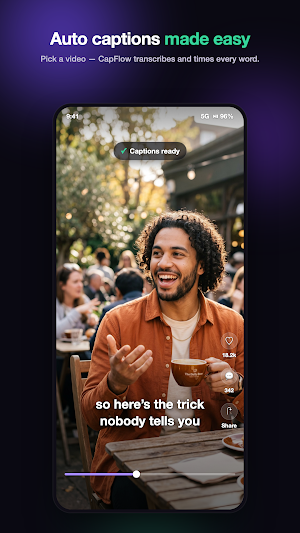
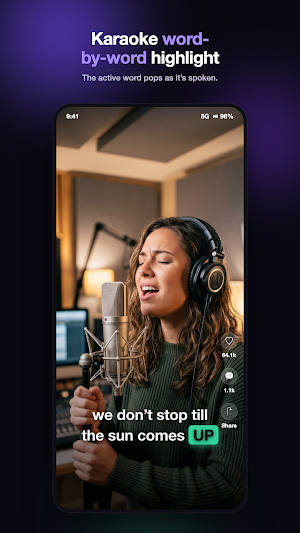
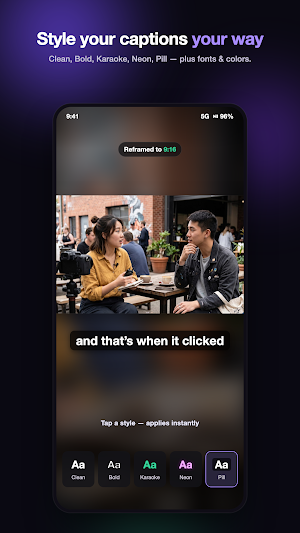
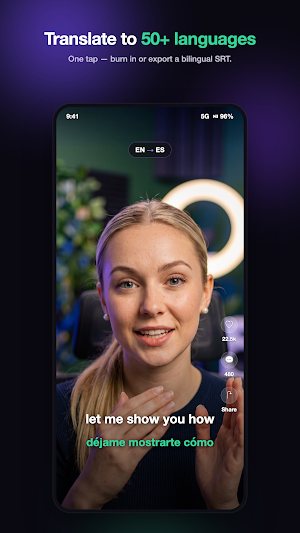

About CapFlow: Captions & Subtitles
CapFlow makes it easy to add subtitles to any video. It's a subtitle maker and auto caption generator that turns speech into editable, time-synced captions — style them and burn them into the video, or export a subtitle file. No watermark.
Built for TikTok, Reels, and YouTube Shorts creators — and anyone who wants clear, accessible video — CapFlow helps you create and customize captions and subtitles.
WHY CAPFLOW
• Automatic captions with editable, word-level timing
• Karaoke word-by-word highlighting that follows the speaker
• Full control over how your captions look and read
• No watermark on your exported video
• Export a captioned video or a subtitle file (SRT / VTT)
FEATURES
• Automatic subtitles — the AI caption generator creates editable, word-timed captions
• Full caption editor — tap to fix text, split or merge lines, and drag to retime (snaps to words)
• Caption styles — Clean, Bold Outline, Karaoke, Pill, Minimal, and Neon presets, plus custom fonts, colors, size, and position
• Animated captions — word-by-word karaoke highlight for that viral short-form look
• Translate subtitles — translate captions into 50+ languages, or transcribe-to-English in one tap; export a bilingual SRT
• Reframe for any platform — 9:16, 1:1, or 16:9 canvas with blurred fill for TikTok, Reels, Shorts, and feed videos
• Filler-word cleanup — flag and remove "um" and "uh" with one tap
• Video to text — transcribe any clip and export a clean SRT or VTT for YouTube, editing apps, or your records
PERFECT FOR
• TikTok, Instagram Reels & YouTube Shorts creators
• Podcasters turning audio into captioned clips
• Making videos accessible with closed captions
• Anyone who wants to add subtitles to video
HOW IT WORKS
1. Pick a video (or share one to CapFlow)
2. CapFlow generates captions automatically
3. Style them and fine-tune the wording
4. Export a captioned video or an SRT file
Add subtitles to your next video with CapFlow — the subtitle maker and auto caption generator for creators. Auto captions, karaoke text, styles, and translation in one app.
TikTok, Instagram, Reels, YouTube, and Shorts are trademarks of their respective owners. CapFlow is an independent app and is not affiliated with, endorsed by, or sponsored by any of these platforms.
Built for TikTok, Reels, and YouTube Shorts creators — and anyone who wants clear, accessible video — CapFlow helps you create and customize captions and subtitles.
WHY CAPFLOW
• Automatic captions with editable, word-level timing
• Karaoke word-by-word highlighting that follows the speaker
• Full control over how your captions look and read
• No watermark on your exported video
• Export a captioned video or a subtitle file (SRT / VTT)
FEATURES
• Automatic subtitles — the AI caption generator creates editable, word-timed captions
• Full caption editor — tap to fix text, split or merge lines, and drag to retime (snaps to words)
• Caption styles — Clean, Bold Outline, Karaoke, Pill, Minimal, and Neon presets, plus custom fonts, colors, size, and position
• Animated captions — word-by-word karaoke highlight for that viral short-form look
• Translate subtitles — translate captions into 50+ languages, or transcribe-to-English in one tap; export a bilingual SRT
• Reframe for any platform — 9:16, 1:1, or 16:9 canvas with blurred fill for TikTok, Reels, Shorts, and feed videos
• Filler-word cleanup — flag and remove "um" and "uh" with one tap
• Video to text — transcribe any clip and export a clean SRT or VTT for YouTube, editing apps, or your records
PERFECT FOR
• TikTok, Instagram Reels & YouTube Shorts creators
• Podcasters turning audio into captioned clips
• Making videos accessible with closed captions
• Anyone who wants to add subtitles to video
HOW IT WORKS
1. Pick a video (or share one to CapFlow)
2. CapFlow generates captions automatically
3. Style them and fine-tune the wording
4. Export a captioned video or an SRT file
Add subtitles to your next video with CapFlow — the subtitle maker and auto caption generator for creators. Auto captions, karaoke text, styles, and translation in one app.
TikTok, Instagram, Reels, YouTube, and Shorts are trademarks of their respective owners. CapFlow is an independent app and is not affiliated with, endorsed by, or sponsored by any of these platforms.
What’s new
Version 1.9 · Updated September 23, 2026
What's new in 1.9 • See how long it will take: CapFlow now shows the time left while it prepares and while it writes your captions. • Nearly full phone? CapFlow checks before exporting, tells you plainly when a video can't be saved, and offers 720p when that fits. • Small fixes.
User reviews

nice app 😊

it's wonderful. I highly recommend
Alternatives to CapFlow: Captions & Subtitles
Looking for apps like CapFlow: Captions & Subtitles? Here are 6 similar Android apps on Google Play. The highest rated is FilmoraHD - AI Video Creator (4.6/5), and all 6 are free to download.
-
Motion Ninja Video Editor 4.5
-
AI Voice: Text to Speech TTS 4.4
-
Mojo: Reels and Video Captions 4.5
-
NaturalReader - Text to Speech 4.3
-
FilmoraHD - AI Video Creator 4.5
-
Teleprompter with Video Audio 4.2
| App | Rating | Price | Installs | Last updated | Compare |
|---|---|---|---|---|---|
| CapFlow: Captions & Subtitles | – | Free | 10,000+ | Sep 23, 2026 | |
| Motion Ninja Video Editor | 4.5 / 5 | Free | 10,000,000+ | Jun 25, 2024 | Compare |
| AI Voice: Text to Speech TTS | 4.4 / 5 | Free | 1,000,000+ | Nov 3, 2026 | Compare |
| Mojo: Reels and Video Captions | 4.5 / 5 | Free | 10,000,000+ | – | Compare |
| NaturalReader - Text to Speech | 4.3 / 5 | Free | 5,000,000+ | Oct 30, 2026 | Compare |
| FilmoraHD - AI Video Creator | 4.6 / 5 | Free | 1,000,000+ | Aug 21, 2025 | Compare |
| Teleprompter with Video Audio | 4.2 / 5 | Free | 1,000,000+ | Sep 11, 2026 | Compare |
Similar apps on Google Play
- Motion Ninja Video Editor
- AI Voice: Text to Speech TTS
- Mojo: Reels and Video Captions
- NaturalReader - Text to Speech
- FilmoraHD - AI Video Creator
- Teleprompter with Video Audio
- AI Cover & Songs: Music AI
- Teleprompter.com
- Eklipse: AI Gaming Clip Maker
- AI Video Generator: Livensa
- AI Video Generator: Voiser AI
- Vozo AI Video Translator & Dub
- Transkriptor - Speech to Text
- Fliki - AI Video Editor
- Storyboard GO
- Veffex: Video effects, filters
- MagPie - Native speech
- TouchNote: Gifts & Cards
- WOMBO Elections: AI Memes
- PixelFlow: Intro Video maker
- Spring - Video Editor & Maker
- EdrawMind: AI Mind map & Note
- Zeemo: AI Video&Auto Captions
- Smart Video Crop - Video Cut
- LightCut -AI Auto Video Editor
- Teleprompter for Video
- RecCloud – AI Video Generator
- Transcribe Speech to Text
- Videoleap: AI Video Editor
- Focus Video - Video Compressor
- YouCam Video: AI Video Editor
- Apowersoft Background Eraser
- invideo AI: AI Video Generator
- AI Video Maker - Renderforest
- Listening: Text to Speech
- Jasper AI Copy Content Writer
- VLLO - Video Editor Vlog Edits
- BIGVU Teleprompter & Captions
- ActionDirector - Video Editing
- Captiono: AI Subtitles
- Clipfly - AI Baby Dance Video
- GOGH: Animated Drawings
- Promeo - Story & Reels Maker
- Notta-Transcribe Audio to Text
- MagicLight:AI Long Video Maker
- Captions Lite
- PeriPage
- BeatSync: Photo & Music Videos
- TicNote: AI Recorder & Agent
- Dawn AI - Avatar Generator
- GoCut - Effect Video Editor
- Letterly: Write by Voice & AI
- Ava: Transcribe Voice to Text
- Magic Mitten
- Node Video
- Video AI -AI Video Creator
- Clony: AI Voice & Face Cloning
- TF STUDIO
- Notesnook Secure Private Notes
- Liner - AI Search and Finance
- ElevenReader: Read Books Aloud
- Freed: AI Clinician Assistant
- Stop Motion Studio Pro
- Post Maker for Social Media
- ideaShell: AI Voice Notes
- GoPro Quik: Video Editor
- AI Book Writer Generator
- Campfire: eBooks & Extras
- YesWriter - Writing, Notes
- WOMBO Dream - AI Art Generator
- Fable - Kids' Story Creator
- Clever AI Hub - Pro AI Agents
- Novel Effect: Read Aloud Books
- GenZArt: Fast AI Art Generator
- PosterMyWall: Design & Promote
- AI Writer: Any Content Writing
- Collect by WeTransfer
- Ardent Money Ninja Training
- Writecream - AI Content Writer
- Blend: AI Videos Logos Try On
- Daily AI Writer: Email, Letter
- Loom – Screen and Cam Recorder
- Gaminik: Auto Screen Translate