

睡眠時間 記録帳
Health & Fitness
Record and graph your sleep time Record the date and time you went to bed and woke up and calculate your sleep time.
- Downloads
- 11+
- on Google Play
- Price
- $9.99
- No in-app purchases
- Updated
- Jan 20
- 2026 · v26.1.2
Screenshots


About 睡眠時間 記録帳
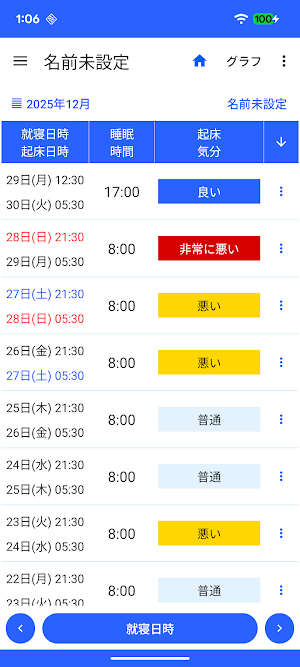
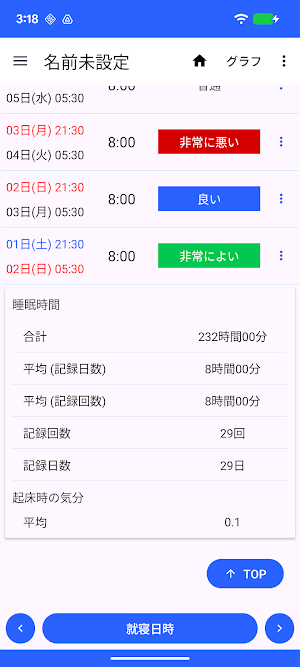
Sleep time is calculated and displayed based on the date and time you went to bed and the date and time you woke up.
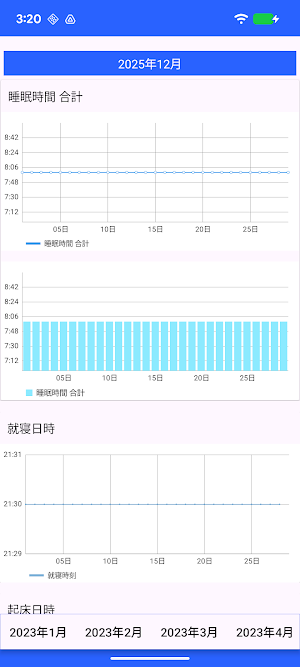
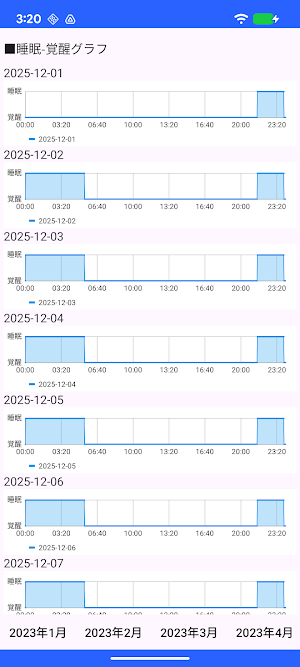
Sleep time is displayed as a line graph and a bar graph.
■Differences from the free version
Ads are not displayed.
A star will appear on the app icon.
The screen design is different.
Otherwise, it is the same as the free version.
・Recording bedtime date and time
1. Tap the "Bedtime" button.
If you press and hold the button, steps 2 and 3 will be skipped,
the current date and time will be set.
2. Select the date and time and tap "Next."
3. Enter your bedtime and tap OK.
・To record wakeup date and time
1. Tap the "Wakeup Date and Time" button in the wakeup date and time column in the table.
If you press and hold the button, steps 2 and 3 will be skipped,
the current date and time will be set.
2. Select the date and time and tap "Next."
3. Enter your wakeup time and tap "Done."
▼Sleep Time
The sleep time displayed in the table is automatically calculated based on the date and time you went to bed and woke up.
▼To record your mood upon waking
1. Tap "Mood" in the "Mood upon waking" column in the table.
2. Select your mood upon waking.
▼To delete all records
You can delete all records by selecting "Clear all data" from the menu in the upper right corner.
Sleep time is displayed as a line graph and a bar graph.
■Differences from the free version
Ads are not displayed.
A star will appear on the app icon.
The screen design is different.
Otherwise, it is the same as the free version.
・Recording bedtime date and time
1. Tap the "Bedtime" button.
If you press and hold the button, steps 2 and 3 will be skipped,
the current date and time will be set.
2. Select the date and time and tap "Next."
3. Enter your bedtime and tap OK.
・To record wakeup date and time
1. Tap the "Wakeup Date and Time" button in the wakeup date and time column in the table.
If you press and hold the button, steps 2 and 3 will be skipped,
the current date and time will be set.
2. Select the date and time and tap "Next."
3. Enter your wakeup time and tap "Done."
▼Sleep Time
The sleep time displayed in the table is automatically calculated based on the date and time you went to bed and woke up.
▼To record your mood upon waking
1. Tap "Mood" in the "Mood upon waking" column in the table.
2. Select your mood upon waking.
▼To delete all records
You can delete all records by selecting "Clear all data" from the menu in the upper right corner.
What’s new
Version 26.1.2 · Updated January 20, 2026
アプリの画面を変更しました
Alternatives to 睡眠時間 記録帳
Looking for apps like 睡眠時間 記録帳? Here are 6 similar Android apps on Google Play. 2 of the 6 are free to download.
-
出勤 退勤 記録帳 勤務時間を記録するためのアプリ
-
医療費 記録帳 医療費と通院費を管理するためのアプリ
-
体温 記録帳 体温管理と体温のグラフを表示
-
光熱費 メモ 記録 電気代 ガス代 水道代 光熱費管理アプリ
-
Transportation expenses
-
Utilities cost note
| App | Rating | Price | Installs | Last updated | Compare |
|---|---|---|---|---|---|
| 睡眠時間 記録帳 | – | $9.99 | 10+ | Jan 20, 2026 | |
| 出勤 退勤 記録帳 勤務時間を記録するためのアプリ | – | 7.49 USD | 5+ | Jul 24, 2026 | Compare |
| 医療費 記録帳 医療費と通院費を管理するためのアプリ | – | 6.49 USD | 10+ | Mar 17, 2026 | Compare |
| 体温 記録帳 体温管理と体温のグラフを表示 | – | 6.49 USD | 5+ | – | Compare |
| 光熱費 メモ 記録 電気代 ガス代 水道代 光熱費管理アプリ | – | 7.99 USD | 10+ | – | Compare |
| Transportation expenses | – | Free | 100+ | Aug 25, 2026 | Compare |
| Utilities cost note | – | Free | 50,000+ | Aug 25, 2026 | Compare |
Compare 睡眠時間 記録帳 with the top alternatives: ratings, updates, ASO score and keyword gaps →