
Posture Correction Reminder
Flash Software Solution Health & Fitness Contains ads
Posture reminders you actually act on. 30 second guided desk stretches.
- Downloads
- 14+
- on Google Play
- Price
- Free
- No in-app purchases
- Updated
- Aug 18
- 2026 · v1.3
Screenshots

About Posture Correction Reminder
Most posture apps send a notification that says "sit up straight". You glance at it, swipe it away, and nothing changes. After a week you stop noticing them at all.
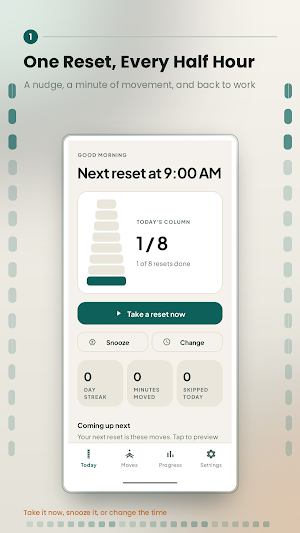
Posture Reminder works differently. Every reminder opens a 30 second guided reset: one specific stretch, a countdown, and clear instructions. You either do it or you skip it, and the app records which. That single difference changes what the app is able to tell you about yourself.
WHAT YOU GET
Guided resets, not nags. Tap the reminder and follow along. Chin tucks, shoulder rolls, chair backbends, eye breaks, wrist stretches. Every move has step by step instructions and a short explanation of why it helps.
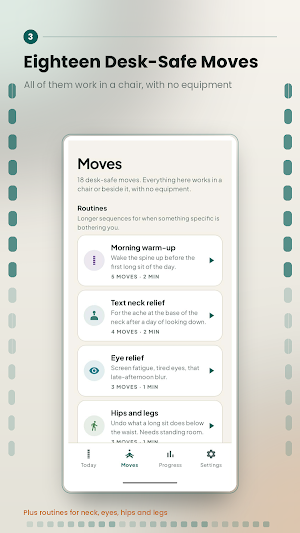
18 desk-safe moves. All of them work in your chair or right beside it. No mat, no equipment, no floor space, nothing that needs privacy in an open office.
7 routines for when something specific is bothering you. Text neck relief, eye relief, hips and legs, wrists and hands, morning warm-up, end of day, and a full reset.
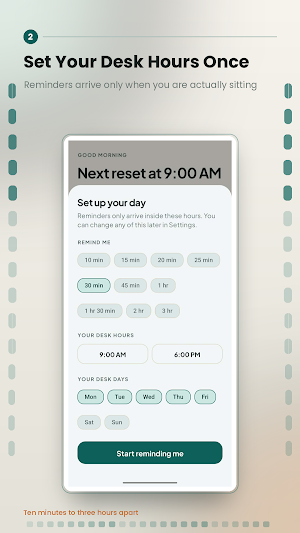
A schedule that fits your actual day. Set your interval, your desk hours and your desk days. The defaults follow the 30/30 ergonomics guidance and the 20-20-20 eye rule.
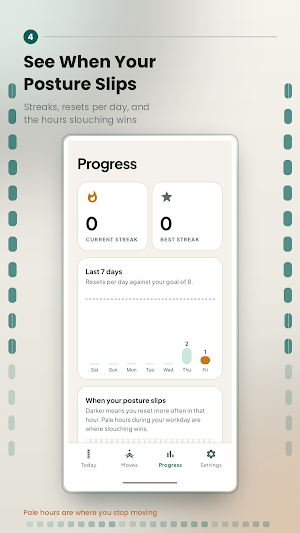
Find out when your posture really slips. Because the app records the reminders you ignored as well as the ones you acted on, it builds an hourly heat map of your day and names your weakest hour. Most people are surprised by theirs.
Streaks, a daily goal and milestones, so the habit survives past the first week.
Spoken coaching. Switch it on and each stretch is read aloud, so you can follow along without taking your eyes off your work.
Skip reminders when you have already been moving. Optional, and it uses your step count so you are not nagged straight after a walk.
A home screen widget and a Quick Settings tile, for a reset in one tap.
Export your whole history to CSV whenever you want it.
COMPLETELY PRIVATE
No account. No sign-up. No analytics. Nothing you do is uploaded anywhere, because there is nowhere to upload it to. Your history lives on your phone, and you can export or erase it at any time.
WORTH KNOWING BEFORE YOU INSTALL
This app reminds you to move and walks you through the stretch. It does not watch you through your camera and it cannot tell when you are slouching. If posture detection is what you are looking for, this is not that app.
The stretches are general desk ergonomics guidance, not medical advice. Stop if anything hurts, and speak to a qualified professional about any ongoing pain.
IF YOUR REMINDERS DO NOT ARRIVE
Some phones block background apps by default, which delays or silences reminders. This is common on Honor, Huawei, Xiaomi, Oppo and Vivo devices. Open Settings inside the app and tap "Let reminders run in the background" to fix it in a couple of taps.
Posture Reminder works differently. Every reminder opens a 30 second guided reset: one specific stretch, a countdown, and clear instructions. You either do it or you skip it, and the app records which. That single difference changes what the app is able to tell you about yourself.
WHAT YOU GET
Guided resets, not nags. Tap the reminder and follow along. Chin tucks, shoulder rolls, chair backbends, eye breaks, wrist stretches. Every move has step by step instructions and a short explanation of why it helps.
18 desk-safe moves. All of them work in your chair or right beside it. No mat, no equipment, no floor space, nothing that needs privacy in an open office.
7 routines for when something specific is bothering you. Text neck relief, eye relief, hips and legs, wrists and hands, morning warm-up, end of day, and a full reset.
A schedule that fits your actual day. Set your interval, your desk hours and your desk days. The defaults follow the 30/30 ergonomics guidance and the 20-20-20 eye rule.
Find out when your posture really slips. Because the app records the reminders you ignored as well as the ones you acted on, it builds an hourly heat map of your day and names your weakest hour. Most people are surprised by theirs.
Streaks, a daily goal and milestones, so the habit survives past the first week.
Spoken coaching. Switch it on and each stretch is read aloud, so you can follow along without taking your eyes off your work.
Skip reminders when you have already been moving. Optional, and it uses your step count so you are not nagged straight after a walk.
A home screen widget and a Quick Settings tile, for a reset in one tap.
Export your whole history to CSV whenever you want it.
COMPLETELY PRIVATE
No account. No sign-up. No analytics. Nothing you do is uploaded anywhere, because there is nowhere to upload it to. Your history lives on your phone, and you can export or erase it at any time.
WORTH KNOWING BEFORE YOU INSTALL
This app reminds you to move and walks you through the stretch. It does not watch you through your camera and it cannot tell when you are slouching. If posture detection is what you are looking for, this is not that app.
The stretches are general desk ergonomics guidance, not medical advice. Stop if anything hurts, and speak to a qualified professional about any ongoing pain.
IF YOUR REMINDERS DO NOT ARRIVE
Some phones block background apps by default, which delays or silences reminders. This is common on Honor, Huawei, Xiaomi, Oppo and Vivo devices. Open Settings inside the app and tap "Let reminders run in the background" to fix it in a couple of taps.
What’s new
Version 1.3 · Updated August 18, 2026
UI changes
Alternatives to Posture Correction Reminder
Looking for apps like Posture Correction Reminder? Here are 6 similar Android apps on Google Play. The highest rated is One Deep Breath: Breathwork (4.5/5), and all 6 are free to download.
-
DanceBody Workout
-
Pushup Tracker GOLDEN Push-Ups 3.3
-
Breathwrk: Breathing Exercises 2.3
-
Push Up Counter and Tracker 4.2
-
One Deep Breath: Breathwork 4.5
-
Strong Workout Tracker Gym Log 4.3
| App | Rating | Price | Installs | Last updated | Compare |
|---|---|---|---|---|---|
| Posture Correction Reminder | – | Free | 10+ | Aug 18, 2026 | |
| DanceBody Workout | – | Free | 1,000+ | Feb 9, 2026 | Compare |
| Pushup Tracker GOLDEN Push-Ups | 3.3 / 5 | Free | 100,000+ | Oct 18, 2026 | Compare |
| Breathwrk: Breathing Exercises | 2.3 / 5 | Free | 500,000+ | Sep 18, 2026 | Compare |
| Push Up Counter and Tracker | 4.2 / 5 | Free | 100,000+ | Oct 5, 2026 | Compare |
| One Deep Breath: Breathwork | 4.5 / 5 | Free | 100,000+ | Sep 15, 2026 | Compare |
| Strong Workout Tracker Gym Log | 4.3 / 5 | Free | 1,000,000+ | Oct 16, 2026 | Compare |
Similar apps on Google Play
- DanceBody Workout
- Pushup Tracker GOLDEN Push-Ups
- Breathwrk: Breathing Exercises
- Push Up Counter and Tracker
- One Deep Breath: Breathwork
- Strong Workout Tracker Gym Log
- Muscle & Motion: Yoga
- The Lyss Method V2
- Cubii
- Thenx: Calisthenics Training
- GOWOD – Mobility & Stretching
- HIIT | Down Dog
- Squabbit - Golf Tournament App