

Useful Sound Stitch
Music & Audio Contains ads
Cut, split, and join audio. Save as M4A/WAV
- Downloads
- 100+
- on Google Play
- Price
- Free
- No in-app purchases
- Updated
- May 26
- 2026 · v1.0.1
Screenshots


About Useful Sound Stitch
Load music and audio files, keep only the parts you need, join them in order, and save the result with a simple audio editing app.
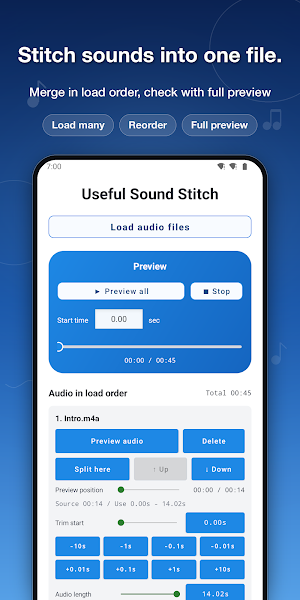
Useful Sound Stitch lets you load multiple audio files, preview them while editing, combine them from the top of the list, and export one finished audio file.
It is useful when you want to connect parts of favorite songs, combine recorded audio, organize sound effects or background music materials, or turn several audio clips into one file.
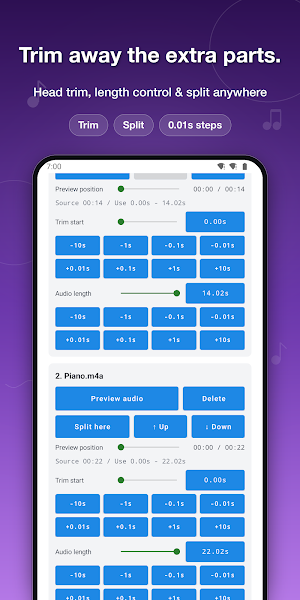
Each loaded audio file can be adjusted individually.
Set the start trim and the length to use, remove unwanted silence or extra parts, and create a joined audio file that flows naturally.
You can also split audio at a specified position. This is useful for separating the parts you need from long recordings or songs and rearranging only those sections.
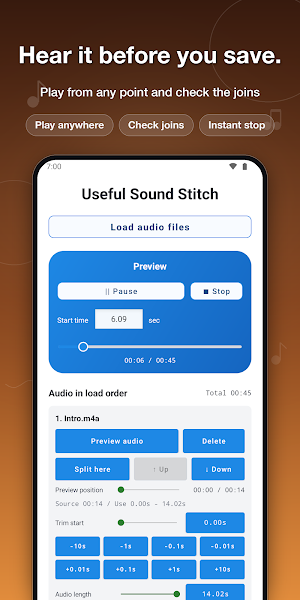
You can preview the full combined audio, and you can also preview each individual audio file.
Sliders make it easy to check playback positions and fine-tune timing while listening.
The order of audio files can be changed with up and down buttons.
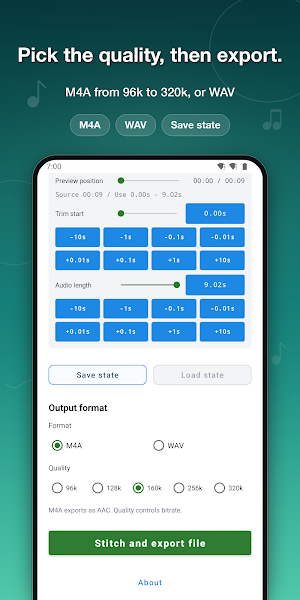
You can also save the current editing state and load it again later, so it is easy to continue the same edit.
Export formats include M4A and WAV.
For M4A, you can choose the audio quality to balance file size and sound quality.
When you want to join audio files, combine recordings, or organize background music materials, give this app a try.
【How to Use】
1. Tap "Load audio files" and choose the audio files you want to join.
2. Loaded audio files are joined from the beginning in the order shown in the list.
3. Adjust "Trim start" and "Audio length" for each file as needed.
4. If you want to split audio, specify the split position and split it.
5. Use individual previews and the full preview to check how the audio connects and where playback starts.
6. To change the order, use the up and down buttons for each audio file.
7. Save the current editing state if you want to continue later.
8. Choose the export format and quality, then tap "Stitch and export file" to export and save the audio file.
Useful Sound Stitch lets you load multiple audio files, preview them while editing, combine them from the top of the list, and export one finished audio file.
It is useful when you want to connect parts of favorite songs, combine recorded audio, organize sound effects or background music materials, or turn several audio clips into one file.
Each loaded audio file can be adjusted individually.
Set the start trim and the length to use, remove unwanted silence or extra parts, and create a joined audio file that flows naturally.
You can also split audio at a specified position. This is useful for separating the parts you need from long recordings or songs and rearranging only those sections.
You can preview the full combined audio, and you can also preview each individual audio file.
Sliders make it easy to check playback positions and fine-tune timing while listening.
The order of audio files can be changed with up and down buttons.
You can also save the current editing state and load it again later, so it is easy to continue the same edit.
Export formats include M4A and WAV.
For M4A, you can choose the audio quality to balance file size and sound quality.
When you want to join audio files, combine recordings, or organize background music materials, give this app a try.
【How to Use】
1. Tap "Load audio files" and choose the audio files you want to join.
2. Loaded audio files are joined from the beginning in the order shown in the list.
3. Adjust "Trim start" and "Audio length" for each file as needed.
4. If you want to split audio, specify the split position and split it.
5. Use individual previews and the full preview to check how the audio connects and where playback starts.
6. To change the order, use the up and down buttons for each audio file.
7. Save the current editing state if you want to continue later.
8. Choose the export format and quality, then tap "Stitch and export file" to export and save the audio file.
What’s new
Version 1.0.1 · Updated May 26, 2026
Ad-related fixes.
Alternatives to Useful Sound Stitch
Looking for apps like Useful Sound Stitch? Here are 6 similar Android apps on Google Play. All of them are free to download.
-
Useful Video Editor
-
Announcement Useful Timer
-
Announcement Useful Alarm
-
Useful Voice Changer
-
Useful Video Mixer
-
Exciting Neon Brick Breaker
| App | Rating | Price | Installs | Last updated | Compare |
|---|---|---|---|---|---|
| Useful Sound Stitch | – | Free | 100+ | May 26, 2026 | |
| Useful Video Editor | – | Free | 100+ | Oct 6, 2026 | Compare |
| Announcement Useful Timer | – | Free | 100+ | Oct 7, 2026 | Compare |
| Announcement Useful Alarm | – | Free | 100+ | – | Compare |
| Useful Voice Changer | – | Free | 500+ | Oct 7, 2026 | Compare |
| Useful Video Mixer | – | Free | 5,000+ | Oct 15, 2026 | Compare |
| Exciting Neon Brick Breaker | – | Free | 1,000+ | Jan 21, 2026 | Compare |