

Useful Video Mixer
Video Players & Editors Contains ads
Add music to videos
- Downloads
- 5.7K+
- on Google Play
- Price
- Free
- No in-app purchases
- Updated
- Oct 15
- 2026 · v1.1.1
Screenshots


About Useful Video Mixer
A handy video editing app has arrived that lets you overlay your favorite background music on videos and instantly change the mood.
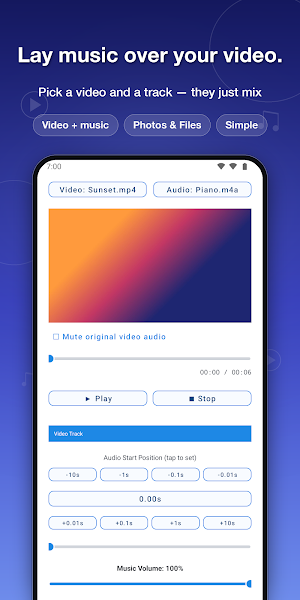
This simple app lets you add music or BGM to a video, preview the result, and then save it.
Just adding music to travel memories, everyday moments, pet clips, or scenic videos can make your footage far more appealing.
If your original video feels a little plain, adding BGM can make it more pleasant and easier to watch.
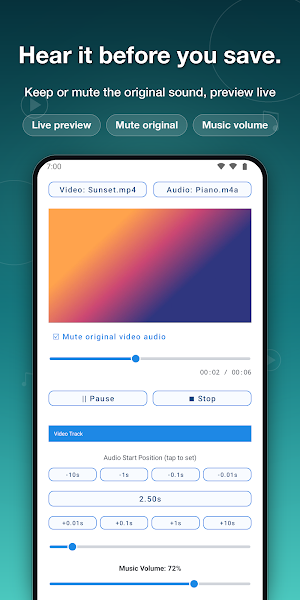
You can overlay BGM while keeping the original video sound, or mute the original audio and save a version with only the music.
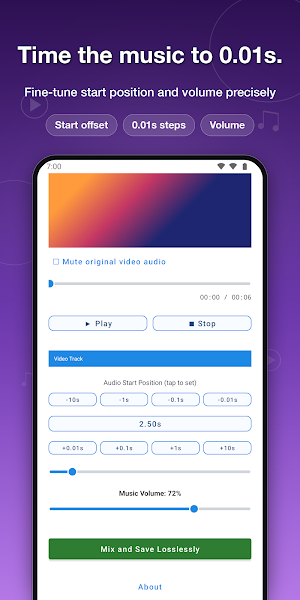
You can also adjust the audio start position so the music begins naturally at the start of the video or at the scene you want to highlight.
If you want to add music to a video, create a better mood, or make a nearly silent clip more engaging, give this app a try.
【How to Use】
1. Tap "Load Video" and choose the video you want to add BGM to.
2. Tap "Load Audio" and choose the music file you want to overlay.
3. Adjust the start position if needed, then tap "▶ Play" to check the result.
4. If you want to remove the original video sound, turn on mute for the original audio.
5. Tap "Mix and Save Losslessly" to export and save the video with BGM.
This simple app lets you add music or BGM to a video, preview the result, and then save it.
Just adding music to travel memories, everyday moments, pet clips, or scenic videos can make your footage far more appealing.
If your original video feels a little plain, adding BGM can make it more pleasant and easier to watch.
You can overlay BGM while keeping the original video sound, or mute the original audio and save a version with only the music.
You can also adjust the audio start position so the music begins naturally at the start of the video or at the scene you want to highlight.
If you want to add music to a video, create a better mood, or make a nearly silent clip more engaging, give this app a try.
【How to Use】
1. Tap "Load Video" and choose the video you want to add BGM to.
2. Tap "Load Audio" and choose the music file you want to overlay.
3. Adjust the start position if needed, then tap "▶ Play" to check the result.
4. If you want to remove the original video sound, turn on mute for the original audio.
5. Tap "Mix and Save Losslessly" to export and save the video with BGM.
What’s new
Version 1.1.1 · Updated October 15, 2026
- Fixed an issue where the video preview turned black after returning from audio selection or other screens. - Improved preview display and playback position restoration for TS and other videos. - Fixed crashes related to video loading and the ad consent process.
Alternatives to Useful Video Mixer
Looking for apps like Useful Video Mixer? Here are 6 similar Android apps on Google Play. All of them are free to download.
-
Useful Furigana Lens
-
Useful Video Editor
-
Useful Sound Stitch
-
Announcement Useful Timer
-
Announcement Useful Alarm
-
Useful Voice Changer
| App | Rating | Price | Installs | Last updated | Compare |
|---|---|---|---|---|---|
| Useful Video Mixer | – | Free | 5,000+ | Oct 15, 2026 | |
| Useful Furigana Lens | – | Free | 1,000+ | Oct 16, 2026 | Compare |
| Useful Video Editor | – | Free | 100+ | Oct 6, 2026 | Compare |
| Useful Sound Stitch | – | Free | 100+ | – | Compare |
| Announcement Useful Timer | – | Free | 100+ | Oct 7, 2026 | Compare |
| Announcement Useful Alarm | – | Free | 100+ | – | Compare |
| Useful Voice Changer | – | Free | 500+ | Oct 7, 2026 | Compare |
Compare Useful Video Mixer with the top alternatives: ratings, updates, ASO score and keyword gaps →