

Simple Pixel Art
Art & Design In-app purchases
Pixel Art Maker for Everyone
- Downloads
- 118+
- on Google Play
- Price
- Free
- In-app purchases
- Updated
- Sep 15
- 2026 · v1.0.0
Screenshots


About Simple Pixel Art
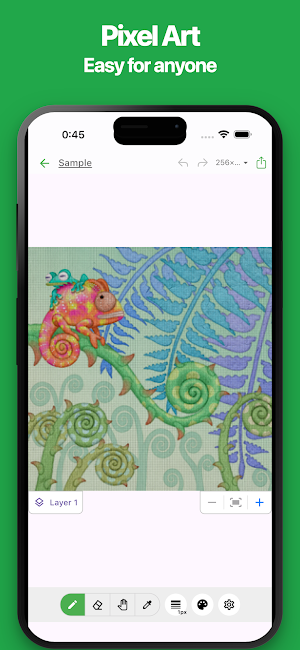
Create pixel art easily on your phone.
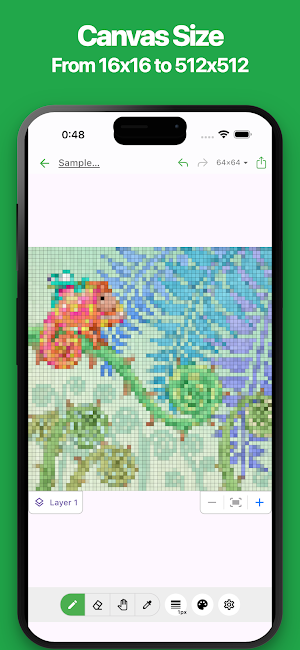
Choose from canvas sizes ranging from 16x16 to 512x512 and create pixel art that fits your style and needs.
With a simple and intuitive interface, plus support for layers, image import, and a variety of editing tools, the app is suitable for both beginners and users who want more control over their pixel art.
Export your creations in formats such as PNG and PDF, making it easy to use your pixel art for social media icons, game assets, illustrations, design materials, and more.
■ Features
・Easy Pixel Art Creation
A simple and intuitive UI / UX makes it easy to create pixel art directly on your phone.
・Flexible Canvas Sizes
Choose from canvas sizes ranging from 16x16 to 512x512.
Select the size that best fits the pixel art you want to create.
・Powerful Editing Tools
Draw and edit pixel by pixel.
Create detailed pixel art easily with intuitive editing tools.
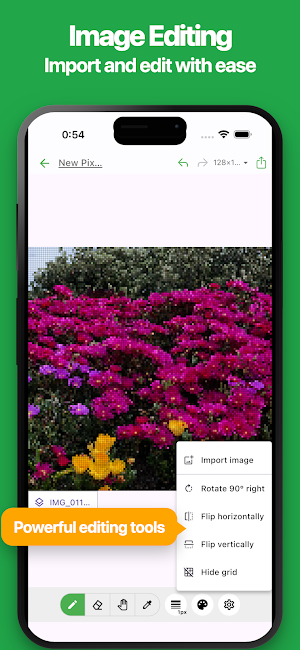
・Image Import
Import images saved on your phone and edit them as pixel art.
This is useful when you want to create artwork based on an existing image.
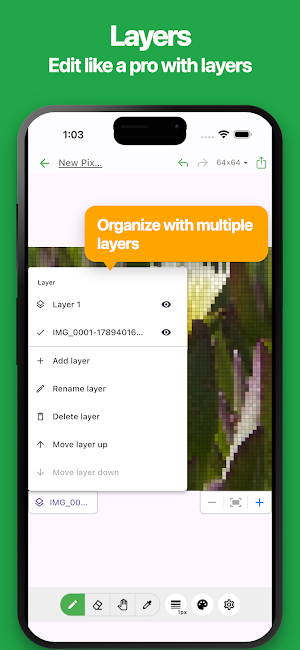
・Layer Support
Manage your artwork using multiple layers.
Edit individual parts separately to make more complex pixel art easier to create.
・PNG / PDF Export
Export your pixel art in formats such as PNG and PDF.
Save your creations or use them in other apps and projects.
・Dark Mode
Dark mode is supported for a more comfortable editing experience, especially at night.
■ Great For
・Creating pixel art
・Creating game characters
・Creating game assets
・Creating social media icons
・Creating avatars
・Creating illustration assets
・Creating retro game-style artwork
・Creating original characters
・Creating pixel art from imported images
If you are looking for a simple way to create pixel art on your phone, give it a try.
Choose from canvas sizes ranging from 16x16 to 512x512 and create pixel art that fits your style and needs.
With a simple and intuitive interface, plus support for layers, image import, and a variety of editing tools, the app is suitable for both beginners and users who want more control over their pixel art.
Export your creations in formats such as PNG and PDF, making it easy to use your pixel art for social media icons, game assets, illustrations, design materials, and more.
■ Features
・Easy Pixel Art Creation
A simple and intuitive UI / UX makes it easy to create pixel art directly on your phone.
・Flexible Canvas Sizes
Choose from canvas sizes ranging from 16x16 to 512x512.
Select the size that best fits the pixel art you want to create.
・Powerful Editing Tools
Draw and edit pixel by pixel.
Create detailed pixel art easily with intuitive editing tools.
・Image Import
Import images saved on your phone and edit them as pixel art.
This is useful when you want to create artwork based on an existing image.
・Layer Support
Manage your artwork using multiple layers.
Edit individual parts separately to make more complex pixel art easier to create.
・PNG / PDF Export
Export your pixel art in formats such as PNG and PDF.
Save your creations or use them in other apps and projects.
・Dark Mode
Dark mode is supported for a more comfortable editing experience, especially at night.
■ Great For
・Creating pixel art
・Creating game characters
・Creating game assets
・Creating social media icons
・Creating avatars
・Creating illustration assets
・Creating retro game-style artwork
・Creating original characters
・Creating pixel art from imported images
If you are looking for a simple way to create pixel art on your phone, give it a try.
What’s new
Version 1.0.0 · Updated September 15, 2026
1st release
Alternatives to Simple Pixel Art
Looking for apps like Simple Pixel Art? Here are 6 similar Android apps on Google Play. The highest rated is Simple Table - Note as table (4.5/5), and all 6 are free to download.
-
Simple Table - Note as table 4.5
-
# Simple Trip Planner
-
Simple Photo Album
-
PoseCraft: Simple Pose Maker
-
Simple Payslip
-
Simple Resume
| App | Rating | Price | Installs | Last updated | Compare |
|---|---|---|---|---|---|
| Simple Pixel Art | – | Free | 100+ | Sep 15, 2026 | |
| Simple Table - Note as table | 4.5 / 5 | Free | 100,000+ | Sep 29, 2026 | Compare |
| # Simple Trip Planner | – | Free | 0+ | – | Compare |
| Simple Photo Album | – | Free | 10+ | Sep 16, 2026 | Compare |
| PoseCraft: Simple Pose Maker | – | Free | 0+ | – | Compare |
| Simple Payslip | – | Free | 100+ | Sep 9, 2026 | Compare |
| Simple Resume | – | Free | 5+ | – | Compare |
Compare Simple Pixel Art with the top alternatives: ratings, updates, ASO score and keyword gaps →