

# Simple Photo Collage
Photography In-app purchases
Combine Photos into Collages
- Downloads
- 181+
- on Google Play
- Price
- Free
- In-app purchases
- Updated
- Sep 1
- 2026 · v1.0.0
Screenshots


About # Simple Photo Collage
Create beautiful photo collages easily on your smartphone or tablet.
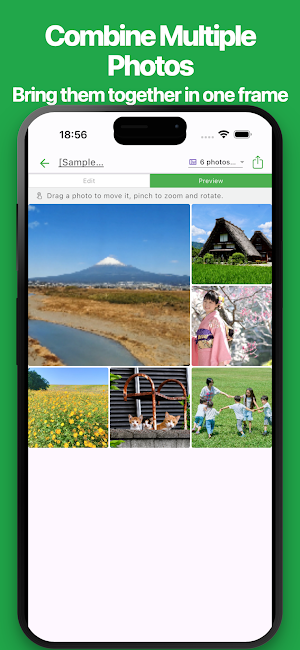
Select your photos and choose a layout to combine multiple images into one collage. Use your collages for social media posts, travel memories, family photos, pet photos, product showcases, before-and-after images, and more.
No professional design software or computer is required.
With simple controls, you can add and rearrange photos, change layouts, add text, customize colors, save images, export PDFs, share, and print.
Choose from square, portrait, landscape, A4 portrait, and A4 landscape frames.
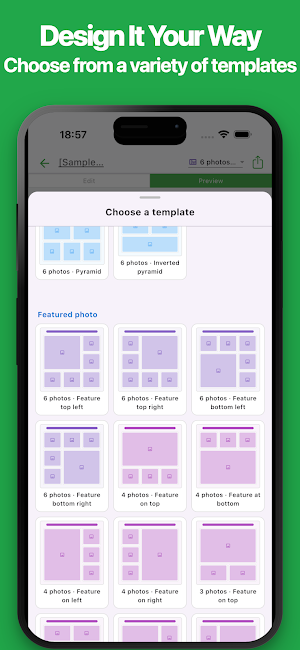
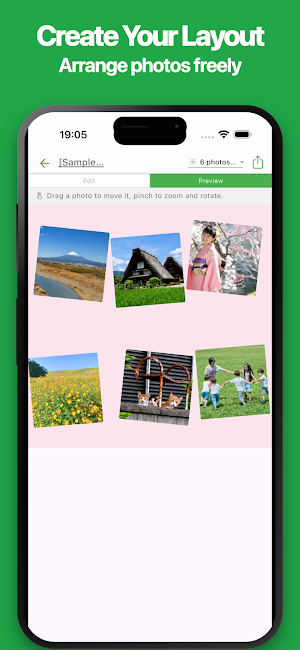
The app includes standard grid layouts, layouts that highlight one main photo, diagonal split layouts, and free-form layouts where you can position, resize, rotate, and overlap photos.
Save your finished collage as an image or PDF for social media, messaging, printing, presentations, and more.
Perfect for:
• Social media posts
• Travel and vacation memories
• Family and friends
• Kids and baby photos
• Pet photo collections
• Birthdays, weddings, graduations, and events
• Food and recipe photos
• Handmade products and product showcases
• Before-and-after images
• Store and service promotions
• Diaries and life logs
• Hobbies and collections
• Printable photo collages
• Gift and keepsake images
• Visual explanations and documents
■ Features
• Easy Photo Collage Maker
Select your photos, choose a layout, and create a collage in just a few steps. No design experience is required.
• Simple & Intuitive Interface
A clean interface makes it easy to add photos, change layouts, and customize your collage.
• Multiple Collage Layouts
Choose from grids, main-photo layouts, multi-photo arrangements, and more.
• Diagonal Split Layouts
Create dynamic collages with photos divided diagonally.
• Free-Form Layouts
Adjust the position, size, angle, and layer order of each photo. Overlap and rotate photos to create your own design.
• Highlight Your Favorite Photo
Make one photo larger and arrange other photos around it.
• Frames for Social Media
Choose square, portrait, or landscape formats for social media posts.
• A4 Portrait & Landscape
Create collages for printing, documents, presentations, and other A4 uses.
• Add, Replace & Rearrange Photos
Add photos, replace them later, and easily change their display order.
• Copy Photo Settings
Duplicate photo items and reuse existing adjustments.
• Adjust Photo Position
Zoom, resize, rotate, and move photos so important parts fit neatly inside each frame.
• Comments for Each Photo
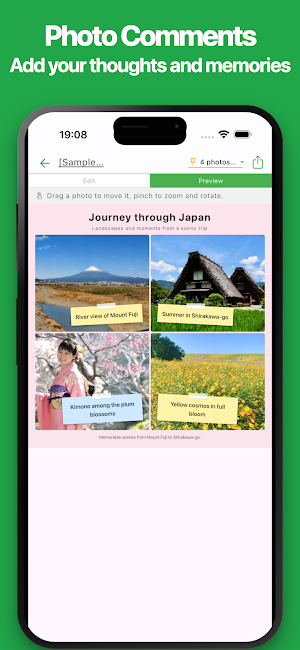
Supported layouts allow you to add dates, locations, names, notes, or memories to individual photos.
• Add Titles & Descriptions
Add a title, subtitle, and description and show or hide them as needed.
• Customize Your Design
Adjust spacing, margins, rounded corners, background colors, text colors, and more.
• Live Preview
Preview your collage while editing and fine-tune the layout before exporting.
• Save as an Image
Save your collage as an image for social media, email, messaging, and more.
• PDF Export
Export your collage as a PDF for saving, sharing, printing, or documents.
• Print
Print your collage directly from your smartphone or tablet.
• Share
Share finished collages with family, friends, or through messaging and social media apps.
• Manage Multiple Collages
Create and manage separate collages for travel, events, family, pets, products, and other themes.
• Save & Continue Editing
Save your editing data and continue working on your collage later.
• No Account Required
No registration or login is required. Start creating immediately after installing the app.
• Dark Mode
Enjoy comfortable editing in dark environments with Dark Mode support.
Whether you want to combine multiple photos into one image, create content for social media, or organize your favorite memories, this photo collage maker keeps it simple.
Combine your favorite photos and create your own unique collage.
Select your photos and choose a layout to combine multiple images into one collage. Use your collages for social media posts, travel memories, family photos, pet photos, product showcases, before-and-after images, and more.
No professional design software or computer is required.
With simple controls, you can add and rearrange photos, change layouts, add text, customize colors, save images, export PDFs, share, and print.
Choose from square, portrait, landscape, A4 portrait, and A4 landscape frames.
The app includes standard grid layouts, layouts that highlight one main photo, diagonal split layouts, and free-form layouts where you can position, resize, rotate, and overlap photos.
Save your finished collage as an image or PDF for social media, messaging, printing, presentations, and more.
Perfect for:
• Social media posts
• Travel and vacation memories
• Family and friends
• Kids and baby photos
• Pet photo collections
• Birthdays, weddings, graduations, and events
• Food and recipe photos
• Handmade products and product showcases
• Before-and-after images
• Store and service promotions
• Diaries and life logs
• Hobbies and collections
• Printable photo collages
• Gift and keepsake images
• Visual explanations and documents
■ Features
• Easy Photo Collage Maker
Select your photos, choose a layout, and create a collage in just a few steps. No design experience is required.
• Simple & Intuitive Interface
A clean interface makes it easy to add photos, change layouts, and customize your collage.
• Multiple Collage Layouts
Choose from grids, main-photo layouts, multi-photo arrangements, and more.
• Diagonal Split Layouts
Create dynamic collages with photos divided diagonally.
• Free-Form Layouts
Adjust the position, size, angle, and layer order of each photo. Overlap and rotate photos to create your own design.
• Highlight Your Favorite Photo
Make one photo larger and arrange other photos around it.
• Frames for Social Media
Choose square, portrait, or landscape formats for social media posts.
• A4 Portrait & Landscape
Create collages for printing, documents, presentations, and other A4 uses.
• Add, Replace & Rearrange Photos
Add photos, replace them later, and easily change their display order.
• Copy Photo Settings
Duplicate photo items and reuse existing adjustments.
• Adjust Photo Position
Zoom, resize, rotate, and move photos so important parts fit neatly inside each frame.
• Comments for Each Photo
Supported layouts allow you to add dates, locations, names, notes, or memories to individual photos.
• Add Titles & Descriptions
Add a title, subtitle, and description and show or hide them as needed.
• Customize Your Design
Adjust spacing, margins, rounded corners, background colors, text colors, and more.
• Live Preview
Preview your collage while editing and fine-tune the layout before exporting.
• Save as an Image
Save your collage as an image for social media, email, messaging, and more.
• PDF Export
Export your collage as a PDF for saving, sharing, printing, or documents.
Print your collage directly from your smartphone or tablet.
• Share
Share finished collages with family, friends, or through messaging and social media apps.
• Manage Multiple Collages
Create and manage separate collages for travel, events, family, pets, products, and other themes.
• Save & Continue Editing
Save your editing data and continue working on your collage later.
• No Account Required
No registration or login is required. Start creating immediately after installing the app.
• Dark Mode
Enjoy comfortable editing in dark environments with Dark Mode support.
Whether you want to combine multiple photos into one image, create content for social media, or organize your favorite memories, this photo collage maker keeps it simple.
Combine your favorite photos and create your own unique collage.
What’s new
Version 1.0.0 · Updated September 1, 2026
1st release
Alternatives to # Simple Photo Collage
Looking for apps like # Simple Photo Collage? Here are 6 similar Android apps on Google Play. The highest rated is Simple Table - Note as table (4.5/5), and all 6 are free to download.
-
Simple Table - Note as table 4.5
-
# Simple Trip Planner
-
Simple Photo Album
-
Simple Pixel Art
-
PoseCraft: Simple Pose Maker
-
Simple Payslip
| App | Rating | Price | Installs | Last updated | Compare |
|---|---|---|---|---|---|
| # Simple Photo Collage | – | Free | 100+ | Sep 1, 2026 | |
| Simple Table - Note as table | 4.5 / 5 | Free | 100,000+ | Sep 29, 2026 | Compare |
| # Simple Trip Planner | – | Free | 0+ | – | Compare |
| Simple Photo Album | – | Free | 10+ | Sep 16, 2026 | Compare |
| Simple Pixel Art | – | Free | 100+ | Sep 15, 2026 | Compare |
| PoseCraft: Simple Pose Maker | – | Free | 0+ | – | Compare |
| Simple Payslip | – | Free | 10+ | – | Compare |