About Simple Markdown Editor
Simple Markdown Application can easily edit markdown text.
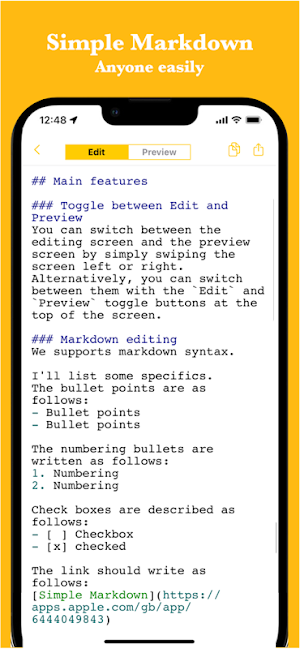
It also supports syntax highlighting during editing and inserting links, images, and tables, enabling a variety of expressions.
It is used in the following situations.
- Create meeting minutes
- Idea book
- Writing
- Simple notepad
Since it can be used for anything managed with markdown, there are reports of various usages.
If you want to take notes in markdown, please try it.
■ Features
* Intuitive operability
Ease of use is the most important thing for simple functions.
It works quickly and you can edit intuitively.
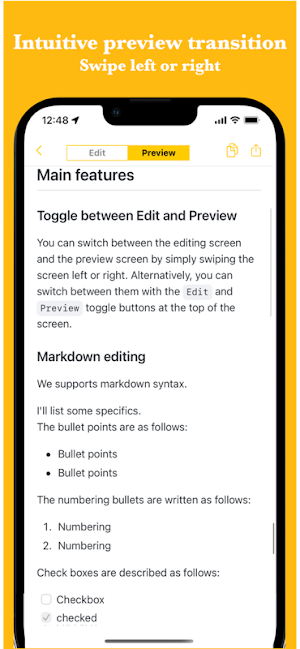
* Smooth switching to preview
Simply swipe the screen left or right to switch between the edit screen and the preview screen.
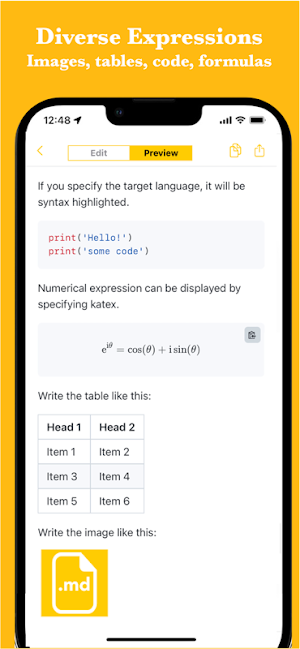
* Various expressions
It supports not only basic expressions such as bullet points and links, but also images, tables, codes, and formulas.
Therefore, it can be used in a variety of situations.
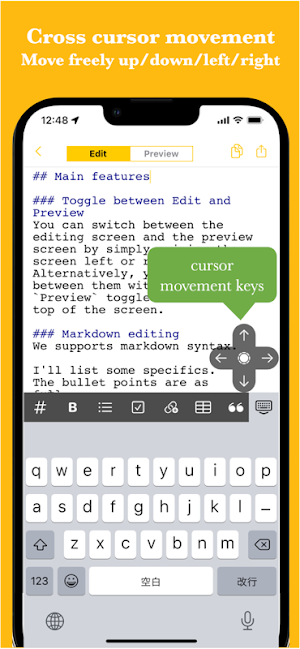
* Easy cursor movement
You can move up, down, left and right with the cross cursor button.
Easier movement makes editing smoother.
* Auto save
When you edit the text, it is saved automatically, so you don't forget to save it.
* Ready to use
You can use it immediately without registering an account.
* Export and share
You can export the created data, share it, or edit it on your PC.
* Dark theme support
Since it supports a dark theme, it is also ideal for use at night.
Similar Apps
Scientific Calculator Pro
A powerful scientific and graphing calculator with matrices and complex numbers.

AI Email, Reply Writer: Xemail
One-Click AI Letter and Email Assistant - Compose Your Email 10x Faster
Chaos Control 2: AI Organizer
Everything you need for planning: GTD Task Manager, Time Tracker and Cloud Sync
MyScript Notes: AI Note Taking
Smart note taking with PDF, handwriting to text & AI notes — perfect for study.

MeisterTask - Task Management
Boost teamwork with MeisterTask: Simple task management. Sync web & mobile.

Falcon PDF - Editor & Tools
Edit, sign, scan & convert PDFs. Reflow mode. 15+ formats. No ads.
