

Sculptor: 3D Modeling
AJA Digital LLC Graphics & Design iPad
Sculptor: 3D Modeling is a free Graphics & Design app for iPad by AJA Digital LLC. Requires iOS 18.0. Updated November 26, 2026.
- Price
- Free
- on the App Store
- Size
- 14 MB
- Age 4+
- Updated
- Nov 26
- 2026 · v1.1
Screenshots
Save to Pinterest


About Sculptor: 3D Modeling
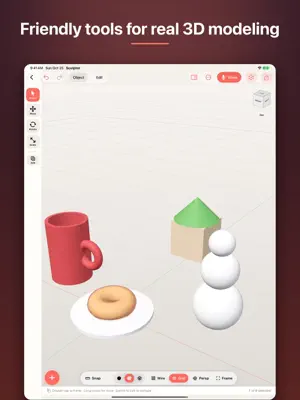
Sculptor is 3D modeling for people who have never opened a 3D app. Describe what you want, watch it build itself step by step, then shape it with big, friendly tools and send it to your 3D printer. SAY IT, WATCH IT BUILD Tap Voice and say "a red mug", "three stacked cubes" or "a house with a green roof". Sculptor turns your words into a short plan you can review, then builds it in front of you. The whole build undoes in one step. Speech is recognized on your device, and planning runs on your device by default. Prefer typing? Type instead. A REAL MODELER, WITHOUT THE LEARNING CLIFF • Cube, sphere, cylinder, cone, torus, plane and Blob, the mascot, all sized in millimeters • Move, rotate and scale with gizmos, snapping and exact numeric fields • Edit mode for vertices, edges and faces: extrude, inset, bevel, loop cut, subdivide, merge and more • A non-destructive modifier stack: Mirror, Subdivision Surface, Array and Solidify • Booleans: union, difference and intersect • Clay-like materials with color, metallic and roughness • Undo everything, with ⌘Z, a three-finger swipe or the toolbar READY FOR YOUR 3D PRINTER • Export binary STL, 3MF with colors, OBJ with materials, or USDZ • The print check finds holes, tangled edges, inside-out faces, very thin walls and models that won't fit your build plate, and fixes most of them in one tap • Import STL and OBJ files to keep working on them SEE IT IN YOUR ROOM Place your model on your desk at real size or tabletop size in AR, or open it in AR Quick Look. YOUR WORK STAYS YOURS Projects are ordinary files in the Files app and iCloud Drive. No account, no ads, no tracking. Voice planning works offline, with no sign-up. If you want, you can connect a supported cloud AI service with your own API key: Sculptor asks before it sends anything, tells you exactly what is sent, and you can stop sharing at any time. MADE FOR IPAD The tools sit beside a big canvas: the tool shelf on one side, the outliner and inspector on the other, and Voice, AR and Export always in reach. Sculptor works in portrait and landscape, in Split View and Stage Manager, and with a keyboard.
What’s new
Version 1.1 · Updated November 26, 2026
Powered by the new open-source Rust sculpt-engine for faster modeling and smoother sculpting. • 40 built-in shapes across 6 categories with instant search: Basics, Rounded & Organic, Polyhedra & Gems, Architecture, Mechanical & Hardware, and Containers. • Draw or place points to extrude: sketch a freehand outline or tap corner points on the grid or any face, then adjust Height, Bevel, and Taper live in 3D. • Freehand 3D tube drawing, sculpt brushes with symmetry and Voxel Remesh, and improved CAD import.
App privacy
The developer, AJA Digital LLC, reported these privacy practices to Apple.
Data Not Linked to You
The following data, which may be collected but is not linked to your identity, may be used for the following purposes:
- User Content: Other User Content
Used for: App Functionality
Alternatives to Sculptor: 3D Modeling
Looking for apps like Sculptor: 3D Modeling? Here are 6 similar apps on the App Store. The highest rated is Blender Local (5.0/5), and all 6 are free to download.


| App | Rating | Price | Last updated | Compare |
|---|---|---|---|---|
| Sculptor: 3D Modeling | – | Free | November 26, 2026 | |
| PocketMesh 3D | – | Free | Nov 13, 2026 | Compare |
| Sculpt3D - 3D Modeling | – | Free | Nov 14, 2026 | Compare |
| HyperRef | 4.7 / 5 (3) | Free | Nov 23, 2026 | Compare |
| 3D Spatial Viewer | – | Free | Sep 20, 2026 | Compare |
| Blender Local | 5.0 / 5 (1) | Free | Nov 23, 2026 | Compare |
| Wax | 3.0 / 5 (2) | Free | Nov 11, 2026 | Compare |