

Blender Local
chienchung Yu Graphics & Design iPhoneiPadiPod touch
Blender Local is a free Graphics & Design app for iPhone and iPad by chienchung Yu. Rated 5.0/5 from 1 ratings. Requires iOS 17.0. Updated November 23, 2026.
- Rating
- 5.0
- 1 ratings
- Price
- Free
- on the App Store
- Size
- 659 MB
- Age 4+
- Updated
- Nov 23
- 2026 · v1.2
Screenshots
Save to Pinterest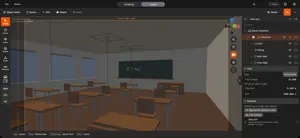


About Blender Local
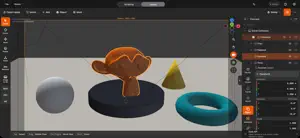
Blender Local is a full 3D studio for iPhone and iPad, built on Blender's own engine. Blender's bpy module is compiled into the app, so modeling, modifiers, Grease Pencil drawing, animation and rendering run Blender's real code on your device. No account, no subscription, no cloud. START • File ▸ New opens Blender's General, 2D Animation and Storyboarding scenes, or a ready-made template: a classroom, a studio showcase, a bouncing-ball animation, a low-poly landscape or a product turntable. MODEL • Add meshes, curves, text, lattices, cameras, lights, empties and Grease Pencil objects. • Edit Mode with vertex, edge and face selection: Extrude, Inset Faces, Bevel, Loop Cut, Knife Project, Spin, Bisect, Merge, Bridge Edge Loops, Fill, Grid Fill and more. • Move, Rotate and Scale with a touch gizmo or Blender's G, R and S keys, with snapping, pivot points, proportional editing and the 3D cursor. • Modifiers in Blender's stack order: Subdivision Surface, Mirror, Array, Bevel, Boolean, Solidify, Screw, Remesh, Decimate, Shrinkwrap, Lattice, Geometry Nodes and more. DRAW • Draw Mode: Grease Pencil drawing with a finger or Apple Pencil, with pressure, layers, materials, onion skinning and keyframes for 2D animation. MATERIALS, ANIMATION AND RENDERING • Material slots and every input of the surface shader. • Keyframes and a Timeline editor: select, move, scale and copy keys, interpolation, easing and markers. • Render images and animations with Cycles on the Metal GPU, EEVEE or Workbench, and save animations as MP4 video. MORE • UV editing: Unwrap, Smart UV Project, seams and packing. • Image to 3D: turn a photo into a relief model on the device. • Scripting: automate your scene with Python, as in Blender's Scripting workspace. • Open and save .blend files. Import and export glTF, OBJ, USD, STL, PLY, FBX and Alembic. • Touch, Apple Pencil, keyboard and trackpad. On iPhone, the Outliner and Properties open as a drawer over the 3D View. Blender's shortcuts and pie menus are where Blender has them, and every tool and menu uses Blender's names. • Your files live in the app's folder, which also appears in the Files app. A guided tour shows what each part of the screen does the first time you open the app. Blender Local is an independent app. It is not affiliated with or endorsed by the Blender Foundation. Blender is a registered trademark of the Blender Foundation. Blender's code is used under the GNU General Public License; its source and the iOS build changes are at github.com/yu314-coder/python-ios-lib, and the app's own source is at github.com/yu314-coder/blender-local.
What’s new
Version 1.2 · Updated November 23, 2026
• Image to 3D Model follows the rules of the App Store in your country or region, and is not offered on the China mainland App Store. • Fixes and smaller improvements.
App privacy
The developer, chienchung Yu, reported these privacy practices to Apple.
Data Not Collected
The developer does not collect any data from this app.
Alternatives to Blender Local
Looking for apps like Blender Local? Here are 6 similar apps on the App Store. The highest rated is Mixos: 3D Creative Suite (5.0/5), and all 6 are free to download.
-
 Wax
3.0
-
 AniMate: 2D Sprite Animation
1.0
-
 Rigster: 2D Skeletal Animation
3.5
-
 Meld - 3D Modeling
3.4
-
 Mixos: 3D Creative Suite
5.0
-
 Ünflat
4.7
| App | Rating | Price | Last updated | Compare |
|---|---|---|---|---|
| Blender Local | 5.0 / 5 (1 rating) | Free | November 23, 2026 | |
| Wax | 3.0 / 5 (2) | Free | Nov 11, 2026 | Compare |
| AniMate: 2D Sprite Animation | 1.0 / 5 (1) | Free | Nov 12, 2026 | Compare |
| Rigster: 2D Skeletal Animation | 3.5 / 5 (8) | Free | Nov 28, 2026 | Compare |
| Meld - 3D Modeling | 3.4 / 5 (9) | Free | Nov 12, 2026 | Compare |
| Mixos: 3D Creative Suite | 5.0 / 5 (3) | Free | Nov 13, 2026 | Compare |
| Ünflat | 4.7 / 5 (3) | Free | Oct 30, 2026 | Compare |
Compare Blender Local with the top alternatives: ratings, updates, ASO score and keyword gaps →