

Wax
John Haas Graphics & Design iPhoneiPadiPod touch
Wax is a free Graphics & Design app for iPhone and iPad by John Haas. Rated 5.0/5 from 1 ratings. Requires iOS 18.0. Updated October 21, 2026.
- Rating
- 5.0
- 1 ratings
- Price
- Free
- on the App Store
- Size
- 5 MB
- Age 4+
- Updated
- Oct 21
- 2026 · v1.1.0
Screenshots
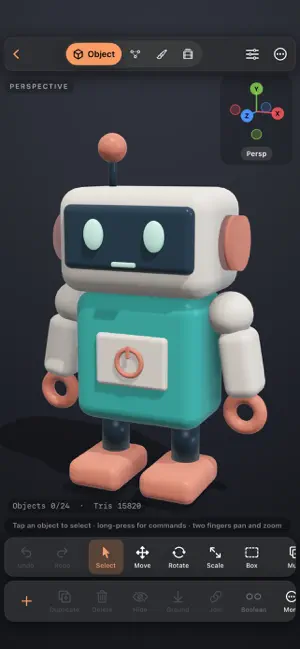
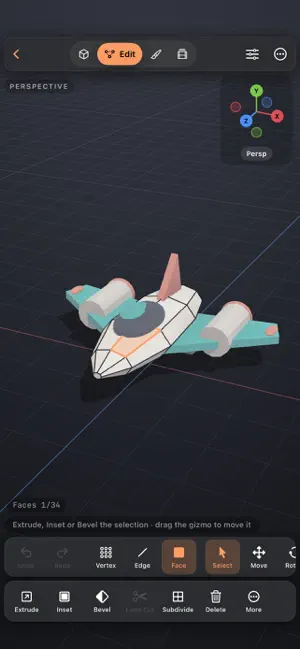


About Wax
Make 3D props, characters and scenes on iPhone and iPad. Start with a shape, import a model, or open one of five editable examples. MODEL Edit vertices, edges and faces. Extrude faces, inset details, bevel edges and add loop cuts. Mirror, Subdivision Surface, Array and Smooth modifiers stay editable. SCULPT AND PAINT Push, pull and smooth a mesh with brushes, symmetry and masks. Paint vertex colors on separate layers with Normal, Multiply, Screen, Overlay and Add blend modes. Adjust opacity, lock coverage with Alpha Lock, and hide or reveal paint with editable layer masks. Sample colors with the eyedropper, reorder layers, and merge visible paint while keeping hidden layers. Visible-surface painting protects the far side of thin models. Subdivide for finer vertex detail; this is not UV texture painting. Add image textures and reference images. Apple Pencil pressure can control brush size and strength. ANIMATE Keyframe position, rotation and scale. Adjust timing on the timeline and motion in the curve editor. Add cameras to frame your scene. KEEP YOUR PROJECT EDITABLE Save and share .waxproject files with the full scene, including paint layers, layer masks, materials, textures, modifiers and animation. Open them on another device to keep working. Older .wax projects still open, and importing a project creates a separate copy. Import OBJ and self-contained GLB or glTF models. GLB/glTF files must contain their own mesh data and textures; separate buffer and image files are not supported. Model import does not bring in animation. Use Wax project files to transfer an editable Wax scene. FREE TO USE Modeling, sculpting, painting, animation, modifiers, model import and unlimited projects are free. Export editable Wax projects, OBJ, STL, SDS and PNG images without buying Pro. WAX PRO • Combine shapes, cut holes and find intersections with booleans. • Rebuild a mesh for sculpting with voxel remesh. • Export animations and turntables as MP4 videos. • Export GLB files with materials and animation for use in other 3D apps, games and the web. • Export USDZ files to view your models in AR. Wax Pro is a one-time purchase with Family Sharing. No subscription. LEARN BY EDITING Open a robot, spacecraft, painted creature, speaker or animated example and change it yourself. Guided modeling and paint-layer tours, gesture help, keyboard shortcuts and a left-handed layout are included. No account is required. Projects are stored on your device and are available in Files.
What’s new
Version 1.1.0 · Updated October 21, 2026
Paint in layers with independent blend modes, opacity and visibility. • Edit your original paint in the Base layer. • Use Alpha Lock to recolor without changing coverage. • Hide and reveal paint with non-destructive layer masks. • Sample paint with the eyedropper, type opacity percentages, and drag layers to reorder. • Merge Down or Merge Visible; hidden layers are kept by Merge Visible. • Protect thin models with visible-surface painting. • Learn the workflow in Help → Learn paint layers. Layers and masks are saved in Wax projects. These tools are free. Painting uses vertex colors; subdivide for finer detail. Projects saved with this update require an updated version of Wax.
App privacy
The developer, John Haas, reported these privacy practices to Apple.
Data Not Collected
The developer does not collect any data from this app.
Alternatives to Wax
Looking for apps like Wax? Here are 6 similar apps on the App Store. The highest rated is Mixos: 3D Creative Suite (5.0/5), and all 6 are free to download.
-
 Meld - 3D Modeling
3.6
Meld - 3D Modeling
3.6
-
 Mixos: 3D Creative Suite
5.0
Mixos: 3D Creative Suite
5.0
-
 TopMod 3D: Design Software
5.0
TopMod 3D: Design Software
5.0
-
 3D Model Print Simple Edit
3.5
3D Model Print Simple Edit
3.5
-
 Moldora: AI 3D Model Generator
4.0
Moldora: AI 3D Model Generator
4.0
-
 Forma3D - 3D Modeling & Print
5.0
Forma3D - 3D Modeling & Print
5.0
| App | Rating | Price | Last updated | Compare |
|---|---|---|---|---|
| Wax | 5.0 / 5 (1 rating) | Free | October 21, 2026 | |
| Meld - 3D Modeling | 3.6 / 5 (5) | Free | Oct 24, 2026 | Compare |
| Mixos: 3D Creative Suite | 5.0 / 5 (2) | Free | Oct 16, 2026 | Compare |
| TopMod 3D: Design Software | 5.0 / 5 (3) | Free | Oct 21, 2026 | Compare |
| 3D Model Print Simple Edit | 3.5 / 5 (2) | Free | Oct 25, 2026 | Compare |
| Moldora: AI 3D Model Generator | 4.0 / 5 (4) | Free | Oct 21, 2026 | Compare |
| Forma3D - 3D Modeling & Print | 5.0 / 5 (6) | Free | Oct 27, 2026 | Compare |
Compare Wax with the top alternatives: ratings, updates, ASO score and keyword gaps →