

3D Model Print Simple Edit
Huragan Kodu s.p z o.o. Graphics & Design iPhoneiPadiPod touch
3D Model Print Simple Edit is a free Graphics & Design app for iPhone and iPad by Huragan Kodu s.p z o.o. Rated 3.5/5 from 2 ratings. Requires iOS 18.0.
- Rating
- 3.5
- 2 ratings
- Price
- Free
- on the App Store
- Size
- 207 MB
- Age 12+
- Updated
- Oct 25
- 2026 · v1.11.0
Screenshots



About 3D Model Print Simple Edit
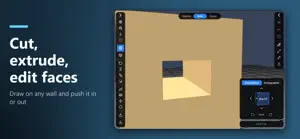
Design, edit and prepare 3D models for printing right on your phone or tablet, or tell an AI agent what you need and watch it build the model for you. 3D Model Print Simple Edit is a fast 3D editor made for touchscreens, makers and 3D printing fans. No desktop CAD and no steep learning curve: shape your idea, check it for printing and send it to your slicer. SIMPLE OR ADVANCED Start in Simple mode with the essential tools, or switch to Advanced for every tool, including the Print panel. Your models and files are the same in both. READY TO PRINT • The Print panel checks for holes, thin walls, overhangs, floating parts and whether the model fits your printer's bed, and its results match a real slicer • Weight and print time estimate, with a material for each object • Best orientation lays the part flat in one tap • Fix the model: Repair (watertight), Hollow, Cut flat or split and Symmetrize, each with a preview • Printer presets and a real-size grid in mm, cm or inches LET AI BUILD IT — MCP Connect Claude or any AI agent that supports the Model Context Protocol (MCP). Copy the setup prompt from the app, paste it into your agent and describe what you need: "a phone stand" or "a box with a lid". The agent creates and edits real objects in your scene while you watch it work, and an agent on your computer can also work with the app on your phone or tablet over your Wi-Fi network. Then refine, sculpt and paint the result by hand. Go from one sentence to a print-ready model in minutes. SCULPTING Push, pull, inflate, smooth and pinch surfaces with intuitive brushes. Print brushes (Layer, Scrape, Fill, Clay, Crease) and Protect base keep the part printable. CAD-STYLE EDITING • CSG: union, subtract and intersect solids to cut holes and join parts • Walls: push and pull faces by an exact distance • Points: move vertices with soft selection and lasso • Round edges; twist, bend, taper and mirror parts • Draw your own shapes and turn them into 3D objects • 3D text in your own fonts, in all 15 app languages, Arabic and Hindi included • Screws, nuts, print-in-place hinges and gears from a parametric catalogue COLOURS FOR MULTICOLOUR PRINTING Paint areas, walls and whole objects. The colour picker shows the colours already in your project, and "Whole colour" changes a colour everywhere in one step. 3MF files keep each colour in its own filament slot. YOUR FILES • Import STL, 3MF, OBJ with MTL and textures, glTF/GLB, SVG and .zip, several files at once • Export a 3MF for your slicer with build plates, or STL, OBJ and glTF, also one file per object • Big models save, open and import in the background, with progress and Cancel • Autosave reopens your project, and Undo and Redo name every step BUILT FOR TOUCH • Normal or Large interface size, light or dark theme • 15 languages, including Arabic (right to left), Hindi, Chinese, Japanese and Korean • Built-in help with short videos for every tool • Works great on phones and tablets WHO IS IT FOR? • 3D printing hobbyists who want to modify models on the go • Makers who need a custom part, bracket or replacement quickly • Beginners who want to create without complicated CAD software • Anyone curious to see how AI can design real, printable objects Download 3D Model Print Simple Edit and turn your ideas, or your prompts, into real objects.
What’s new
Version 1.11.0 · Updated October 25, 2026
- Project colours: the colour picker shows the colours "In this project" first, and Paint › "Whole colour" changes a colour on all objects or on one object in one step; your slicer gets the new colour in the same filament slot - 3D text in all 15 app languages, including Arabic and Hindi - Pick several files at once: an OBJ with its .mtl and textures comes in with its colours, and exporting one file per object saves into a folder you choose - Simple and Advanced mode (Settings › General › Interface): Simple shows the essential tools, Advanced shows every tool - New Print panel (Advanced): checks for holes, thin walls, overhangs, floating parts and whether the model fits the bed; estimates weight and print time with a material for each object; Best orientation, Drop to bed, printer presets; its results now agree with a real slicer: a thin wall that still prints is a warning, not an error, standing 3D text is no longer reported as floating, and solids touching along an edge count as watertight - Fix the model: Repair…, Hollow…, Cut… (flat or split) and Symmetrize…, with a preview and one-step undo - Bend / twist… in the Geometry panel bends, twists or tapers the selected objects, with a preview and one-step undo - Big models no longer freeze the app: saving, opening, importing, CSG and repairs run in the background with progress and Cancel - Safer saving: an interrupted save keeps the old file whole, project files are much smaller, and the project autosave is on and reopens your work at the next start; a damaged file that opens only in part never overwrites the original, because saving asks for a new name - File menu: New project, Open project…, Recent, Save project, Save as…, Import model…, For the slicer (3MF)… and Other format…; the app asks before discarding unsaved changes - Walls mode with its own dock: Draw shape and push/pull by a typed distance; new Points mode for moving vertices - Flip (Mirror) shows the plane it mirrors across before you apply it, and Esc cancels it - Sculpt: five print brushes (Layer, Scrape, Fill, Clay, Crease) and Protect base - Better 3MF, STL, OBJ and glTF import: colours, textures, units and .zip files - Undo and Redo name every step; a real-size grid (1 mm / 1 cm) - Interface size Normal or Large, theme System, Light or Dark, smooth animations (you can turn them off in Settings); Arabic reads right to left, and Chinese shows correctly on iPhone and iPad - At most 3 ads a day; tap "Ad in: …" in the toolbar to see how long is left - AI agents (MCP): an agent on another device in your network can connect once you turn on "Allow access from other devices" - Clearer names for buttons and menu items - Projects saved in 1.11 need 1.11 or newer; 1.11 opens all your older projects - Many other fixes
App privacy
The developer, Huragan Kodu s.p z o.o., reported these privacy practices to Apple.
Data Used to Track You
The following data may be used to track you across apps and websites owned by other companies:
- Identifiers: Device ID
- Usage Data: Product Interaction, Advertising Data
Data Linked to You
The following data, which may be collected and linked to your identity, may be used for the following purposes:
- Identifiers: Device ID
- Usage Data: Product Interaction, Advertising Data
Used for: Third-Party Advertising, Analytics, App Functionality
Data Not Linked to You
The following data, which may be collected but is not linked to your identity, may be used for the following purposes:
- Diagnostics: Crash Data, Performance Data
Used for: Analytics, App Functionality
Alternatives to 3D Model Print Simple Edit
Looking for apps like 3D Model Print Simple Edit? Here are 6 similar apps on the App Store. The highest rated is TopMod 3D: Design Software (5.0/5), and all 6 are free to download.
-
 TopMod 3D: Design Software
5.0
TopMod 3D: Design Software
5.0
-
 Forma3D - 3D Modeling & Print
5.0
Forma3D - 3D Modeling & Print
5.0
-
 Meld - 3D Modeling
3.2
Meld - 3D Modeling
3.2
-
 Moldora: AI 3D Model Generator
4.0
Moldora: AI 3D Model Generator
4.0
-
 3D Print Designer CAD
4.6
3D Print Designer CAD
4.6
-
 Open3D: STL & 3D Model Viewer
4.8
Open3D: STL & 3D Model Viewer
4.8
| App | Rating | Price | Last updated | Compare |
|---|---|---|---|---|
| 3D Model Print Simple Edit | 3.5 / 5 (2 ratings) | Free | October 25, 2026 | |
| TopMod 3D: Design Software | 5.0 / 5 (3) | Free | Oct 21, 2026 | Compare |
| Forma3D - 3D Modeling & Print | 5.0 / 5 (6) | Free | Oct 27, 2026 | Compare |
| Meld - 3D Modeling | 3.3 / 5 (4) | Free | Oct 24, 2026 | Compare |
| Moldora: AI 3D Model Generator | 4.0 / 5 (4) | Free | Oct 21, 2026 | Compare |
| 3D Print Designer CAD | 4.6 / 5 (33) | Free | May 26, 2026 | Compare |
| Open3D: STL & 3D Model Viewer | 4.8 / 5 (22) | Free | Oct 24, 2026 | Compare |