

PocketMesh 3D
Can Ogan Karagun Graphics & Design iPhoneiPadiPod touch
PocketMesh 3D is a free Graphics & Design app for iPhone and iPad by Can Ogan Karagun. Requires iOS 17.0. Updated November 13, 2026.
- Price
- Free
- on the App Store
- Size
- 1 MB
- Age 4+
- Updated
- Nov 13
- 2026 · v1.0
Screenshots
Save to Pinterest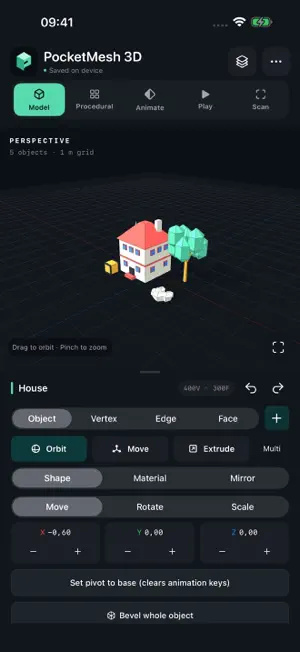


About PocketMesh 3D
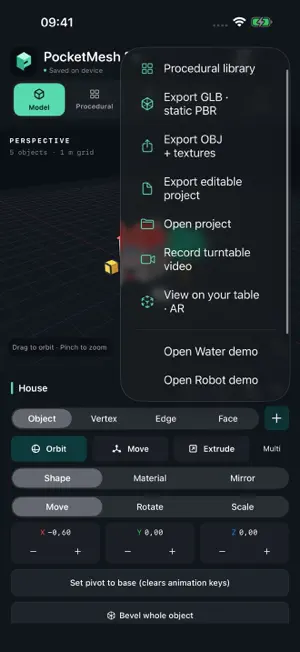
Build your next game prop wherever inspiration finds you. PocketMesh 3D is a compact 3D modeling studio for iPhone and iPad. Start with a shape or generate a prop, make it your own, and export a static model for your next project. GENERATE A STARTING POINT Explore 26 styles across trees, houses, rocks, crates, barrels, tables, stairs and ramps. Make pines, oaks, palms and bare trees. Build cottages, townhouses, L-shaped houses and towers. Adjust dimensions, floors, windows, roof styles, colors and more, with a live 3D preview. MAKE IT YOUR OWN Select objects, vertices, edges and faces. Move, rotate and scale. Extrude and inset faces, add loop cuts, bevel, mirror and arrange parts. Generated props become editable meshes when you add them to your scene. EXPLORE MATERIALS AND MOTION Use colors and PBR material presets, including a live water preview. Animate individual objects with keyframes. Try simple physics and touch-triggered behaviors in the Play workspace. SAVE AND EXPORT Completed edits save automatically on your device. Undo changes and recover earlier scenes. Export editable projects, static GLB models, OBJ with MTL and scan textures, or a turntable video. Preview your scene on a real surface with AR on supported devices. BRING IN A SCAN Open compatible USDZ scans. Live object capture is available only on devices supported by Apple Object Capture with the required LiDAR hardware; it is not available on standard iPhone 16. Capture and reconstruction run on device. SMALL AND PRIVATE No account. No ads. No in-app purchases. Procedural geometry is generated on your device, without downloading asset packs. PocketMesh 3D does not upload your models or collect usage analytics. FORMAT NOTES GLB and OBJ export static models. Custom water motion, keyframe animation and physics behaviors stay in PocketMesh 3D’s editable project format. OBJ/GLB import, rigging and texture painting are not included. Scanned surfaces support object transforms and animation; polygon editing is for handmade and procedurally generated meshes. Requires iOS 17 or later. Camera features depend on device support.
App privacy
The developer, Can Ogan Karagun, reported these privacy practices to Apple.
Data Not Collected
The developer does not collect any data from this app.
Alternatives to PocketMesh 3D
Looking for apps like PocketMesh 3D? Here are 6 similar apps on the App Store. The highest rated is Blockhammer (5.0/5), and all 6 are free to download.


| App | Rating | Price | Last updated | Compare |
|---|---|---|---|---|
| PocketMesh 3D | – | Free | November 13, 2026 | |
| Sculptor: 3D Modeling | – | Free | Nov 26, 2026 | Compare |
| Blockhammer | 5.0 / 5 (1) | Free | Nov 21, 2026 | Compare |
| Sculpt3D - 3D Modeling | – | Free | Nov 14, 2026 | Compare |
| HyperRef | 4.7 / 5 (3) | Free | Nov 23, 2026 | Compare |
| 3D Spatial Viewer | – | Free | Sep 20, 2026 | Compare |
| Wax | 3.0 / 5 (2) | Free | Nov 11, 2026 | Compare |
Compare PocketMesh 3D with the top alternatives: ratings, updates, ASO score and keyword gaps →