

F-CAD
Kenta Tokiyoshi Graphics & Design iPhoneiPadiPod touch
F-CAD is a free Graphics & Design app for iPhone and iPad by Kenta Tokiyoshi. Requires iOS 17.0. Updated November 3, 2026.
- Price
- Free
- on the App Store
- Size
- 5 MB
- Age 4+
- Updated
- Nov 3
- 2026 · v1.1
Screenshots


About F-CAD
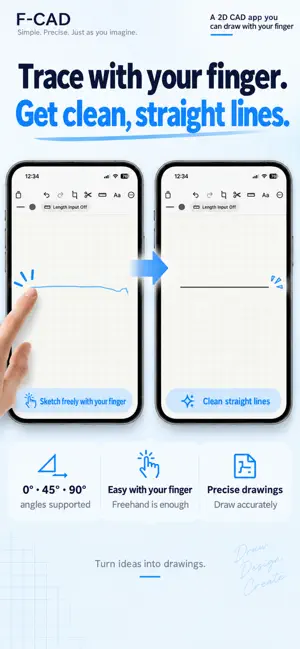
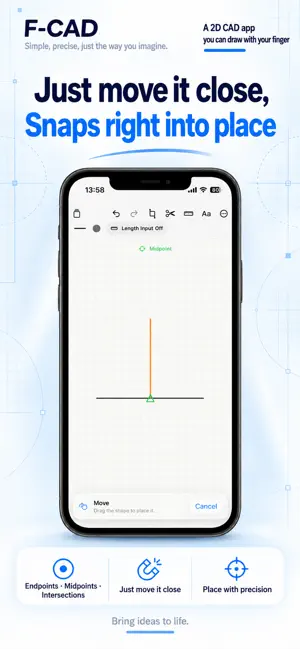
F-CAD is a simple 2D drafting app that feels like paper and a ruler. Draw shapes with your finger and add dimensions to turn ideas into plans for DIY projects, furniture layouts and room measurements. Draw with your finger and snap to endpoints, midpoints, intersections and circle centers. Use parallel copy, trim, rotate, groups, line styles, colors and text with straightforward touch controls. Add length, diameter and angle dimensions. Pick any two points for horizontal, vertical or aligned measurements, and use the magnifier for precise point selection. Drawings are stored in real millimeters. From small DIY parts to room layouts, two-finger pan and zoom keep navigation fast and natural. Share and import editable F-CAD drawing files (.fcad). Use AirDrop or Files to transfer drawings between iPhone and iPad and continue editing. This is file transfer, not automatic synchronization. Available features and Pro On iPhone, basic drafting is available in portrait. On iPad, you can try straight-line drawing in portrait. Editing tools on iPad, and landscape drawing on both iPhone and iPad, require a one-time Pro purchase. One DXF export is included on iPhone. DXF export on iPad, and further exports on iPhone, require Pro. One Pro purchase unlocks all iPad editing tools and Pro features on iPhone. No subscription. Already purchased? Restore Purchases with the same Apple Account.
What’s new
Version 1.1 · Updated November 3, 2026
• Added iPad support: try straight-line drawing in portrait. Pro unlocks all editing tools and landscape. • One Pro purchase unlocks Pro features on both iPhone and iPad. • Share and import editable F-CAD drawing files (.fcad) between devices. • Improved iPad layouts, usage guidance and localized text.
App privacy
The developer, Kenta Tokiyoshi, reported these privacy practices to Apple.
Data Not Collected
The developer does not collect any data from this app.
Alternatives to F-CAD
Looking for apps like F-CAD? Here are 6 similar apps on the App Store. The highest rated is Room Planner & Design: Roomsy (5.0/5), and 5 of the 6 are free to download.
-
 Puracam: 3D Scanner
-
 CAD设计 - CADesign
-
 DDesigner-Design icons
-
 Room Planner & Design: Roomsy
5.0
-
 DrafterPro 2D CAD & DWG Editor
4.0
-
 CAD Studio: DWG Viewer&Editor
3.7
| App | Rating | Price | Last updated | Compare |
|---|---|---|---|---|
| F-CAD | – | Free | November 3, 2026 | |
| Puracam: 3D Scanner | – | Free | Nov 9, 2026 | Compare |
| CAD设计 - CADesign | – | Free | Sep 17, 2026 | Compare |
| DDesigner-Design icons | – | Free | Feb 4, 2024 | Compare |
| Room Planner & Design: Roomsy | 5.0 / 5 (1) | Free | Oct 26, 2026 | Compare |
| DrafterPro 2D CAD & DWG Editor | 4.0 / 5 (2) | Free | Nov 5, 2026 | Compare |
| CAD Studio: DWG Viewer&Editor | 3.7 / 5 (3) | 9.99 USD | Nov 7, 2026 | Compare |
Compare F-CAD with the top alternatives: ratings, updates, ASO score and keyword gaps →